Approval tab (related list) in scoped app

- Mark as New
- Bookmark
- Subscribe
- Mute
- Subscribe to RSS Feed
- Permalink
- Report Inappropriate Content
02-22-2022 07:33 PM
Hi All,
I have a scoped app that is being worked on and want to be able to have the approvals tab in the related lists. The table doesn't extend the task table.
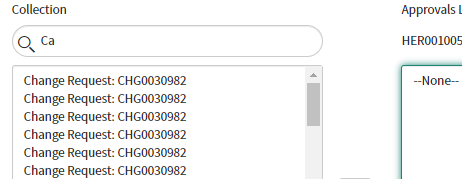
If I try add the list it's not an option in there. I've tried in scoped app view and also in global and all I get is below. How can I add it?
Thanks

- Mark as New
- Bookmark
- Subscribe
- Mute
- Subscribe to RSS Feed
- Permalink
- Report Inappropriate Content
02-22-2022 08:10 PM
Hi
Extending task was the OOB way Or else you can create an m2m table between your custom table and User table and name it as Approvals.
To create this, you can navigate to sys_m2m.list, create a new entry, select from and To table and and a name for your related list and submit it.
A new many to many list with the name will be added in your related list.
You can configure it and add on form layout and then edit users into it.
Note: This does not get the features of OOB approval table.
https://docs.servicenow.com/bundle/paris-platform-administration/page/administer/table-administration/task/t_CreateAManyToManyRelationship.html
https://docs.servicenow.com/bundle/sandiego-platform-administration/page/administer/table-administration/task/t_CreateAManyToManyRelationship.html
Screenshot for reference on how to do this:


Now once you define this, just navigate to your Custom table form layout and Right click on the form header and then select Configure-->related List and add this new related list and you should be good here.
Hope this helps. Please mark the answer as correct/helpful based on impact.
Regards,
Shloke
Regards,
Shloke
- Mark as New
- Bookmark
- Subscribe
- Mute
- Subscribe to RSS Feed
- Permalink
- Report Inappropriate Content
02-22-2022 08:32 PM
Hi,
I've done the above and related list shows but can't add people to it, when I search no one come up in the approval list like normal. I can see change requests in there though.
I also can't delete any of the relationships that I have created
I'll read the articles and see if they help.
Thanks
- Mark as New
- Bookmark
- Subscribe
- Mute
- Subscribe to RSS Feed
- Permalink
- Report Inappropriate Content
02-22-2022 08:36 PM
Ok deleted the ones I made
- Mark as New
- Bookmark
- Subscribe
- Mute
- Subscribe to RSS Feed
- Permalink
- Report Inappropriate Content
02-22-2022 08:43 PM
Did you try the m2m approach or using the Relationship as mentioned by other folk in thread above?
Can you please share screenshot of what have you configured till now to assist further?
Regards,
Shloke
Regards,
Shloke
- Mark as New
- Bookmark
- Subscribe
- Mute
- Subscribe to RSS Feed
- Permalink
- Report Inappropriate Content
02-22-2022 08:51 PM