- Mark as New
- Bookmark
- Subscribe
- Mute
- Subscribe to RSS Feed
- Permalink
- Report Inappropriate Content
01-19-2017 10:27 AM
When I click on the magnifying glass under incident for configuration item the list comes up, but pulls in everything from software to application. How do I get it to just pull in the parent CIs of computers and servers only?

Solved! Go to Solution.
- Mark as New
- Bookmark
- Subscribe
- Mute
- Subscribe to RSS Feed
- Permalink
- Report Inappropriate Content
01-19-2017 10:52 AM
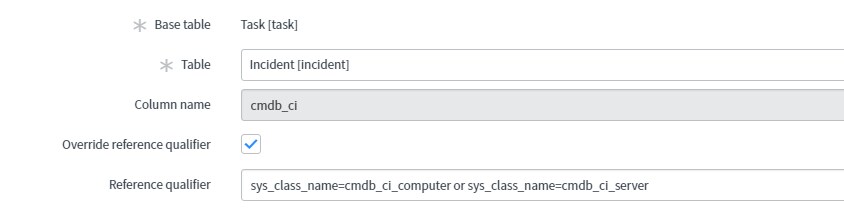
1. Right click the configuration item field and select "Configure dictionary"
2. Under "Dictionary overrides" related list click "New"
3. Select -- > Table : Incident
4. Check "Override reference qualifier"
5. add this --- > sys_class_name=cmdb_ci_computer^ORsys_class_name=cmdb_ci_server
- Mark as New
- Bookmark
- Subscribe
- Mute
- Subscribe to RSS Feed
- Permalink
- Report Inappropriate Content
01-19-2017 10:52 AM
1. Right click the configuration item field and select "Configure dictionary"
2. Under "Dictionary overrides" related list click "New"
3. Select -- > Table : Incident
4. Check "Override reference qualifier"
5. add this --- > sys_class_name=cmdb_ci_computer^ORsys_class_name=cmdb_ci_server
- Mark as New
- Bookmark
- Subscribe
- Mute
- Subscribe to RSS Feed
- Permalink
- Report Inappropriate Content
01-19-2017 11:15 AM

- Mark as New
- Bookmark
- Subscribe
- Mute
- Subscribe to RSS Feed
- Permalink
- Report Inappropriate Content
01-19-2017 11:28 AM
You can add more. Navigate to the CMDB table and build another query with all your conditions.
Encoded Query Strings - ServiceNow Wiki
Then, erase what you have and paste the new query..
Let me know if that works.
Thanks,
- Mark as New
- Bookmark
- Subscribe
- Mute
- Subscribe to RSS Feed
- Permalink
- Report Inappropriate Content
01-19-2017 11:45 AM
I try it and it's not working. Can you show me where I need to go to build this conditions so I can copy it to the reference qualifier?