- Mark as New
- Bookmark
- Subscribe
- Mute
- Subscribe to RSS Feed
- Permalink
- Report Inappropriate Content
10-20-2020 10:20 AM
I have a Single Line Text Variable called "Base_Salary".
I'm using a Regular Expression validation to make sure the format matches $000,000 ($ sign and comma are mandatory)
Now I want to take this string and replace the $ sign and comma with "", then convert this resulting string to an integer.
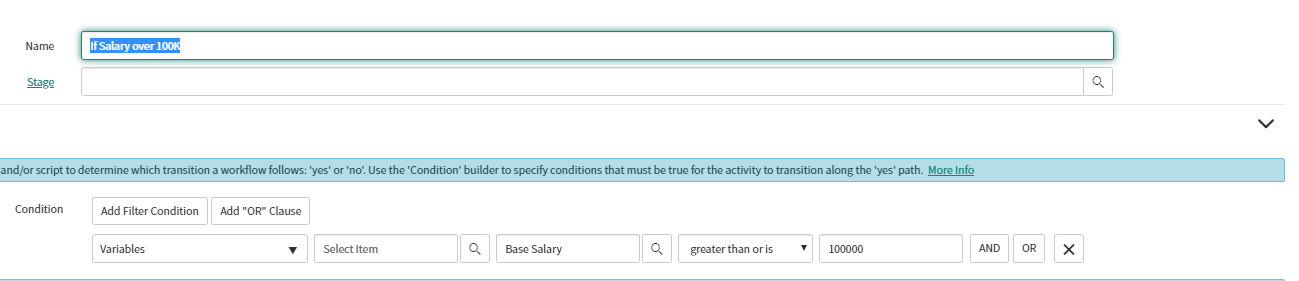
The reason is I'd like to setup a condition in my workflow that branches my approvals based on this integer value.
(See attachment)
What's the best way to handle this?
Thanks.
Joe
Solved! Go to Solution.
- Labels:
-
Service Catalog


- Mark as New
- Bookmark
- Subscribe
- Mute
- Subscribe to RSS Feed
- Permalink
- Report Inappropriate Content
10-20-2020 11:57 AM
Can you try below.
var oldvalue = current.variables.base_salary.toString();
var newvalue = oldvalue.toString().replace(/\$/g,''); //adding both in same will not work. replaces $
newvalue=newvalue.toString().replace(/\,/g,''); //replaces comma
var value = parseInt(newvalue);
- Mark as New
- Bookmark
- Subscribe
- Mute
- Subscribe to RSS Feed
- Permalink
- Report Inappropriate Content
10-20-2020 10:25 AM
Hi Joe,
Try below
var valueis=current.variables.yourvariablename; //replace variable name correctly
valueis=valueis.replace(/\$/g,''); //replaces $ with space
valueis=valueis.replace(/\,/,'')//replaces , with space
var convertedtointeger=parseInt(valueis); //holds final text converted to integer
- Mark as New
- Bookmark
- Subscribe
- Mute
- Subscribe to RSS Feed
- Permalink
- Report Inappropriate Content
10-20-2020 10:45 AM
Thanks Jaspal.
I see how you replaced the $ sign, but I also need to get rid of the comman as well.
I'm getting a workflow error now.
Here's what my script looks like in my 'If' condition workflow actitivity:
var oldvalue = current.variables.base_salary;
var newvalue = oldvalue.replace(/\$,/g,'');
var value = parseInt(newvalue);
answer = ifScript();
function ifScript() {
if (value > 100000) {
return 'yes';
}
else {
return 'no';
}}

- Mark as New
- Bookmark
- Subscribe
- Mute
- Subscribe to RSS Feed
- Permalink
- Report Inappropriate Content
10-20-2020 11:00 AM
Yes, the above comments were modified post giving question second look.
Try below.
var oldvalue = current.variables.base_salary;
var newvalue = oldvalue.replace(/\$/g,''); //adding both in same will not work. replaces $
newvalue=newvalue.replace(/\,/g,''); //replaces comma
var value = parseInt(newvalue);
- Mark as New
- Bookmark
- Subscribe
- Mute
- Subscribe to RSS Feed
- Permalink
- Report Inappropriate Content
10-20-2020 11:35 AM
Still getting the same execution error in the workflow.
"Cannot find function replace in object..."
Do I need to create a "Run script" activity to create my "value" variable in front of my "If" condition activity?
Here's what my script look like in my 'If' condition now:
var oldvalue = current.variables.base_salary;
var newvalue = oldvalue.replace(/\$/g,''); //adding both in same will not work. replaces $
newvalue=newvalue.replace(/\,/g,''); //replaces comma
var value = parseInt(newvalue);
answer = ifScript();
function ifScript() {
if (value > 100000) {
return 'yes';
}
else {
return 'no';
}}