Copy variables from RITM to Catalog Task

- Mark as New
- Bookmark
- Subscribe
- Mute
- Subscribe to RSS Feed
- Permalink
- Report Inappropriate Content
05-07-2020 06:11 AM
Hi,
I wrote a scheduled job to created a manual task for an RITM after specific number of days.The Requested item(RITM) has variables associated with it which is visible under Variables tab of RITM. With this scheduled job I was able to create the tasks and map it to an existing RITM. But, when the new Catalog task is created it doesn't inherit/copy the variables from RITM. Is there any way we can copy all the RITM variables into the CTASK Variable tab in the scheduled job.
Thanks in advance.
Regards
Dinesh
- Labels:
-
Request Management


- Mark as New
- Bookmark
- Subscribe
- Mute
- Subscribe to RSS Feed
- Permalink
- Report Inappropriate Content
05-07-2020 06:23 AM
Hi Dinesh,
variables are stored for RITM
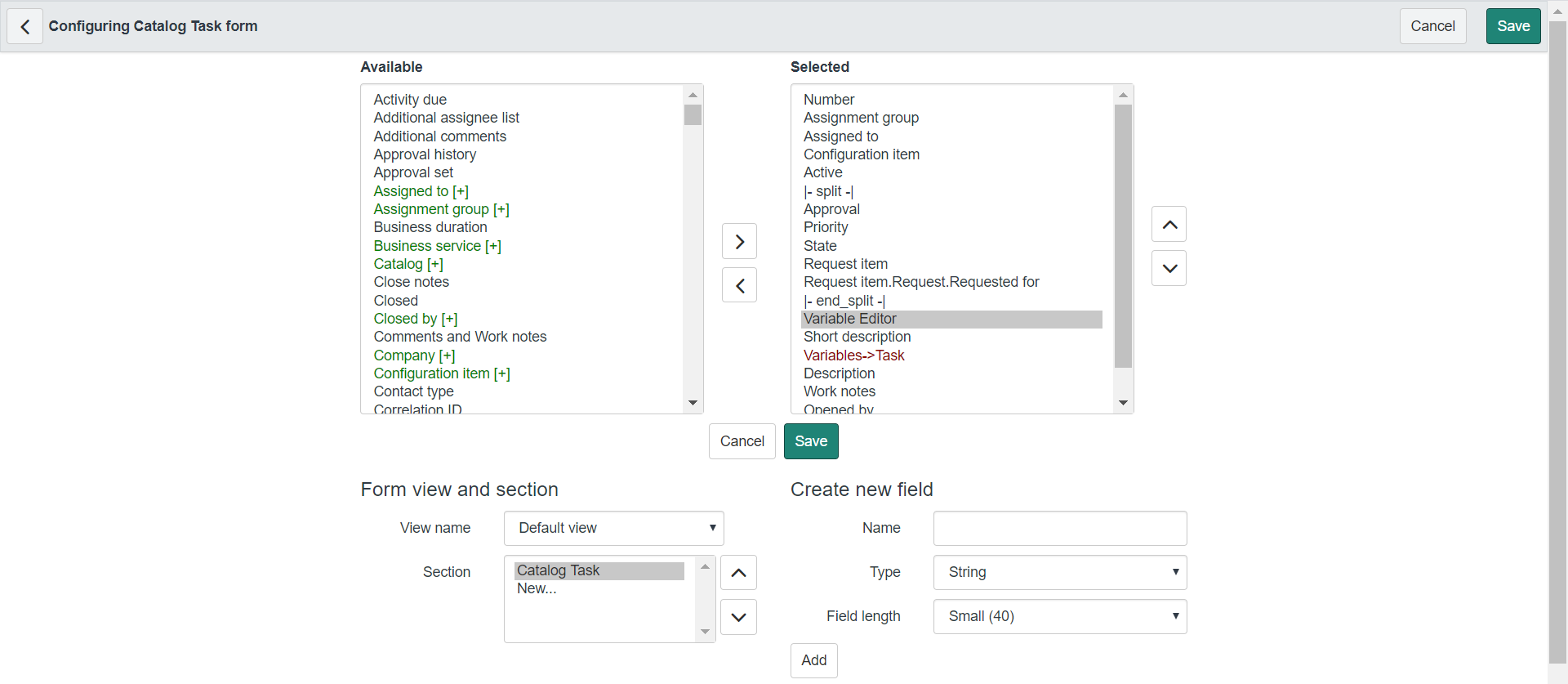
You can add them on the Catalog Task form view;
1) configure form layout of sc_task record
2) add the Variable Editor from available to selected
It will start showing the variables on Task form

Mark ✅ Correct if this solves your issue and also mark 👍 Helpful if you find my response worthy based on the impact.
Thanks
Ankur
Ankur
✨ Certified Technical Architect || ✨ 10x ServiceNow MVP || ✨ ServiceNow Community Leader

- Mark as New
- Bookmark
- Subscribe
- Mute
- Subscribe to RSS Feed
- Permalink
- Report Inappropriate Content
05-07-2020 06:25 AM
Hi,
Yes, you can. Since this was a manual task that was created, you have to also manually add those variables so that they appear. Please use this thread for solution: https://community.servicenow.com/community?id=community_question&sys_id=d90a2c4ddb116f005ed4a851ca96...
Please mark reply as Helpful/Correct, if applicable. Thanks!
Please consider marking my reply as Helpful and/or Accept Solution, if applicable. Thanks!
- Mark as New
- Bookmark
- Subscribe
- Mute
- Subscribe to RSS Feed
- Permalink
- Report Inappropriate Content
06-01-2020 06:21 PM
Hi,
I just wanted to check in on this. If my reply helped guide you correctly, please mark it as Helpful & Correct.
Thank you!
Please consider marking my reply as Helpful and/or Accept Solution, if applicable. Thanks!
- Mark as New
- Bookmark
- Subscribe
- Mute
- Subscribe to RSS Feed
- Permalink
- Report Inappropriate Content
06-02-2020 05:56 AM
Hi,
I just wanted to check in on this. If my reply helped guide you correctly, please mark it as Helpful & Correct.
Thank you!
Please consider marking my reply as Helpful and/or Accept Solution, if applicable. Thanks!