- Mark as New
- Bookmark
- Subscribe
- Mute
- Subscribe to RSS Feed
- Permalink
- Report Inappropriate Content
05-05-2021 04:17 AM
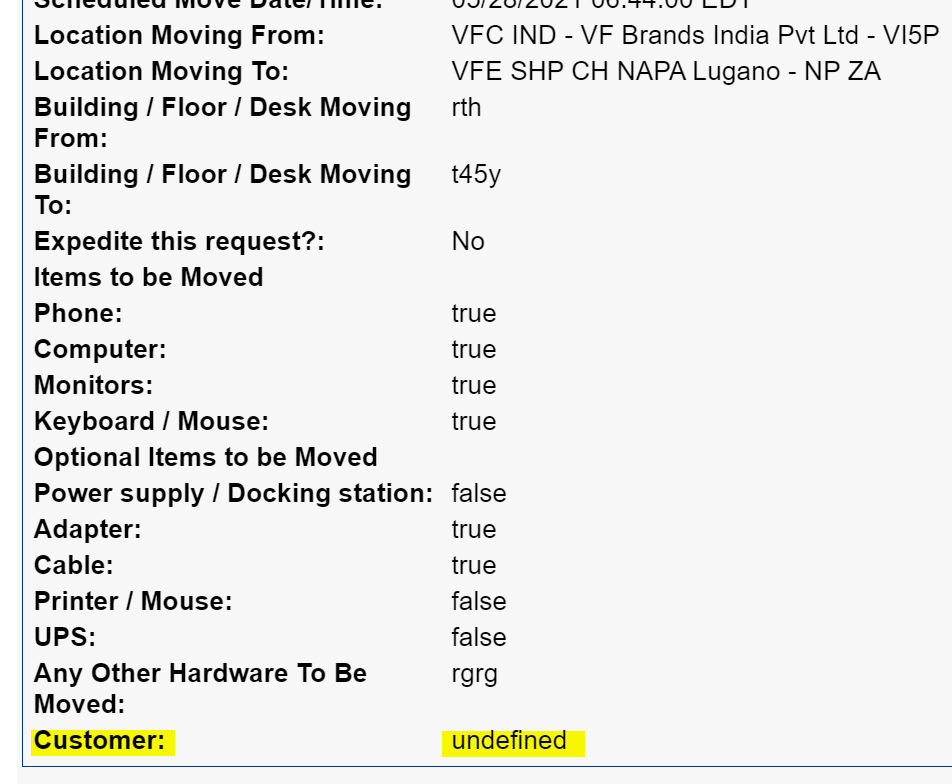
We have a requirement to retrieve variable value from multi row variable set in Email notification.
Notification script is attached below
Currently I am able to retrieve all variable values into email notification except multi row variable

When I tried to add in the email script I am getting value as undefined. So please help me out

Regards,
Sanketh
Solved! Go to Solution.
- Labels:
-
Service Catalog


- Mark as New
- Bookmark
- Subscribe
- Mute
- Subscribe to RSS Feed
- Permalink
- Report Inappropriate Content
05-05-2021 04:22 AM
Hi,
check this link and enhance as per your requirement
How to Display Multi Row Variable set (MRVS) data in a notification
Regards
Ankur
Ankur
✨ Certified Technical Architect || ✨ 10x ServiceNow MVP || ✨ ServiceNow Community Leader
- Mark as New
- Bookmark
- Subscribe
- Mute
- Subscribe to RSS Feed
- Permalink
- Report Inappropriate Content
05-05-2021 04:22 AM
Hi,
check this link and enhance as per your requirement
How to Display Multi Row Variable set (MRVS) data in a notification
Regards
Ankur
Ankur
✨ Certified Technical Architect || ✨ 10x ServiceNow MVP || ✨ ServiceNow Community Leader
- Mark as New
- Bookmark
- Subscribe
- Mute
- Subscribe to RSS Feed
- Permalink
- Report Inappropriate Content
05-05-2021 04:49 AM
if your notification is on RITM table then use this
var mrvs;
mrvs = current.variables.your_mrvs_name;//mention your mrvs internal name here
var rowCount = mrvs.getRowCount();
template.print("<table>");
for (var i = 0; i < rowCount; i++) {
	var row = mrvs.getRow(i);
        template.print("<tr>");
        template.print("<td>"+row.your_variable_name1+"</td>"); //mention your variable name
        template.print("<td>"+row.your_variable_name2+"</td>"); //mention your variable name
        template.print("<td>"+row.your_variable_name3+"</td>"); //mention your variable name
        template.print("</tr>");
}
template.print("</table>");
If your notification is on approval table then use this
var mrvs;
mrvs = current.sysapproval.variables.your_mrvs_name;//mention your mrvs internal name here
var rowCount = mrvs.getRowCount();
template.print("<table>");
for (var i = 0; i < rowCount; i++) {
	var row = mrvs.getRow(i);
        template.print("<tr>");
        template.print("<td>"+row.your_variable_name1+"</td>"); //mention your variable name
        template.print("<td>"+row.your_variable_name2+"</td>"); //mention your variable name
        template.print("<td>"+row.your_variable_name3+"</td>"); //mention your variable name
        template.print("</tr>");
}
template.print("</table>");
Regards
Ankur
Ankur
✨ Certified Technical Architect || ✨ 10x ServiceNow MVP || ✨ ServiceNow Community Leader

- Mark as New
- Bookmark
- Subscribe
- Mute
- Subscribe to RSS Feed
- Permalink
- Report Inappropriate Content
03-10-2022 06:17 AM
Thank you.
- Mark as New
- Bookmark
- Subscribe
- Mute
- Subscribe to RSS Feed
- Permalink
- Report Inappropriate Content
05-27-2022 05:48 AM
Hi Ankur,
I have a requirement of updating values of MRVS variables in to related fields in sc_task table.
Actually My MRVS is attaching to my task at the time of task create (I have UI policy to hide from RITM and portal) and I want once values of the MRVS variables are updated by an agent, it need to updates to sc_task table.
I have tried with BR as below
var mrvs;
var taskGR = new GlideRecord('sc_task');
if (taskGR.get(current.sys_id)) {
mrvs = taskGR.variables.u_demand_management_relese_details; // Internal Name of MRVS
}
gs.print(mrvs);
var rowCount = mrvs.getRowCount();
for (var i = 0; i < rowCount; i++) {
var row = mrvs.getRow(i);
current.buid_end_date=row.u_actual_build_end_date;
current.status=row.u_status;
Request to suggest on this.
Thanks,
Samarendra Nayak