- Mark as New
- Bookmark
- Subscribe
- Mute
- Subscribe to RSS Feed
- Permalink
- Report Inappropriate Content
08-19-2022 04:08 AM
Hi all,
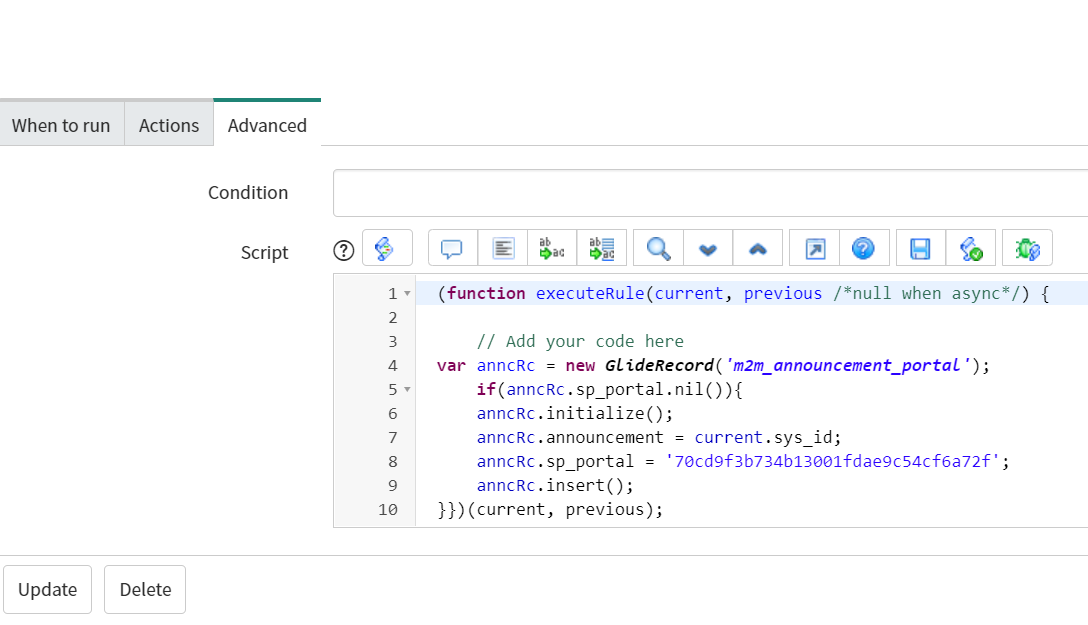
I had a requirement that the announcements should default to ESC portal. For this requirement I have written a before insert BR. So whenever a new announcement is created, the Portal will set to ESC Portal. But the issue came in, when a portal is selected other than ESC before saving it is adding both the portals(ESC and the selected one before saving) which should not be the case.
So I tried to put condition in my business rule, but it didn't worked for me. I am attaching screenshots here.
How can I change it to display whenever the Portal is empty?

Both portals are populating.

Above is the before insert BR I have written, but not working
Solved! Go to Solution.

- Mark as New
- Bookmark
- Subscribe
- Mute
- Subscribe to RSS Feed
- Permalink
- Report Inappropriate Content
08-19-2022 04:58 AM
Please try the below code after making the necessary changes.
    var sp_def_sysId = '81b75d3147032100ba13a5554ee4902b'; //Please update to your Default Service Portal sys_id value

    var gr = new GlideRecord("m2m_announcement_portal");
	gr.addQuery("announcement",current.sys_id);
    //gr.addQuery('sp_portal', sp_def_sysId);  // If you want to check whether this announcement is already available on your default portal then enable this one.
    gr.query();
    if (!gr.next()) {
        gr.initialize();
        gr.announcement = current.sys_id;
        gr.sp_portal = sp_def_sysId;
        gr.insert();
    }
Thanks & Regards,
Vasanth

- Mark as New
- Bookmark
- Subscribe
- Mute
- Subscribe to RSS Feed
- Permalink
- Report Inappropriate Content
08-19-2022 04:30 AM
Hello,
Try deleting other portal record from BR before inserting for ESC ? that should work I guess
Regards
Regards,
Musab
- Mark as New
- Bookmark
- Subscribe
- Mute
- Subscribe to RSS Feed
- Permalink
- Report Inappropriate Content
08-19-2022 04:35 AM
If you don't mind, can you provide the script for the same.
- Mark as New
- Bookmark
- Subscribe
- Mute
- Subscribe to RSS Feed
- Permalink
- Report Inappropriate Content
08-19-2022 04:58 AM
Please try the below code after making the necessary changes.
    var sp_def_sysId = '81b75d3147032100ba13a5554ee4902b'; //Please update to your Default Service Portal sys_id value

    var gr = new GlideRecord("m2m_announcement_portal");
	gr.addQuery("announcement",current.sys_id);
    //gr.addQuery('sp_portal', sp_def_sysId);  // If you want to check whether this announcement is already available on your default portal then enable this one.
    gr.query();
    if (!gr.next()) {
        gr.initialize();
        gr.announcement = current.sys_id;
        gr.sp_portal = sp_def_sysId;
        gr.insert();
    }
Thanks & Regards,
Vasanth
- Mark as New
- Bookmark
- Subscribe
- Mute
- Subscribe to RSS Feed
- Permalink
- Report Inappropriate Content
08-19-2022 06:40 AM
Thanks for the reply Vasantharajan!
I tried with the script, working fine if I commented
gr.addQuery('sp_portal', sp_def_sysId);If I uncommented above it is showing two portals, if I add other than ESC portal.