- Mark as New
- Bookmark
- Subscribe
- Mute
- Subscribe to RSS Feed
- Permalink
- Report Inappropriate Content
09-12-2022 12:21 AM
Hi,
We had a catalog form, after submission a RITM is created and catalog task, when we open the catalog task and selected a option in drop box a info message should be appeared..
so this info message should be visible in task level but not on catalog form
Thanks,
Asish
Solved! Go to Solution.
- Mark as New
- Bookmark
- Subscribe
- Mute
- Subscribe to RSS Feed
- Permalink
- Report Inappropriate Content
09-12-2022 12:32 AM
Hello,
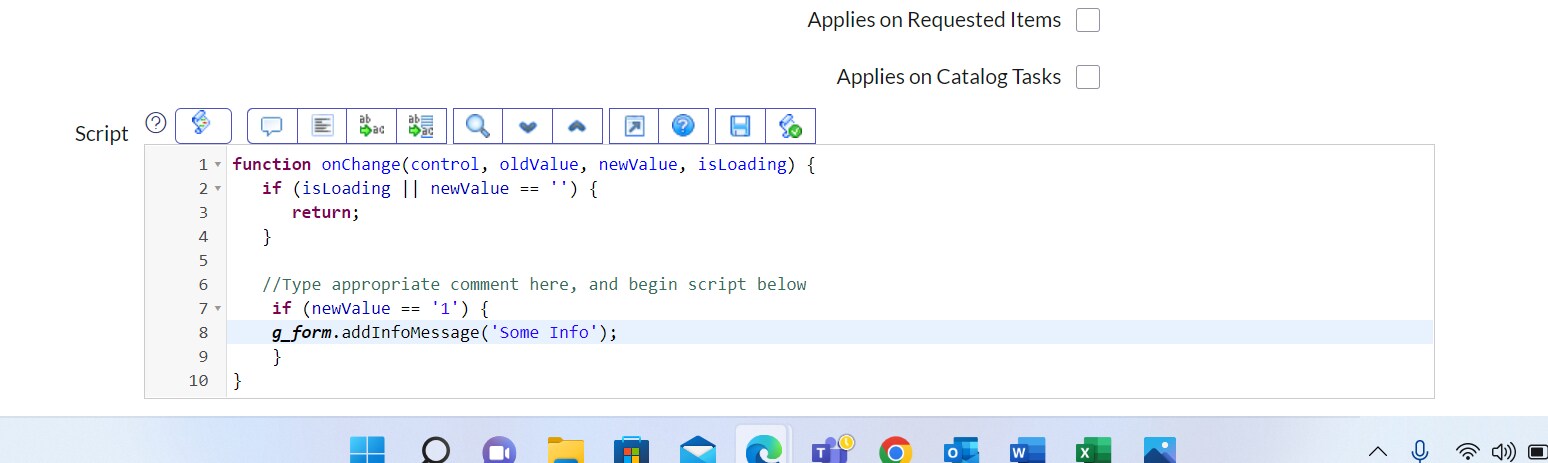
in order to do that i would go into Catalog Task form right click -> Configure -> Client Script (to make sure we configure Client Script for this task form) just select and create On Change Client Script.
Something like this:


- Mark as New
- Bookmark
- Subscribe
- Mute
- Subscribe to RSS Feed
- Permalink
- Report Inappropriate Content
09-12-2022 12:26 AM
Hi
Need more details:
Are you talking about which drop box?
Is that a catalog variable or task field?
If it is a catalog variable write catalog client script on catalog item which applies on catalog tasks only.
if it is a task field you need to make sure to run only for one specific catalog item.
Thanks,
Murthy
Murthy
- Mark as New
- Bookmark
- Subscribe
- Mute
- Subscribe to RSS Feed
- Permalink
- Report Inappropriate Content
09-12-2022 12:49 AM
Hi
Thanks for the reply!!
its working now
Thanks,
Asish
- Mark as New
- Bookmark
- Subscribe
- Mute
- Subscribe to RSS Feed
- Permalink
- Report Inappropriate Content
09-12-2022 12:32 AM
- Mark as New
- Bookmark
- Subscribe
- Mute
- Subscribe to RSS Feed
- Permalink
- Report Inappropriate Content
09-12-2022 12:48 AM
Hi
Thanks for the reply!!
It is working now.
Thanks,
Asish