
- Mark as New
- Bookmark
- Subscribe
- Mute
- Subscribe to RSS Feed
- Permalink
- Report Inappropriate Content
02-04-2022 11:17 PM
Hi Everyone,
I am Developing Notification Now.
I need to get the filed value(u_platform_type) from custom table (u_platform) though the mail script.
Can you help me on mail script..
Thank you.
Solved! Go to Solution.
- Labels:
-
Incident Management


- Mark as New
- Bookmark
- Subscribe
- Mute
- Subscribe to RSS Feed
- Permalink
- Report Inappropriate Content
02-05-2022 01:04 AM
What table notification is on? Is there a common/primary key in your notifcation table & u_platform table?
If you you need to try something as below
(function runMailScript(current, template, email, email_action, event) {

  var nameis = new GlideRecord("u_custom"); //replace table name

  nameis.addQuery("xyz", current.abc); //common field name to be replaced with abc here & xyz is field that is in custom table with same value as abc in current notification table

  nameis query();

  if(nameis.next()) {

  template.print('Platform value '+nameis.u_platform_value.getDisplayValue());

  }

})(current, template, email, email_action, event);
- Mark as New
- Bookmark
- Subscribe
- Mute
- Subscribe to RSS Feed
- Permalink
- Report Inappropriate Content
02-04-2022 11:42 PM

- Mark as New
- Bookmark
- Subscribe
- Mute
- Subscribe to RSS Feed
- Permalink
- Report Inappropriate Content
02-05-2022 01:04 AM
What table notification is on? Is there a common/primary key in your notifcation table & u_platform table?
If you you need to try something as below
(function runMailScript(current, template, email, email_action, event) {

  var nameis = new GlideRecord("u_custom"); //replace table name

  nameis.addQuery("xyz", current.abc); //common field name to be replaced with abc here & xyz is field that is in custom table with same value as abc in current notification table

  nameis query();

  if(nameis.next()) {

  template.print('Platform value '+nameis.u_platform_value.getDisplayValue());

  }

})(current, template, email, email_action, event);- Mark as New
- Bookmark
- Subscribe
- Mute
- Subscribe to RSS Feed
- Permalink
- Report Inappropriate Content
02-05-2022 01:47 AM
Hi,
Can you share more details on if Notification is on same table where the field is?
If it is on the same table then you do not need a Script and you can make use of Field directly as shown below:
Just use like this in body of Notification:
Platform Type : ${u_platform_type}
2) Now in case this Field Platform Type is not on the same table where you have written your Notification then you need to use a Mail Script and do a Glide Query as shown below:
(function runMailScript(/* GlideRecord */ current, /* TemplatePrinter */ template,
          /* Optional EmailOutbound */ email, /* Optional GlideRecord */ email_action,
          /* Optional GlideRecord */ event) {

          // Add your code here
	getPlatformValue();

	function getPlatformValue(){
		var gr = new GlideRecord('Table Name'); // Replace "Table Name" with the name of table where "u_platform_type" field is present
		gr.addQuery('Field Name',current.sys_id); // Replace "Field Name" with the name of Field which should be a reference field which is linking it to the Table where you have written your Notification on
		gr.query();
		if(gr.next()){
			template.print('Platform Type is ' + gr.getDisplayValue('u_platform_type'));
		}
	}

})(current, template, email, email_action, event);
Now you need to call this Mail Script in your Notification as below using the syntax:
${mail_script:Email Script Name};
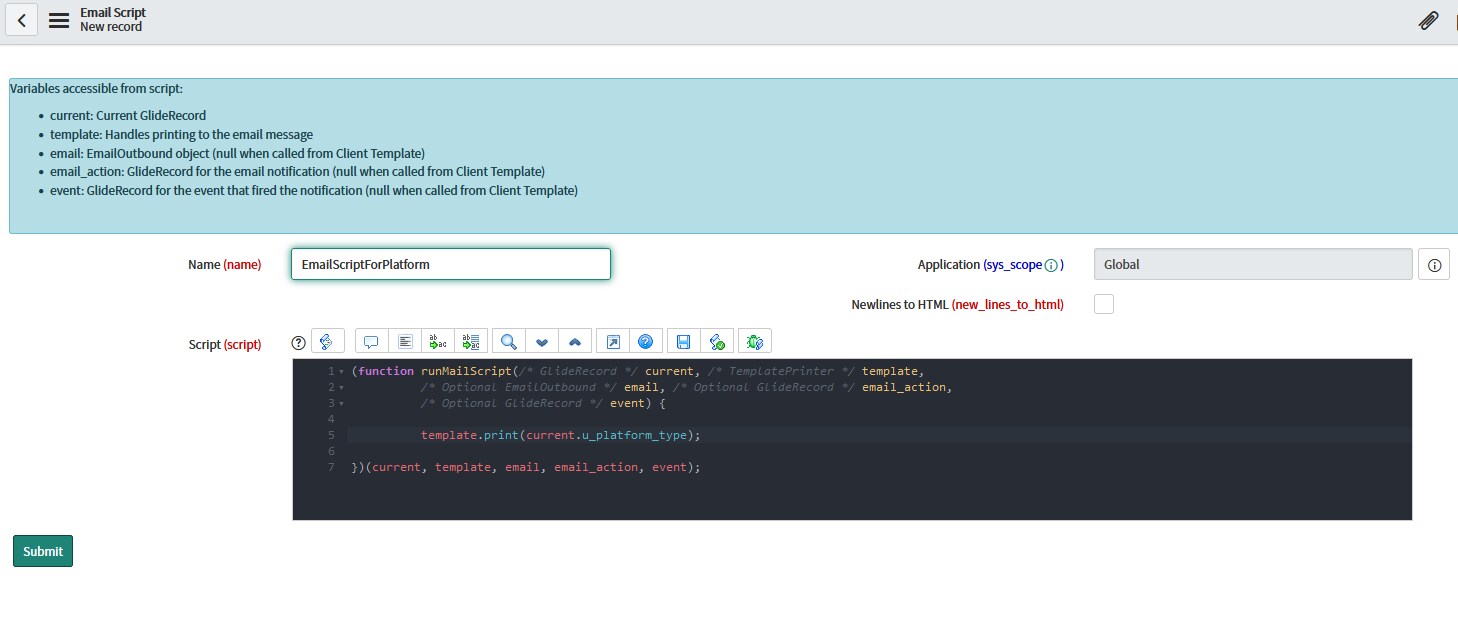
Hope this helps. Please mark the answer as correct/helpful based on impact.
Regards,
Shloke


- Mark as New
- Bookmark
- Subscribe
- Mute
- Subscribe to RSS Feed
- Permalink
- Report Inappropriate Content
03-22-2022 11:29 AM
Hi. If your issue is resolved and my response has helped, plese consider marking Correct and Helpful. Thanks!
Martin Ivanov
2022 Community Rising Star
