- Mark as New
- Bookmark
- Subscribe
- Mute
- Subscribe to RSS Feed
- Permalink
- Report Inappropriate Content
05-07-2020 11:03 PM
Hey guys,
I am trying to test a catalog request using the Automated Test Framework (ATF). I would like to validate some fields in the sc_request table after ordering a Catalog Item. So I am wondering how to I open an existing request that I just created.
Steps used in ATF:
Impersonate User
Open a Catalog Item
Set Variable Values
Order Catalog Item
I can query the request item using the following:

I can also query the catalog task using

However, how do I query the request in the sc_request table so that I can then open up the form?
Thanks in advance
Troy
Solved! Go to Solution.
- Labels:
-
Request Management
-
Service Catalog

- Mark as New
- Bookmark
- Subscribe
- Mute
- Subscribe to RSS Feed
- Permalink
- Report Inappropriate Content
05-08-2020 12:38 AM
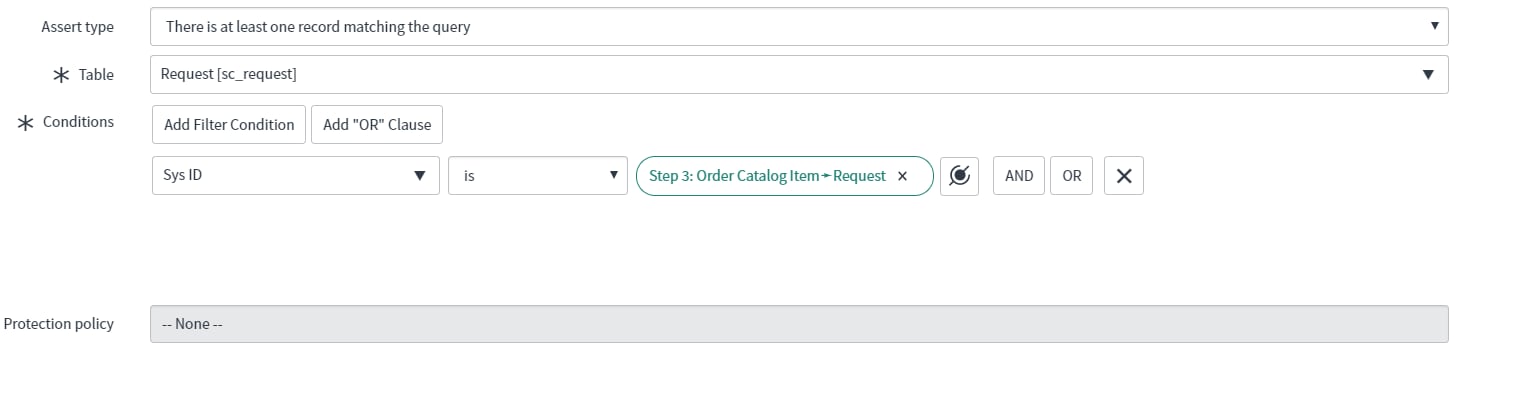
Oh Okay got it. Can you try this to get the REQ and open the REQ form-
Give Sys ID instead of Request in the Conditions-

Data pill chosen is-


- Mark as New
- Bookmark
- Subscribe
- Mute
- Subscribe to RSS Feed
- Permalink
- Report Inappropriate Content
05-08-2020 12:05 AM
Hi Troy
I would like to add few data to Priyanka's Answer:-
If you have the catalog_administrator role, validate single catalog item transactions, as well as requester and fulfiller flows in Service Catalog.
ATF for Service Catalog is not supported for order guides and multiple items in the cart. For more information about ATF, see
Activation of the Automated Test Framework for Service Catalog
The Automated Test Framework Service Catalog (com.glide.automated_testing_impl.service_catalog) plugin, which is active by default, is required to support ATF for Service Catalog.
Please Mark Correct and Helpful
Thanks and Regards
Gaurav Shirsat