- Mark as New
- Bookmark
- Subscribe
- Mute
- Subscribe to RSS Feed
- Permalink
- Report Inappropriate Content
03-18-2021 07:27 AM


- Mark as New
- Bookmark
- Subscribe
- Mute
- Subscribe to RSS Feed
- Permalink
- Report Inappropriate Content
03-18-2021 10:57 PM
Hi,
UI Action based approach based on problem table which is related list on Incident table
1) Visit this OOB UI Action -> Edit on Global Table
URL: https://instanceName.service-now.com/nav_to.do?uri=sys_ui_action.do?sys_id=7fff4c3d0a0a0b3400ad3f1a1d613f74
Update as this so that you create new button for your related list table
a) Action name - sysverb_edit_o2m_problem
b) Condition: (new GlideRecord(current.getTableName())).canWrite() && RP.isOneToMany() && !RP.getListControl().isOmitEditButton() && current.getTableName() == 'problem'
c) Script:
var uri = action.getGlideURI();
var path = uri.getFileFromPath();
uri.set('sysparm_m2m_ref', current.getTableName());
uri.set('sysparm_collection_related_file', current.getTableName());
uri.set('sysparm_form_type', 'o2m');
uri.set('sysparm_stack', 'no');
uri.set('sysparm_query', '');
uri.set('jvar_no_filter', 'true'); // added new
action.setRedirectURL(uri.toString('sys_m2m_template.do'));
d) Do Insert and Stay
2) Now Visit the Edit button which is OOB and update the condition as this so that the OOB button is not visible for your table
URL: https://instanceName.service-now.com/nav_to.do?uri=sys_ui_action.do?sys_id=7fff4c3d0a0a0b3400ad3f1a1d613f74
Condition: (new GlideRecord(current.getTableName())).canWrite() && RP.isOneToMany() && !RP.getListControl().isOmitEditButton() && current.getTableName() != 'problem'
OOB UI Action After changes

New Edit button

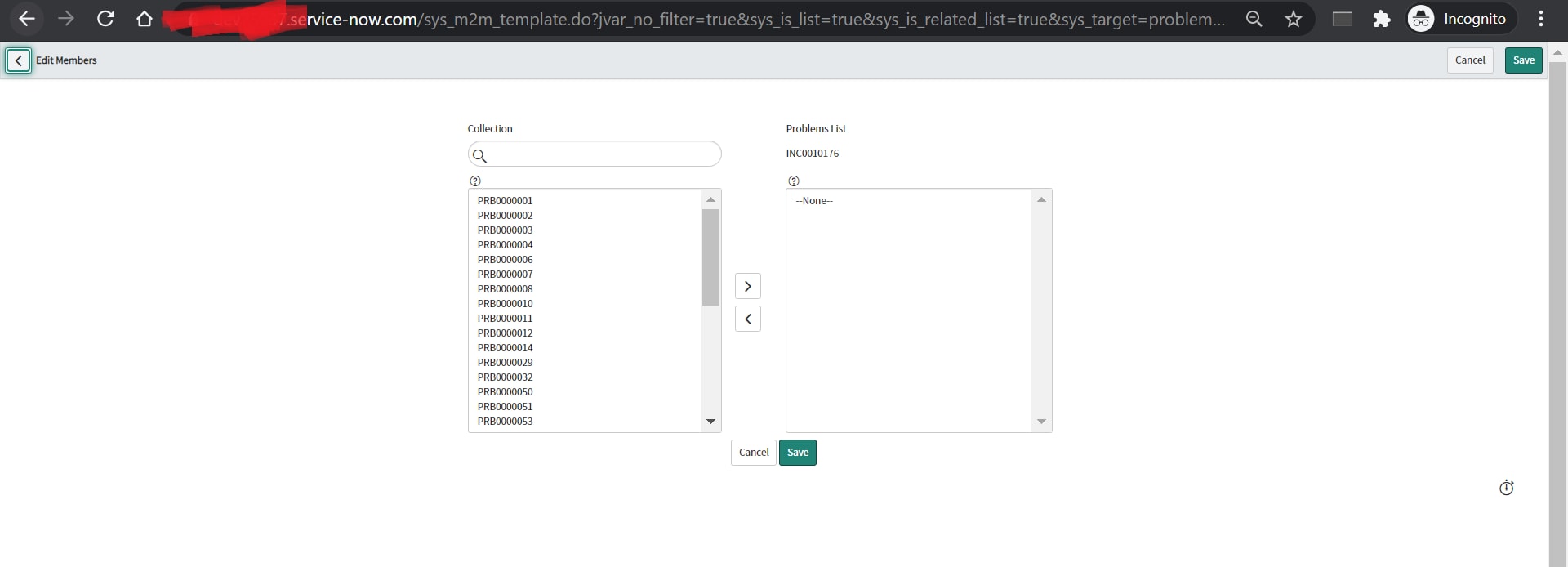
Output:

Regards
Ankur
Ankur
✨ Certified Technical Architect || ✨ 10x ServiceNow MVP || ✨ ServiceNow Community Leader

- Mark as New
- Bookmark
- Subscribe
- Mute
- Subscribe to RSS Feed
- Permalink
- Report Inappropriate Content
03-18-2021 07:49 AM

- Mark as New
- Bookmark
- Subscribe
- Mute
- Subscribe to RSS Feed
- Permalink
- Report Inappropriate Content
03-18-2021 07:54 AM

- Mark as New
- Bookmark
- Subscribe
- Mute
- Subscribe to RSS Feed
- Permalink
- Report Inappropriate Content
03-18-2021 08:24 PM
Hi Arkesh,
sorry you are right. I was too fast 🙂
Basically there is no configuration for that, but you can achieve the goal by creating a customized version of the "Edit" button.
Stick to the instructions on the following page: https://community.servicenow.com/community?id=community_article&sys_id=dfe11027db58101023f4a345ca961...
And for hiding the condition builder add the following line of code:
uri.set('jvar_no_filter', 'true');
Kind regards
Maik
If my answer replied your question please mark appropriate response as correct so that the question will appear as resolved for other users who may have a similar question in the future.
- Mark as New
- Bookmark
- Subscribe
- Mute
- Subscribe to RSS Feed
- Permalink
- Report Inappropriate Content
03-18-2021 10:12 PM
Hi,
I have tried the given but no luck
UI action Name: Edit
Action: m2m_change_edit
condition: RP.isManyToMany() && RP.getListControl().isOmitEditButton()
table: m2m Location Change Request.
var uri = action.getGlideURI();
var path = uri.getFileFromPath();
uri.set('sysparm_m2m_ref', 'current.getTableName()');
uri.set('sysparm_stack', 'no');
uri.set('sysparm_collection', 'change_request');
uri.set('sysparm_collection_label', 'Locations');
uri.set('sysparm_collection_related_field', 'u_location');
uri.set('sysparm_collection_related_file', 'cmn_location');
uri.set('jvar_no_filter', 'true'); //hides filters when the edit button is clicked so it is limited to the below query.
action.setRedirectURL(uri.toString('sys_m2m_template.do'));
When i click on edit. it is throwing alert message no record selected.

any issue with script
Thank you,
Arkesh