Get a first look at what's coming. The Developer Passport Australia Release Preview kicks off March 12. Dive in! 

How to update user's manager in Microsoft Entra Azure? using flow designer.

SamrudhiK
Tera Expert

We have catalog item 'Employee internal transfer' . When employee is transferred from one department to other its user profile details change. Using microsoft entra spoke action 'update user' I can update user's department name, title,location etc but it has no option to update 'manager' . I tried using custom action but it gives errors.

1 ACCEPTED SOLUTION

SamrudhiK
Tera Expert

1 - Create new custom action "Update Entra User Manager" in flow designer actions.

2 - Define inputs u_user_id and u_manager_id as string.

3 - In preprocessing step map input variables and add below script : 

(function execute(inputs, outputs) {
    // 1. Trim and capture inputs
    var userId = inputs.u_user_id ? inputs.u_user_id.toString().trim() : "";
    var managerId = inputs.u_manager_id ? inputs.u_manager_id.toString().trim() : "";

    // 2. Validate inputs
    if (!userId || !managerId) {
        gs.error("AzureAD Update Manager: Missing User ID or Manager ID.");
        return;
    }

    // 3. Create the payload - REMOVED @odata.type per Microsoft error
    var payloadObj = {
        "@odata.id": "https://graph.microsoft.com/v1.0/users/" + managerId
    };

    // 4. Map to output variables
    outputs.u_user_id = userId;
    outputs.payload = JSON.stringify(payloadObj);

})(inputs, outputs);
 
4-Define output variables u_user_id and payLoad
5-In REST step add resource path as "v1.0/users/u_user_id data pill from preprocessing step/manager/$ref. Use http as PUT method
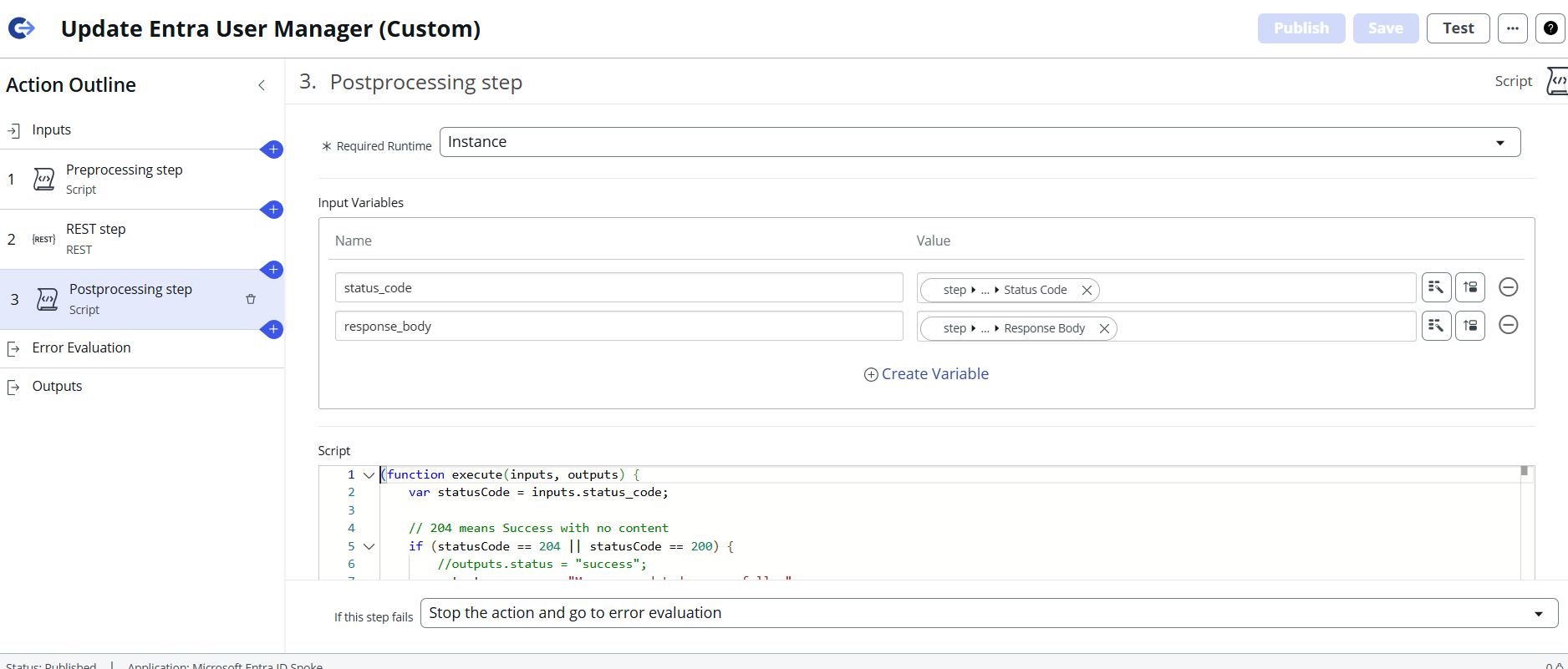
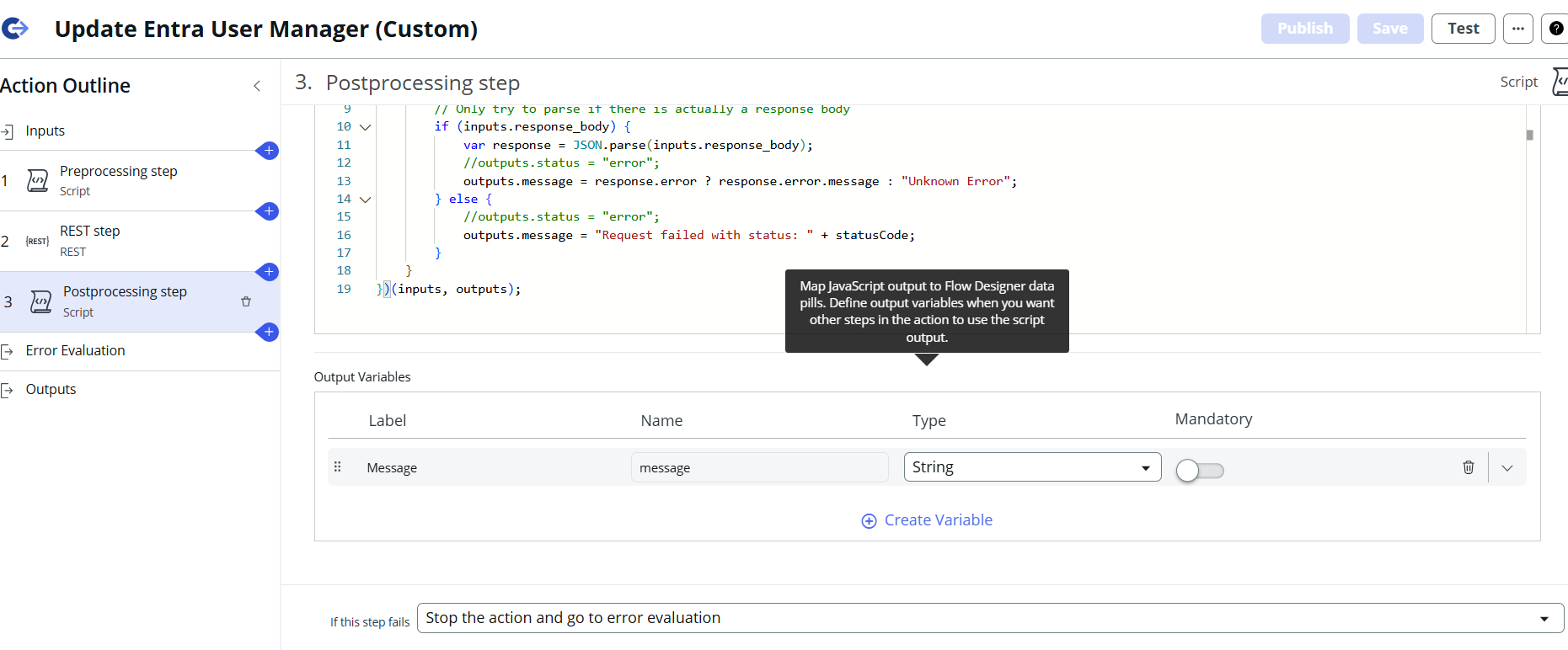
6- In postprocessing step define input variables status_code and input body and use below script : 
(function execute(inputs, outputs) {
    var statusCode = inputs.status_code;
   
    // 204 means Success with no content
    if (statusCode == 204 || statusCode == 200) {
        //outputs.status = "success";
        outputs.message = "Manager updated successfully.";
    } else {
        // Only try to parse if there is actually a response body
        if (inputs.response_body) {
            var response = JSON.parse(inputs.response_body);
            //outputs.status = "error";
            outputs.message = response.error ? response.error.message : "Unknown Error";
        } else {
            //outputs.status = "error";
            outputs.message = "Request failed with status: " + statusCode;
        }
    }
})(inputs, outputs);
 
Adding screenshot for reference. This helped me to successfully update user's manager in Entra using flow and in next entra sync it automatically updated manager in servicenow user record for particular user.

View solution in original post

5 REPLIES 5

SamrudhiK
Tera Expert

1 - Create new custom action "Update Entra User Manager" in flow designer actions.

2 - Define inputs u_user_id and u_manager_id as string.

3 - In preprocessing step map input variables and add below script : 

(function execute(inputs, outputs) {
    // 1. Trim and capture inputs
    var userId = inputs.u_user_id ? inputs.u_user_id.toString().trim() : "";
    var managerId = inputs.u_manager_id ? inputs.u_manager_id.toString().trim() : "";

    // 2. Validate inputs
    if (!userId || !managerId) {
        gs.error("AzureAD Update Manager: Missing User ID or Manager ID.");
        return;
    }

    // 3. Create the payload - REMOVED @odata.type per Microsoft error
    var payloadObj = {
        "@odata.id": "https://graph.microsoft.com/v1.0/users/" + managerId
    };

    // 4. Map to output variables
    outputs.u_user_id = userId;
    outputs.payload = JSON.stringify(payloadObj);

})(inputs, outputs);
 
4-Define output variables u_user_id and payLoad
5-In REST step add resource path as "v1.0/users/u_user_id data pill from preprocessing step/manager/$ref. Use http as PUT method
6- In postprocessing step define input variables status_code and input body and use below script : 
(function execute(inputs, outputs) {
    var statusCode = inputs.status_code;
   
    // 204 means Success with no content
    if (statusCode == 204 || statusCode == 200) {
        //outputs.status = "success";
        outputs.message = "Manager updated successfully.";
    } else {
        // Only try to parse if there is actually a response body
        if (inputs.response_body) {
            var response = JSON.parse(inputs.response_body);
            //outputs.status = "error";
            outputs.message = response.error ? response.error.message : "Unknown Error";
        } else {
            //outputs.status = "error";
            outputs.message = "Request failed with status: " + statusCode;
        }
    }
})(inputs, outputs);
 
Adding screenshot for reference. This helped me to successfully update user's manager in Entra using flow and in next entra sync it automatically updated manager in servicenow user record for particular user.