Need to show info message alert when record is new & existing record is opened (only for the first time)

- Mark as New
- Bookmark
- Subscribe
- Mute
- Subscribe to RSS Feed
- Permalink
- Report Inappropriate Content
01-05-2022 07:56 AM
Greetings!
I got a requirement that an Info message should only be visible when a new record is opened or an existing record is opened for the first time. Info message is visible even after clicking on a UI action again and again. (Need to make it work in the Agent Workspace)
Steps to reproduce:
1. Click on + in Agent Workspace to open a new Interaction:

2. Interaction is opened with the Info message (Message hidden for client privacy)

3. Record is saved and the message is not visible

4. Record is closed and re-opened

5. Info message not visible (It should be visible when opened again for the first time) but should not be visible if same form is updated again

I have tried using everything available on docs, business rule to set a counter field, on submit client script to hide messages when UI action is clicked etc.
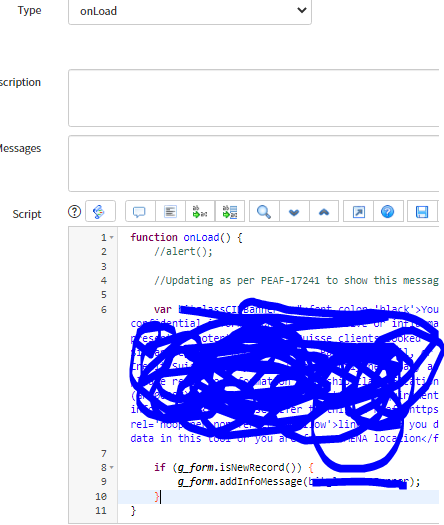
Below is the current client script:

Please help!!
- Labels:
-
Agent Workspace
-
Walk-Up Experience

- Mark as New
- Bookmark
- Subscribe
- Mute
- Subscribe to RSS Feed
- Permalink
- Report Inappropriate Content
01-05-2022 08:24 AM
You can do this in a workflow script against the sys_broadcast_message table (I'm actually working on the very same thing myself right now and just created the same).
Steps to accomplish:
1. create a role and assign it to the group that needs to see the broadcast message so you don't end up spamming all users each time (I created one called "approval_message" for mine).
2. In workflow editor, create a new workflow and use the "Run Script" node. Name it as you like.
3. Add the below script but modify it to suit your own needs:
var gr = new GlideRecord('sys_broadcast_message');
var date = gs.nowDateTime();
var end = gs.minutesAgo(15);
var incident = current.incident.number;
var sysID = current.sys_id;
var url = 'https://onedev.service-now.com/u_operational_mechanical_incident.do?sys_id='+ sysID;
var urlString = '<a class="web" target="_blank" href = "'+ url + '">' +incident + '</a>';
gr.initialize();
gr.message = 'Incident ' + urlString + ' has been submitted for a communication approval. Please refer to the My Approvals link to review the details of this incident and either approve or reject the approval';
gr.user_filter = 'approval_message';
gr.at_login= 'false';
gr.logged_in = 'true';
gr.email = 'false';
gr.notify_users_after_date = date;
gr.notify_users_until_date = end;
gr.insert();
I hope this helps!!
Please mark my answer helpful or correct, if applicable.
- Mark as New
- Bookmark
- Subscribe
- Mute
- Subscribe to RSS Feed
- Permalink
- Report Inappropriate Content
01-06-2022 09:18 AM
Hi this is not working for me. Is there any other option available apart from using the workflow?
I dont need to show a broadcast message, just a simple info message when form is loaded for the first time.(either new or existing)