- Mark as New
- Bookmark
- Subscribe
- Mute
- Subscribe to RSS Feed
- Permalink
- Report Inappropriate Content
03-04-2026 08:02 PM
Hi
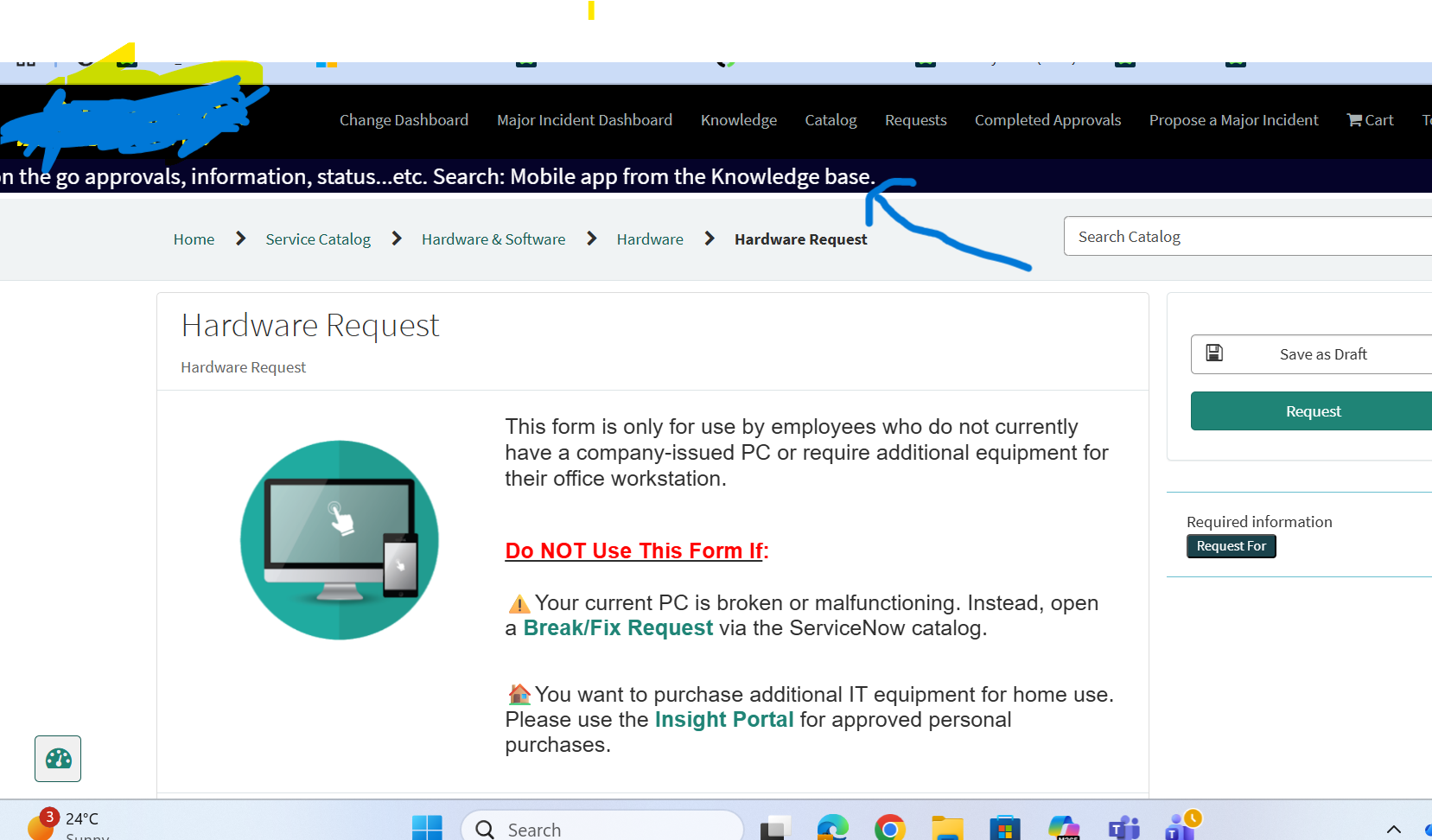
Can anyone help me to update the text by including dynamic link on the service catalog top. Attaching screenshot for the reference (need to update the text in between breadcums & menu bar. Arrow is added for identification)
Any help would be really grateful.
Thank you
Solved! Go to Solution.
- Mark as New
- Bookmark
- Subscribe
- Mute
- Subscribe to RSS Feed
- Permalink
- Report Inappropriate Content
03-04-2026 09:28 PM
You can update the text that appears between the menu bar and the breadcrumbs in the Service Catalog by modifying the Service Portal widget or adding a custom HTML block depending on how your portal is configured.
Steps to update the text with a dynamic link:
Navigate to Service Portal > Portals.
Open the portal you are using (for example the main Employee Service Portal).
Check the Theme associated with the portal.
In many portals, the banner text between the menu bar and breadcrumbs is controlled by a widget placed in the Header container.
Option 1 – Update existing widget
Go to Service Portal > Widgets.
Search for the widget used in the portal header (commonly something like Header, Announcement, or Custom Header).
Open the widget and update the HTML Template.
Add your text and dynamic link like below:
Search: <a href="/kb_view.do?sysparm_article=KB0012345">Mobile app from the Knowledge base</a>If you want it to be dynamic you can also use Angular variables or portal options inside the widget.
Option 2 – Add an Announcement / HTML block
Go to Service Portal > Announcements (if announcements are enabled).
Create a new announcement.
Add HTML content with your link.
Example:
Search: <a href="/sp?id=kb_article&sys_id=ARTICLE_SYS_ID">Mobile app from the Knowledge base</a>Set the portal and audience.
Save and publish.
After saving, refresh the Service Portal and the updated text with the clickable link will appear between the menu bar and breadcrumbs.
This is typically controlled by the portal header layout, so the exact widget may vary depending on how the portal theme was designed.
- Mark as New
- Bookmark
- Subscribe
- Mute
- Subscribe to RSS Feed
- Permalink
- Report Inappropriate Content
03-04-2026 09:28 PM
You can update the text that appears between the menu bar and the breadcrumbs in the Service Catalog by modifying the Service Portal widget or adding a custom HTML block depending on how your portal is configured.
Steps to update the text with a dynamic link:
Navigate to Service Portal > Portals.
Open the portal you are using (for example the main Employee Service Portal).
Check the Theme associated with the portal.
In many portals, the banner text between the menu bar and breadcrumbs is controlled by a widget placed in the Header container.
Option 1 – Update existing widget
Go to Service Portal > Widgets.
Search for the widget used in the portal header (commonly something like Header, Announcement, or Custom Header).
Open the widget and update the HTML Template.
Add your text and dynamic link like below:
Search: <a href="/kb_view.do?sysparm_article=KB0012345">Mobile app from the Knowledge base</a>If you want it to be dynamic you can also use Angular variables or portal options inside the widget.
Option 2 – Add an Announcement / HTML block
Go to Service Portal > Announcements (if announcements are enabled).
Create a new announcement.
Add HTML content with your link.
Example:
Search: <a href="/sp?id=kb_article&sys_id=ARTICLE_SYS_ID">Mobile app from the Knowledge base</a>Set the portal and audience.
Save and publish.
After saving, refresh the Service Portal and the updated text with the clickable link will appear between the menu bar and breadcrumbs.
This is typically controlled by the portal header layout, so the exact widget may vary depending on how the portal theme was designed.


- Mark as New
- Bookmark
- Subscribe
- Mute
- Subscribe to RSS Feed
- Permalink
- Report Inappropriate Content
03-04-2026 09:43 PM
how is that rendered currently? what script etc?
share that
Ankur
✨ Certified Technical Architect || ✨ 10x ServiceNow MVP || ✨ ServiceNow Community Leader
- Mark as New
- Bookmark
- Subscribe
- Mute
- Subscribe to RSS Feed
- Permalink
- Report Inappropriate Content
03-05-2026 05:47 AM
The text is currently showing up from Announcements . Please refer the screenshot bit not sure any widget is associated to it
Thank you
- Mark as New
- Bookmark
- Subscribe
- Mute
- Subscribe to RSS Feed
- Permalink
- Report Inappropriate Content
03-05-2026 05:52 AM
announcement doesn't support links etc
Only plain text can be shown
💡 If my response helped, please mark it as correct ✅ and close the thread 🔒— this helps future readers find the solution faster! 🙏
Ankur
✨ Certified Technical Architect || ✨ 10x ServiceNow MVP || ✨ ServiceNow Community Leader