Script to Run on catalog item to Count and Limit Attachment Number

- Mark as New
- Bookmark
- Subscribe
- Mute
- Subscribe to RSS Feed
- Permalink
- Report Inappropriate Content
07-15-2021 04:58 AM
HI
I need to limit the number of attachments to 1 on the catalog item while ordering
i have checked yours previous answer available here Limit number of attachements on catalog Item - Developer Community - Question - ServiceNow Community but it not working.
i written some code to find attachment is attached or not, but how to add filter to count the number of attachments
- Labels:
-
Service Catalog
- Mark as New
- Bookmark
- Subscribe
- Mute
- Subscribe to RSS Feed
- Permalink
- Report Inappropriate Content
02-28-2022 05:02 AM
Cheers

- Mark as New
- Bookmark
- Subscribe
- Mute
- Subscribe to RSS Feed
- Permalink
- Report Inappropriate Content
02-28-2022 09:31 PM
Hi
Here you go:
1) If the filesize is greater than 100kb we need to alert the user which means if it is greater than 100000 in bytes.
2) We need to alert the user if it is not a jpg or png file.
If this is the requirement I would suggest to go with onChange of attachment variable rather than using Onsubmit.
Onsubmit also will works but we need to do more coding. If you want onSubmti only then we can do the same.
But i will show you the onchange client script now on attachment variable
function onChange(control, oldValue, newValue, isLoading) {
    if (isLoading || newValue == '') {
        return;
    }
    var ajax = new GlideAjax('Newglidingabc');
    ajax.addParam('sysparm_name', 'checkAttachmentSize');
    ajax.addParam('sysparm_existing', newValue);
    ajax.getXML(getRITMdata);

    function getRITMdata(response) {
        var answer = response.responseXML.documentElement.getAttribute("answer");
        if (answer) {
            alert(answer);
            g_form.clearValue("add_attachment"); //give your attachment variable name
        }
    }
}
checkAttachmentSize: function() {
var grA = new GlideRecord("sys_attachment");
grA.addQuery("sys_id", this.getParameter("sysparm_existing"));
grA.query();
if (grA.next()) {
gs.info("size value" + grA.getValue("size_bytes")+":"+typeof grA.getValue("size_bytes"));
if (grA.getValue("size_bytes") > 100000) {
return "File size must be less than 100kb.";
} else if (grA.getValue("content_type") != "image/png" && grA.getValue("content_type") != "image/jpeg") {
return "Please attach jpeg or png files";
} else {
return "";
}
}
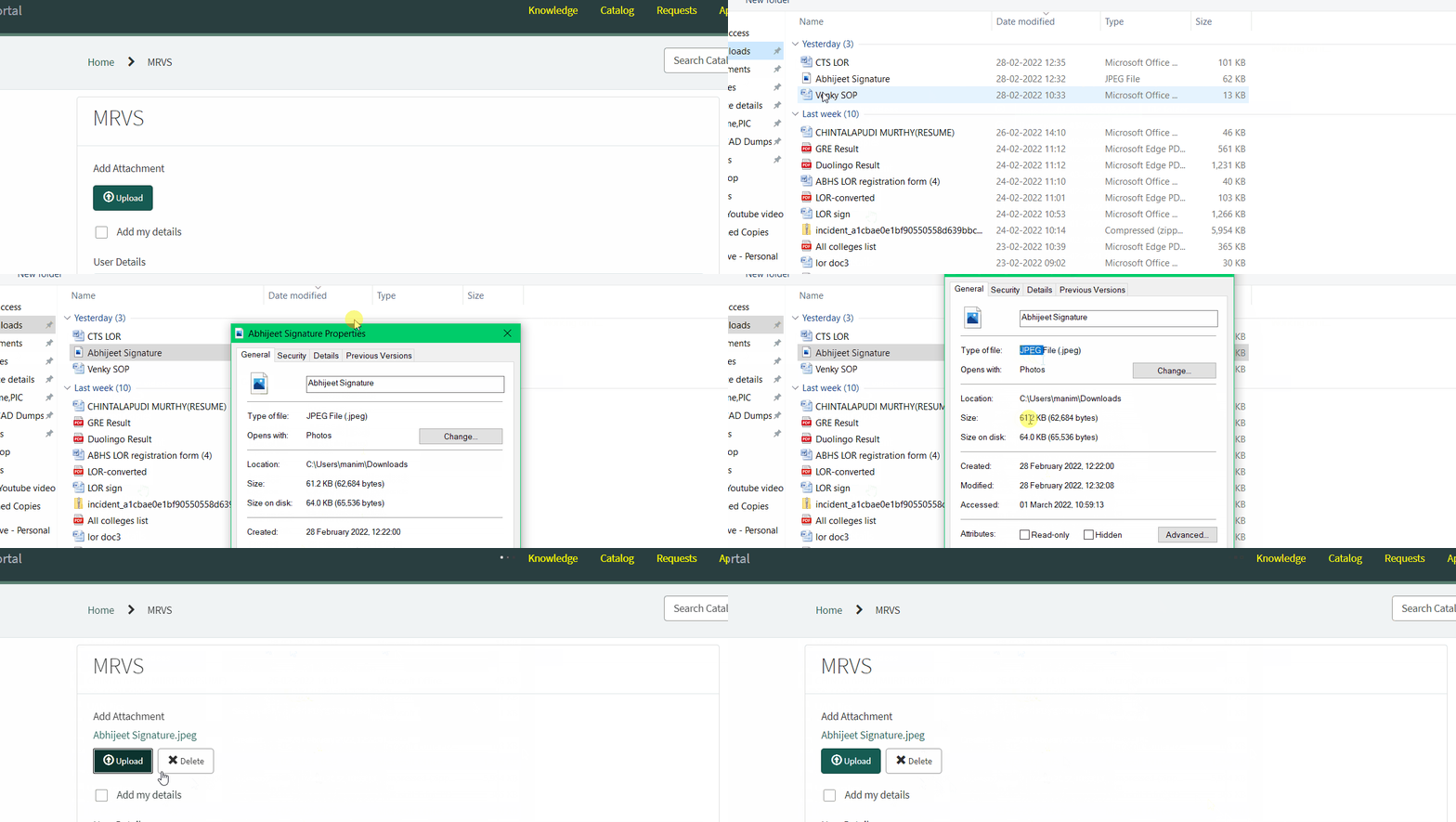
},See the below GIF for refernce which I tested in my PDI.
Scenario 1:
If it is more than 100kb and if the file is not jpeg or png.

Now i am adding correct attachment
It is jpg or png and it is less than 100kb see below:

Hope it clears your query.
Thanks
Murthy
Murthy
- Mark as New
- Bookmark
- Subscribe
- Mute
- Subscribe to RSS Feed
- Permalink
- Report Inappropriate Content
03-01-2022 05:32 AM
First, thank you very much for taking the time to respond, create the scripts and include videos. You're help is certainly appreciated!
However, I have two questions:
1) Is all of code you supplied to be put inside one onChange client script? The second code window of " checkAttachmentSize function():" is causing errors.
2) If that second code window is also supposed to be inside the same onCHange client script, the line "gs.info("size value" + grA.getValue(........" is causing an error as "gs" should not be used in client scritps.
Basically, should the entire onChange client script be:
function onChange(control, oldValue, newValue, isLoading) {
    if (isLoading || newValue == '') {
        return;
    }
    var ajax = new GlideAjax('Newglidingabc');
    ajax.addParam('sysparm_name', 'checkAttachmentSize');
    ajax.addParam('sysparm_existing', newValue);
    ajax.getXML(getRITMdata);

    function getRITMdata(response) {
        var answer = response.responseXML.documentElement.getAttribute("answer");
        if (answer) {
            alert(answer);
            g_form.clearValue("add_attachment"); //give your attachment variable name
        }
    }
 }
function checkAttachmentSize() {
        var grA = new GlideRecord("sys_attachment");
        grA.addQuery("sys_id", this.getParameter("sysparm_existing"));
        grA.query();
        if (grA.next()) {
            //gs.info("size value" + grA.getValue("size_bytes")+":"+typeof grA.getValue("size_bytes"));
            if (grA.getValue("size_bytes") > 100000) {
                return "File size must be less than 100kb.";
            } else if (grA.getValue("content_type") != "image/png" && grA.getValue("content_type") != "image/jpeg") {
                return "Please attach jpeg or png files";
            } else {
                return "";
            }
        }
    }
Again, thank you very much it's appreciated!!
- Mark as New
- Bookmark
- Subscribe
- Mute
- Subscribe to RSS Feed
- Permalink
- Report Inappropriate Content
03-01-2022 05:34 AM
No Thats a script Include
If you dont mind lets have a gmeet here:
manichintalapudi9@gmail.com
I will explain you clearly.
Thanks
Murthy
Murthy
- Mark as New
- Bookmark
- Subscribe
- Mute
- Subscribe to RSS Feed
- Permalink
- Report Inappropriate Content
03-01-2022 07:07 AM
This is exactly what I was looking for and thank you very much again for taking the time to demonstrate and walk me through it.
Everyone, @Murthy is extremely knowledgeable and I would highly recommend him for your ServiceNow requirements...perhaps you can hire him 🙂
Thank you again!