UI Action Override Field Not Working – What Is Its Purpose?

- Mark as New
- Bookmark
- Subscribe
- Mute
- Subscribe to RSS Feed
- Permalink
- Report Inappropriate Content
06-01-2026 06:40 AM
Hi Community,
I have a question about the purpose of the Override field in UI Actions.
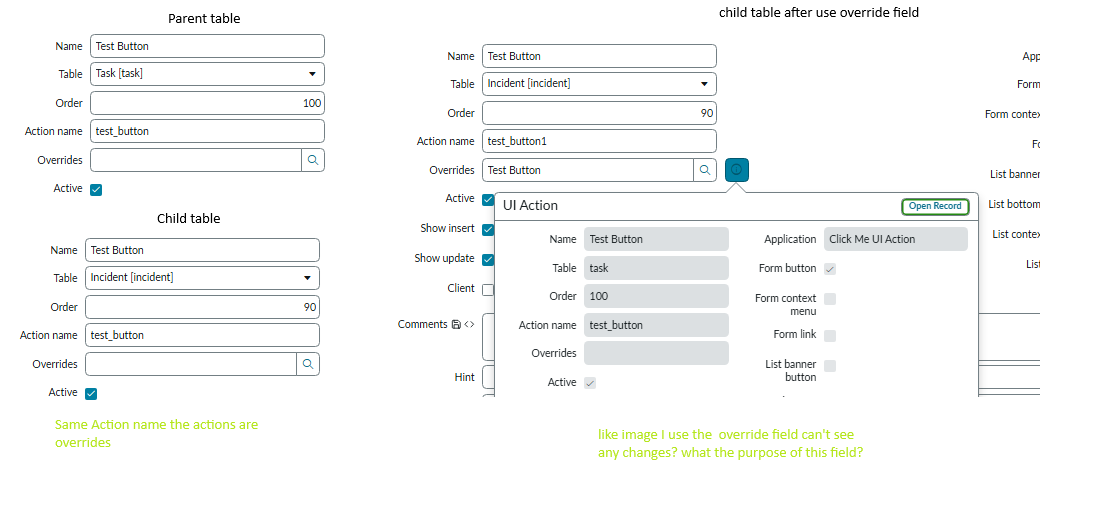
I created a UI Action on a parent table and another UI Action on a child table using the same Action Name, but with different scripts/actions. The child table executes its own UI Action even when the Override field is not selected.
Because of this, I'm confused about the purpose of the Override field. If the child table's UI Action already replaces the parent behavior when the Action Name is the same, what additional functionality does the Override field provide?
Can someone explain the difference between:
Same Action Name without Override
Same Action Name with Override
and provide a practical example where the Override field is actually required?
Thanks in advance.

- Mark as New
- Bookmark
- Subscribe
- Mute
- Subscribe to RSS Feed
- Permalink
- Report Inappropriate Content
06-01-2026 01:16 PM
Hi @prasathvima
Check this article:
KB0686189 How to override UI Actions for an extended table
https://www.youtube.com/watch?v=Yt8-6-f8oe4
Override UI Policy on Child table?
Regards
Tanushree Maiti
ServiceNow Technical Architect
LinkedIn: https://www.linkedin.com/in/tanushreemaiti

- Mark as New
- Bookmark
- Subscribe
- Mute
- Subscribe to RSS Feed
- Permalink
- Report Inappropriate Content
06-02-2026 02:30 AM
Thank you for your response.
I have attached my test case screenshot. When I create a UI Action on the child table with the same Action Name as the parent UI Action, it already overrides the parent behavior even without using the Overrides field.
I also tested by selecting the parent UI Action in the Overrides field, but I could not see any difference.
Could you please explain what additional purpose the Overrides field serves and when it is actually required?
Thank you.
- Mark as New
- Bookmark
- Subscribe
- Mute
- Subscribe to RSS Feed
- Permalink
- Report Inappropriate Content
06-02-2026 02:38 AM
Hi @Tanushree Maiti ,
Thank you for your response and for sharing the references.
I have already referred to these articles and tested them. My question is a little different. When I use the same Action Name for both the parent and child table UI Actions, the child UI Action seems to override the parent even without selecting the Override field.
So I'm trying to understand the exact purpose of the Override field in this scenario.
Thanks again for your help.
- Mark as New
- Bookmark
- Subscribe
- Mute
- Subscribe to RSS Feed
- Permalink
- Report Inappropriate Content
06-01-2026 03:04 PM
Hi @prasathvima
ServiceNow handles Form Buttons completely differently than List Actions (like right-click menus).
1. On a Form
When you open a record (like an Incident), ServiceNow looks at the UI Actions. If it sees a Parent action and a Child action with the same Action Name, it automatically hides the parent button.
Because of this built-in rule, both settings look exactly the same on a form:
| Without Override | Only the Child Button appears. (Parent is hidden automatically) |
| With Override | Only the Child Button appears. |
2. On a List
Now, imagine you change both of those UI Actions so they appear as List Choices (the dropdown menu at the bottom of a list of records) or List Context Menus (when you right-click a row in a list).
ServiceNow automatic hiding rule does not work on lists. This is where the difference happens:
Without Override
ServiceNow treats them as two completely separate buttons that just happen to have the same name.
The Result: When you view a list, both buttons appear at the same time. A user looking at the list will see two identical options, causing confusion and duplicate execution bugs.
With Override
Checking the box
The Result: The parent option is completely suppressed. The user sees only one button on the list, which runs your child script.
Summary: If your UI Action is only a button on a form, ServiceNow automatically hides the parent for you, making the "Override" checkbox feel useless. You need the Override checkbox when your UI Action is used in Lists, Related Lists, or Right-Click Menus to prevent duplicate buttons from showing up.