UI page on Agent workspace

- Mark as New
- Bookmark
- Subscribe
- Mute
- Subscribe to RSS Feed
- Permalink
- Report Inappropriate Content
09-13-2022 10:49 AM
Hi can someone please help me on how can i show the ui page functionality on the agent workspace on click of the UI action. Currently its working on Native UI to mark attachments as internal(u_internal on sys_attachment table) and vice versa. Same functionality i need on the workspace.
UI Page:
HTML
<?xml version="1.0" encoding="UTF-8"?>
<j:jelly trim="false" xmlns:g="glide" xmlns:g2="null" xmlns:j="jelly:core"
	xmlns:j2="null">

	<j:set var="jvar_target_sys_id" value="${JS:RP.getWindowProperties().get('target_sys_id')}" />
	<j:set var="jvar_target_table" value="${JS:RP.getWindowProperties().get('target_table')}" />
    <j:set var="jvar_attachment_disabled" value="${RP.getWindowProperties().get('attachment_disabled')}" />
    <j:set var="jvar_sc_override" value="${RP.getWindowProperties().get('sc_override')}" />
	<j:set var="jvar_show_link" value="true" />
	<j:if test="${gs.getProperty('glide.ui.disable_attachment_view') == 'true'}">
		<j:set var="jvar_show_link" value="false" />
	</j:if>
	<input type="hidden" id="ni.show_attachment_view" name="ni.show_attachment_view"
		value="${jvar_show_link}" />
	<j:set var="jvar_show_link_popup" value="true" />
	<j:if test="${gs.getProperty('glide.ui.attachment_popup')=='false'}">
		<j:set var="jvar_show_link_popup" value="false" />
	</j:if>

	<style>

		tr {
    height: 30px;
}

	</style>


	<span style="font-size:14px;">Use the internal link to restrict a file visibility only to agents.</span>
	<input type="hidden" id="ni.show_attachment_popup" name="ni.show_attachment_popup"
		value="${jvar_show_link_popup}" />

	<table width="100%" style="table-layout:fixed;">
		<tbody>

			<tr>
				<td>

						<input name="sysparm_nostack" type="hidden" value="yes" />
						<input name="sysparm_this_url" id="sysparm_this_url" type="hidden"
							value="" />

					<table width="100%" style="table-layout:fixed;">
							<TR >
								<TD style="white-space:nowrap;">
									<div id="current_attachments" style="display:block">
										<div style="margin-top:4px;">
											<div id="attachment_dialog_list">
													<table width="100%" style="table-layout:fixed;">
														<tbody id="attachment_table_body">

															<g2:attachment_list_by_availability sys_id="${jvar_target_sys_id}"
																table="${jvar_target_table}" available="true">
																<g2:for_each_record file_variable="sys_attachment"
																	var="attachment">
																	<TR>
																		<TD colspan="2" style="white-space:nowrap;">

																			<input name="Name" type="hidden" value="false" />
																			<input type="hidden" id="$[sys_attachment.sys_id]" class="attachment_sys_id" />
																			<g2:attachment_entry_custom />


																		</TD>
																	</TR>
																</g2:for_each_record>
															</g2:attachment_list_by_availability>


														</tbody>


													</table>
											</div>

										</div>
									</div>
								</TD>
							</TR>
						</table>


				</td>
			</tr>
		</tbody>
	</table>

</j:jelly>
Client Script:
function markInternal(attachId) {
	gel('progressicon_'+attachId).style.display='inline';
    var gInternal = new GlideAjax('InternalAttachments');
    gInternal.addParam('sysparm_name', 'markInternal');
    gInternal.addParam('sysparm_attachId', attachId);
    gInternal.getXMLAnswer(showInternalIcon);


}

/**
 * This showcase internal flag icon and remove internal link.
 * This also hides the internl button/link.
 * @param value
 */

function showInternalIcon(response) {
    var iconSpan = 'internalFlag_' + response;
    var internalLink = 'internal_view_' + response;
	var removeInternalLink ='removeInternal_view_'+response;
    var iconClass = document.getElementsByClassName(iconSpan);

    for (i = 0; i < iconClass.length; i++) {
        iconClass[i].style.display = "inline";
    }

	var removeInternalClass = document.getElementsByClassName(removeInternalLink);

    for (y = 0; y < removeInternalClass.length; y++) {
        removeInternalClass[y].style.display = "inline";
    }

    var internalClass = document.getElementsByClassName(internalLink);

    for (n = 0; n < internalClass.length; n++) {
        internalClass[n].style.display = "none";
    }

	gel('progressicon_'+response).style.display='none';


}


function removeInternal(attachId) {
	gel('progressicon_'+attachId).style.display='inline';
    var gInternal = new GlideAjax('InternalAttachments');
    gInternal.addParam('sysparm_name', 'removeInternal');
    gInternal.addParam('sysparm_attachId', attachId);
    gInternal.getXMLAnswer(hideInternalIcon);


}

/**
 * This showcase internal flag icon and remove internal link.
 * This also hides the internl button/link.
 * @param value
 */

function hideInternalIcon(response) {

    var iconSpan = 'internalFlag_' + response;
    var internalLink = 'internal_view_' + response;
	var removeInternalLink ='removeInternal_view_'+response;
    var iconClass = document.getElementsByClassName(iconSpan);

    for (i = 0; i < iconClass.length; i++) {
        iconClass[i].style.display = "none";
    }

	var removeInternalClass = document.getElementsByClassName(removeInternalLink);

    for (y = 0; y < removeInternalClass.length; y++) {
        removeInternalClass[y].style.display = "none";
    }

    var internalClass = document.getElementsByClassName(internalLink);

    for (n = 0; n < internalClass.length; n++) {
        internalClass[n].style.display = "inline";
    }

	gel('progressicon_'+response).style.display='none';


}
Workspace UI action:

- Labels:
-
Agent Workspace
- Mark as New
- Bookmark
- Subscribe
- Mute
- Subscribe to RSS Feed
- Permalink
- Report Inappropriate Content
09-13-2022 11:31 AM
I was able to render my UI Page in Agent Workspace on click of UI Action via below script.
var ui_page_id = '<sys_id_of_your_ui_page>';
    g_modal.showFrame({
        url: '/ui_page.do?sys_id=' + ui_page_id,
        title: 'Attachments',
        size: 'xl',
        height: 500
    });
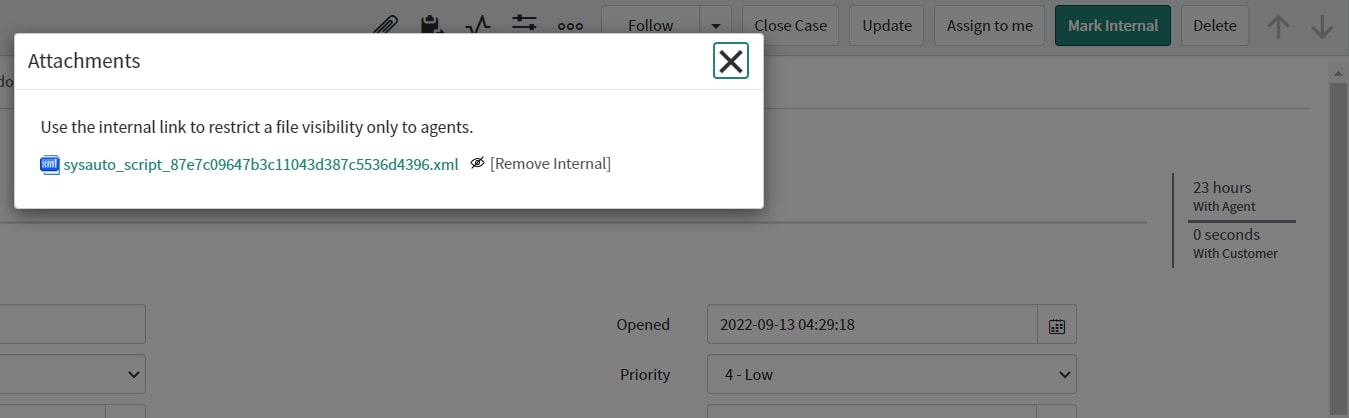
See the below images for reference.
Workspace Script

Page created via g_modal

UI Page rendered via g_modal

Make sure client callable is true/checked.
- Mark as New
- Bookmark
- Subscribe
- Mute
- Subscribe to RSS Feed
- Permalink
- Report Inappropriate Content
09-14-2022 03:52 AM
hi Muhammad
I tried but still not working, client callable is checked on ui action. Below is how the ui page is rendered on the native UI calling a macro, containing clickable link to mark the attachments internal

UI Macro: attachment_entry_custom
<?xml version="1.0" encoding="utf-8" ?>
<j:jelly trim="false" xmlns:j="jelly:core" xmlns:g="glide" xmlns:j2="null" xmlns:g2="null">
<style>
.not_available_icon:focus, .not_available_file:focus {
outline: 5px auto #1f8476;
outline-offset: -2px;
}
</style>
<g:macro show_link="true" />
<g:evaluate var="jvar_edge_invalid" copyToRhino="true">
var atd = GlideTableDescriptor.get(sys_attachment.table_name);
atd.getED().hasAttachmentsEncrypted() ${AND} !gs.isEdgeEncryptedSession();
</g:evaluate>
<g:evaluate var="jvar_attach_internal" copyToRhino="true">
</g:evaluate>
<!-- Check no_attachment attribute in order to override if necessary. -->
<g:evaluate var="jvar_no_attachment">
var atd = GlideTableDescriptor.get(sys_attachment.table_name);
atd.getED().getBooleanAttribute("no_attachment")
</g:evaluate>
<j:if test="${empty(jvar_document_viewer_enabled)}">
<g:evaluate var="jvar_document_viewer_enabled" copyToRhino="true">
var plugin_enabled = GlidePluginManager.isActive('com.snc.documentviewer');
var prop_enabled = gs.getProperty('com.snc.documentviewer.enable_document_viewer','true') === 'true' ? true : false;
var atd = GlideTableDescriptor.get(sys_attachment.table_name);
var attr_enabled = atd.getED().getBooleanAttribute("use_document_viewer");
plugin_enabled ${AND} prop_enabled ${AND} attr_enabled;
</g:evaluate>
</j:if>
<g:evaluate var="jvar_not_available" copyToRhino="true">
sys_attachment.state == 'not_available';
</g:evaluate>
<g:evaluate var="jvar_can_write_to_record">
sys_attachment.canWrite();
</g:evaluate>
<j:if test="${jvar_edge_invalid or gs.getProperty('glide.ui.disable_attachment_view') == 'true'}">
<j:set var="jvar_show_link" value="false" />
</j:if>
<j:set var="jvar_can_add_attachments" value="false" />
<j:if test="${jvar_no_attachment == 'false'}">
<j:if test="${jvar_can_write_to_record == 'true'}">
<j:set var="jvar_can_add_attachments" value="true" />
</j:if>
</j:if>
<j:if test="${jvar_edge_invalid or RP.getWindowProperties().get('attachment_disabled') == 'true'}">
<j:set var="jvar_can_add_attachments" value="false" />
</j:if>
<!-- determine which icon to use and what title text to display -->
<j:set var="jvar_random_id" value="${new GlideGuid.generate(null)}" />
<j:set var="jvar_encrypt_context" value="${sys_attachment.encryption_context}" />
<j:set var="jvar_sys_id" value="${sys_attachment.sys_id}" />
<g:inline template="gr_to_icon_path.xml" />
<j:set var="jvar_attachment_icon" value="${jvar_icon_path}" />
<j:if test="${!empty(jvar_encrypt_context)}" >
<j:set var="jvar_attachment_alt" value="${gs.getMessage('Attached by')} ${sys_attachment.sys_created_by} ${gs.getMessage('on')} ${sys_attachment.sys_created_on.getDisplayValue()}, ${gs.getMessage('Encrypted')}: ${sys_attachment.encryption_context.getDisplayValue()}" />
</j:if>
<j:if test="${empty(jvar_encrypt_context)}" >
<j:set var="jvar_attachment_alt" value="${gs.getMessage('Attached by')} ${sys_attachment.sys_created_by} ${gs.getMessage('on')} ${sys_attachment.sys_created_on.getDisplayValue()}" />
</j:if>
<j:set var="jvar_common_attachment_style" value="overflow:hidden; vertical-align:middle; margin-right: 5px;" />
<g:set_if
var="jvar_attachment_style"
test="${jvar_use_ellipsis}"
true="display: inline-block; text-overflow: ellipsis; white-space: nowrap; ${jvar_common_attachment_style}"
false="display: inline; max-width: 75%; ${jvar_common_attachment_style}"/>
<g:evaluate var="jvar_attachment_action_title" copyToRhino="true">
var action_title = gs.getMessage('[download]');
if(jvar_document_viewer_enabled === 'true')
action_title = gs.getMessage('[view]');
else
action_title = gs.getProperty('glide.ui.attachment.force_download_all_mime_types') === 'true' ? gs.getMessage('[download]') : gs.getMessage('[view]');
action_title;
</g:evaluate>
<g:evaluate var="jvar_attachment_aria_label" copyToRhino="true">
var aria_label = gs.getMessage('Download {0}', sys_attachment.file_name)
if(jvar_document_viewer_enabled === 'true')
aria_label = gs.getMessage('View {0}', sys_attachment.file_name);
else
aria_label = gs.getProperty('glide.ui.attachment.force_download_all_mime_types') === 'true' ? gs.getMessage('Download {0}', sys_attachment.file_name) : gs.getMessage('View {0}', sys_attachment.file_name);
aria_label;
</g:evaluate>
<!-- output the icon with title text and file name -->
<j:choose>
<j:when test="${jvar_edge_invalid}" >
<img src="${jvar_attachment_icon}" alt="${jvar_attachment_alt}" />${HTML:sys_attachment.file_name}
</j:when>
<j:when test="${jvar_not_available}" >
<img class="not_available_icon" style="opacity:0.5" tabindex="-1" src="${jvar_attachment_icon}" alt="${jvar_attachment_alt}" onclick="pushNotAvailableMessage('${JS,HTML:sys_attachment.file_name}')"/>
<span data-use-ellipsis="${jvar_use_ellipsis}" class="not_available_file" style="opacity:0.66; ${jvar_attachment_style}" tabindex="0" id="${jvar_random_id}" data-id="${sys_attachment.sys_id}" onclick="pushNotAvailableMessage('${JS,HTML:sys_attachment.file_name}')" aria-label="${HTML:gs.getMessage('Attachment {0} unavailable', sys_attachment.file_name)}">${HTML:sys_attachment.file_name}</span>
</j:when>
<j:otherwise>
<a href="sys_attachment.do?sys_id=${sys_attachment.sys_id}&sysparm_this_url=${RP.getReferringURL()}" title="${jvar_attachment_alt}" onclick="window.location = this.getAttribute('href'); return false;" click-on-enter='true' tabindex="-1">
<img src="${jvar_attachment_icon}" alt="${jvar_attachment_alt}" /></a>
<a href="sys_attachment.do?sys_id=${sys_attachment.sys_id}&sysparm_this_url=${RP.getReferringURL()}" data-use-ellipsis="${jvar_use_ellipsis}" style="${jvar_attachment_style}" id="${jvar_random_id}" data-id="${sys_attachment.sys_id}" onkeydown="allowInPlaceEditModification(this, event);" onclick="if ($(this).readAttribute('contentediD') != 'true') window.location.href=this.getAttribute('href'); return false;" aria-label="${HTML:gs.getMessage('Download {0}', sys_attachment.file_name)}">${HTML:sys_attachment.file_name}</a>
</j:otherwise>
</j:choose>
<span id="progressicon_${sys_attachment.sys_id}" style='display:none;'><img src="loaderprogess.svg" style="height: 15px; width: 20px;"/></span>
<j:choose>
<j:when test="${sys_attachment.u_internal==false}">
<a class="internal_view_${sys_attachment.sys_id}" style="color: #555555; display:inline;" click-on-enter="true" href="javascript:void(0)" onclick="markInternal('${sys_attachment.sys_id}');" aria-label="${HTML:Internal}">
${gs.getMessage('[Internal]')}
</a>
<span class="internalFlag_${sys_attachment.sys_id}" style="display:none"><img src="internalflagIcon.svg" width="15" height="15"/></span>
<a class="removeInternal_view_${sys_attachment.sys_id}" style="color: #555555; display:none;" click-on-enter="true" href="javascript:void(0)" onclick="removeInternal('${sys_attachment.sys_id}');" aria-label="${HTML:Internal}">
${gs.getMessage('[Remove Internal]')}
</a>
</j:when>
<!-- attachment is marked internal -->
<j:otherwise>
<span class="internalFlag_${sys_attachment.sys_id}" style="display:inline"><img src="internalflagIcon.svg" width="15" height="15"/></span>
<a class="internal_view_${sys_attachment.sys_id}" style="color: #555555; display:none;" click-on-enter="true" href="javascript:void(0)" onclick="markInternal('${sys_attachment.sys_id}');" aria-label="${HTML:Internal}">
${gs.getMessage('[Internal]')}
</a>
<a class="removeInternal_view_${sys_attachment.sys_id}" style="color: #555555; display:inline;" click-on-enter="true" href="javascript:void(0)" onclick="removeInternal('${sys_attachment.sys_id}');" aria-label="${HTML:Internal}">
${gs.getMessage('[Remove Internal]')}
</a>
</j:otherwise>
</j:choose>
</j:jelly>
- Mark as New
- Bookmark
- Subscribe
- Mute
- Subscribe to RSS Feed
- Permalink
- Report Inappropriate Content
04-21-2026 08:53 AM
Hello,
use the url with the parms in your G_MODAL :
url: 'YOUR PAGE.do?sysparm_table='+table+'&sysparm_sys_id='+incidentId,
and in the ui page use sysparm instead of
- Mark as New
- Bookmark
- Subscribe
- Mute
- Subscribe to RSS Feed
- Permalink
- Report Inappropriate Content
03-03-2023 09:41 AM
I faced similar problem on Agent Workspace, I can't resolve that. I don't know how to pass data from UI action (in g_modal) to UI Page, is there any possibility to do that like in GlideModal? I'm digging hard whole community but seems that there is no solution for pass data from UI Action to UI Page in Workspace. I will appreciate any help or maybe other solution how to mark attachments as internal on Agent Workspace (using our u_internal field on sys_attachment table)?