- Mark as New
- Bookmark
- Subscribe
- Mute
- Subscribe to RSS Feed
- Permalink
- Report Inappropriate Content
01-27-2021 09:53 AM
I'm having user permissions issues with a Service Portal widget. As administrator I can access the widget on the portal no problem, but for any other user they receive the error: "You do not have permission to see this catalog". This error message is generated from the Server script and I've done several trial & errors to make sure every other part of the portal is accessible to the same users. Below is the Server Script. Any insight is much appreciated.
(function() {
data.category_id = $sp.getParameter("category_id");
var page = options.link_target_page;
if (data.category_id) {
// Does user have permission to see this category?
var categoryId = '' + data.category_id;
var categoryJS = new sn_sc.CatCategory(categoryId);
if (!categoryJS.canView()) {
data.error = gs.getMessage("You do not have permission to see this category");
return;
}
}
// No category_id provided - at the root of the Service Catalog
// So we'll show all top level categories for this catalog
else {
data.catalog_id = $sp.getParameter("sys_id") || $sp.getValue('sc_catalog');
// Does user have permission to see this catalog?
if (!$sp.canReadRecord("sc_catalog", data.catalog_id)) {
data.error = "You do not have permission to see this catalog ";
return;
}
}
if (data.category_id) {
var currentCategory = new GlideRecord('sc_category');
if (currentCategory.get(data.category_id)) {
data.category_title = currentCategory.title.toString();
data.category_desc = currentCategory.description.toString();
}
}
var items = data.items = [];
var cat = new GlideRecord('sc_category');
if (data.category_id) {
cat.addQuery('parent',data.category_id);
}
else {
cat.addQuery('sc_catalog',data.catalog_id)
cat.addEncodedQuery('parentISEMPTY');
}
cat.addQuery('active','true');
cat.orderBy('title');
cat.query();
while (cat.next()) {
// Does user have permission to see this category?
var catId = '' + cat.sys_id;
var catJS = new sn_sc.CatCategory(catId);
if (!catJS.canView()) {
continue;
}
var item = {};
$sp.getRecordDisplayValues(item, cat, 'title,description,homepage_image,sys_id');
item.sys_class_name = cat.sys_class_name + "";
item.page = page;
items.push(item);
}
})()
Solved! Go to Solution.
- Labels:
-
Service Catalog
- Mark as New
- Bookmark
- Subscribe
- Mute
- Subscribe to RSS Feed
- Permalink
- Report Inappropriate Content
01-29-2021 07:19 AM
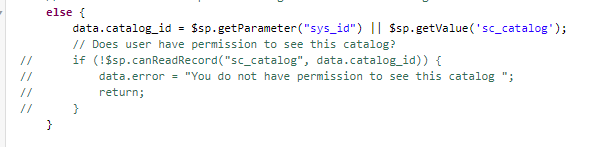
I figured it out. At first I didn't know exactly what to comment out, but with more trial & error I was able to get it working by commenting out the specific code as display in the screenshot below. Thanks for your assistance on this Pranesh.

- Mark as New
- Bookmark
- Subscribe
- Mute
- Subscribe to RSS Feed
- Permalink
- Report Inappropriate Content
01-29-2021 06:44 AM
See below. I've also provided admin access details for you.
* SP page that includes the widget: https://dev100713.service-now.com/sp?id=sc_category
* Admin Access:
-> pranesh
-> user.do%3Fsys_id%3D
- Mark as New
- Bookmark
- Subscribe
- Mute
- Subscribe to RSS Feed
- Permalink
- Report Inappropriate Content
01-29-2021 07:03 AM

- Mark as New
- Bookmark
- Subscribe
- Mute
- Subscribe to RSS Feed
- Permalink
- Report Inappropriate Content
01-29-2021 07:19 AM