chaozhang
ServiceNow Employee

By default, a knowledge article can be attached to an incident from Contextual Search Results under the "Possible Solution" tab. The only missing part here is that you will only be able to select from a limited list of Knowledge articles based from the search results. If your article is not listed in those search results, you cannot link it to the incident through this method. And after you linked the article, you can't remove it form the incident if any modification is needed.

Let me introduce a different method to attach specific knowledge articles to an incident. If you know the Knowledge article ID number beforehand, you can use a new UI Macro with knowledge reference lookup to achieve this. This allows the attached knowledge list to be added to the incident form. From the newly created tab(e.g "Related Knowledge Articles" tab in our example), internal users can search for the corresponding knowledge articles using the KB's ID number and attach the article directly to the current incident. Once the KB article is attached, it will be displayed on the list within the same tab. If you decide that the article does not relate to the incident, you can reverse the link and detach the article from the incident after.

Example of attaching a KB article to an existing incident using a UI Macro with Knowledge reference lookup:

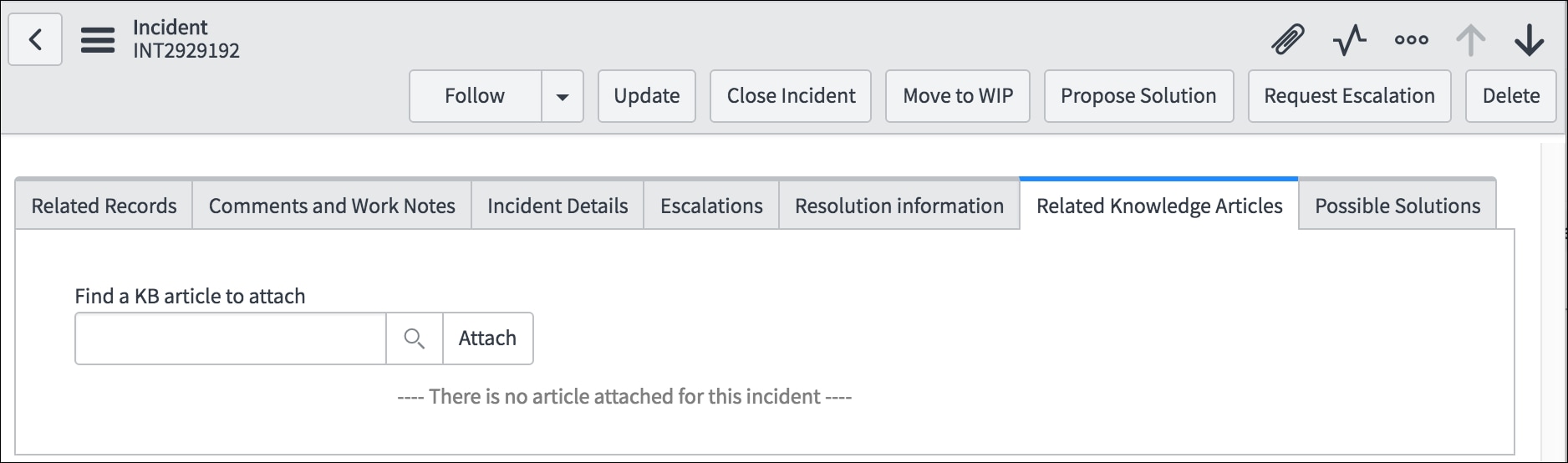
1. Currently, there is no article attached to the following incident INT2929192.

example article.jpg

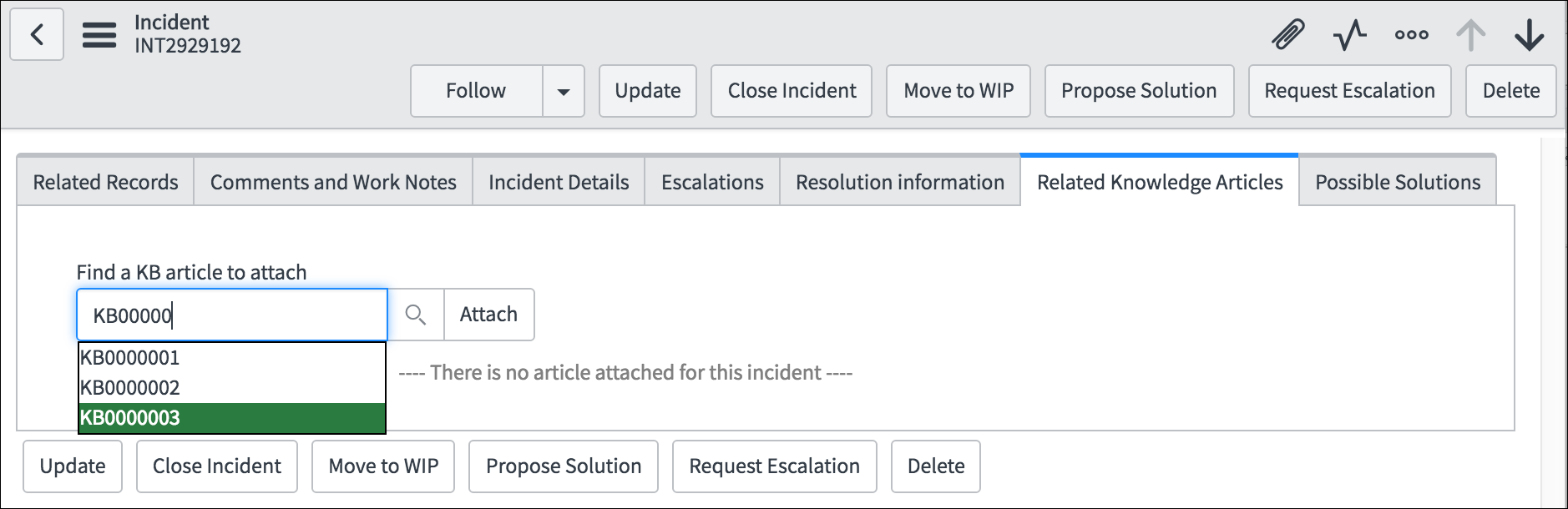
2. In this example, we plan to add a known KB article: KB0000003 to this incident. We can either add the KB number to the input box or search for it by clicking the search icon next. After the KB number is entered, click "Attach" button to trigger the action.

add kb to int.png

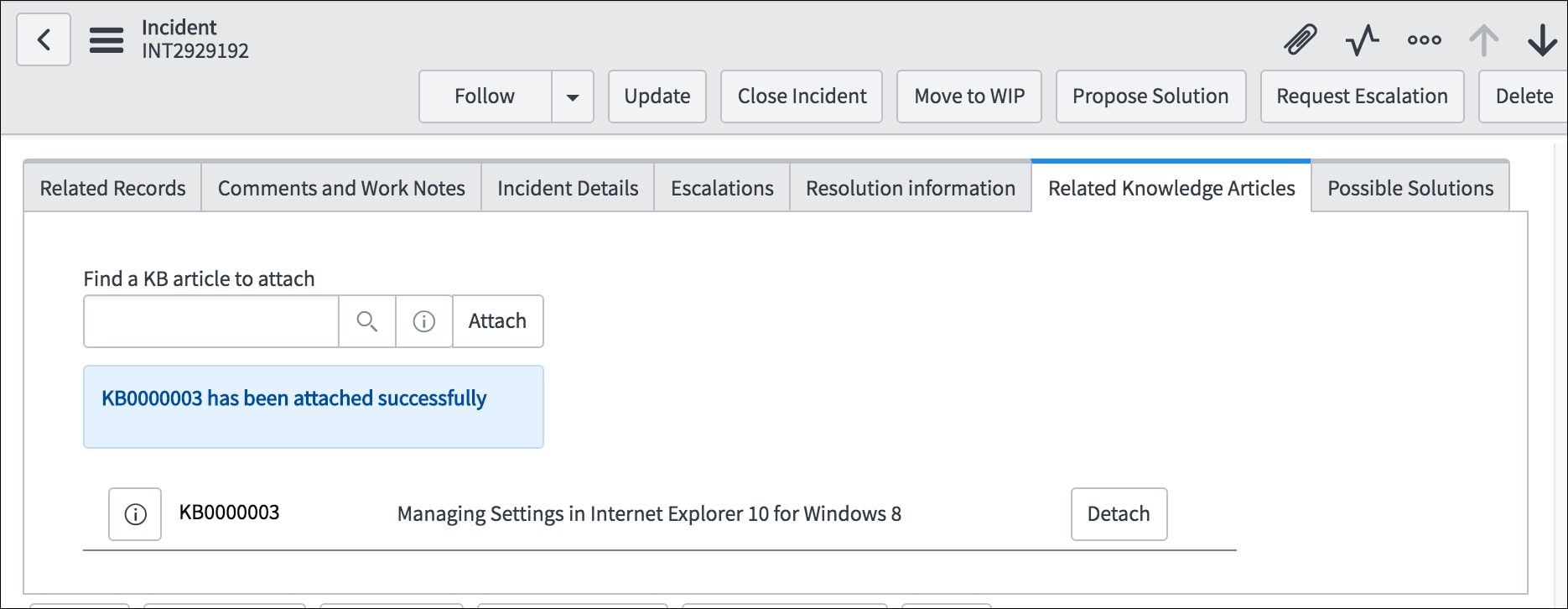
3. Once the article is attached, it will be automatically added to the attached articles list below the input box. An information message will also shown up.

kb added.jpg

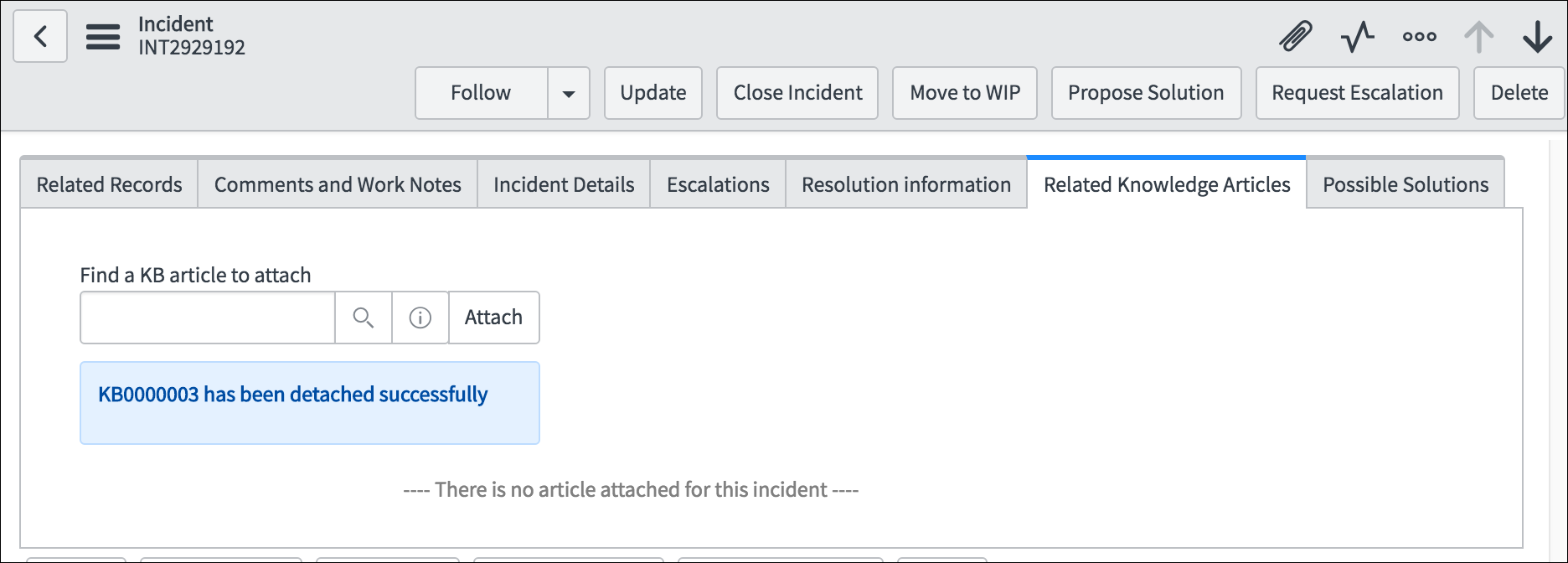
4. If the Knowledge Base article is no longer needed for this incident, you can easily remove it from this incident by clicking "Detach" button on the KB article record.

detach kb int.png

Now you are equipped with a new method to attach and detach a known Knowledge article to existing incidents. This method provides a more interactive way for eligible users to manage all the needed KB articles for their incident with ease.

The code for the UI Macro and Script includes are attached to this post, feel free to download the code and edit/trim it to fit your needs.

PS: Many thanks to jesse.williams for helping to design the solution.

22 Comments
randrews
Tera Guru

ok i am a little confused on the implementation of this...


when i import the related knowledge articles .xml what is that adding... is the js the script i put inside of a script   include?


chaozhang
ServiceNow Employee

Hi Raymond,


The "Related Knowledge Articles" is actually an UI Macro file you can import directly. Then you can wrap it inside a Formatter after and added it to the incident form page. The "RelatedKnowledgeUtil.js" is a script include file that contains all the server side functions.


Please feel free to let me know how it goes or other suggestions/questions.


Thanks,


Chao


charlesk_
Kilo Contributor

This is awesome!


I'm having an issue in Helsinki, though - the "Attach" button is shorter than the text.


I verified this isn't just goofiness in our prod/dev environments by testing it in my personal dev instance.


Here's a screenshot:


9-28-2016 3.28.44 PM.png


Also, is there an easy way to remove the black line separating each article?


chaozhang
ServiceNow Employee

Hello Charles,


For the question about "Attach" button, I mainly used bootstrap to configure the width of component. I would suggest that you might want to check the corresponding classes. As I highlight below, line 293 is where I configure the unit and line 300 is where the exact "attach" button is configured. Hope the modifications here can help to ease the problem.


--> Line 293:               <div class="col-md-4 input-group inputPadding">


                                                                            <g:ui_reference class="form-control" name="knowledgeSelector"


                                                                                                    id="knowledgeSelector"


                                                                                                    table="kb_knowledge"


                                                                                                    query="workflow_state=published^active=true"


                                                                                      />


                                                                  <span class="input-group-btn">


--> Line 300:                                       <button class="btn btn-default" style="min-width:75px;" id="kb_attach_button"                                 onclick="attachKBArticleToIncident('$[current.sys_id]')"   type="button">Attach</button>


                                                                </span>                                        


                                                        </div>


For the question to remove the solid bottom line, remove the line 261 should be the solution(see the bold line).


                                                  .recordRow {


                                                                    padding-top: 5px;


                                                                    padding-bottom: 5px;


-->Line 261                           border-bottom: 1px solid grey;


                                                                  box-sizing: border-box;


                                                  }


PS: all the line numbers and contents are from the file expanded from "Related Knowledge Articles.xml.zip" attached here.


Please let me know if it answers your questions.


Thanks,


Chao


Anna-Kaisa
Kilo Expert

chaozhang  


Hi, we have implemented this to our test environment, and it works as described.


I have one question / wonder around this:


We are using SN KB at the moment only for our Service Desk's internal use,


Top reason having in SN is that our supporters could close tickets more efficiently (we are counting FCR time etc.)


Now if keep it like this that supporters Link the KB to INC via this Related Knowledge Tab =   they still need to go in to Closure notes > mandatory fields needs be to fill up manually > see pic


find_real_file.png


So this is not very efficient but instead just creates one extra tab for supporters to add info in.


I would like them to be able to link KB into INC and INC could be closed with used KB.


Does anyone have an idea how this could be performed?


I would REALLY appreciate any tips within this since ive been trying to find a way to:


a) link and close INC fast by linking KB as resolution (no customer visible needed) and


b) to be able measure knowledge use as well.


Very Warm Thanks in Advance!!


br. Anna


chaozhang
ServiceNow Employee

Hello Anna,


I think it would still be prefered for the users to go to "Closure Information" tab to fill the information even as an additional step.


However, if this feature is still needed, I would suggest the following which might provide hints for your question:


a) In this example, when a KB article is attached to the current incident, I made an AJAX call to trigger function "attachKBToIncident" in the "RelatedKnowledgeUtil.js". For each newly added KB, the function will create one record in "m2m_kb_task" table(this is where we record the link between KB and incident). So, if you would like to close the Incident at this point(when the KB is linked), you can change the state of incident or trigger the closing workflow based on your setting.


b) If "measure knowledge use" here refers to count how many times a KB article is linked/used by incidents. Again, you can check the information on "m2m_kb_task" table, where each record match an one-on-one relationship between KB and incident. For example, finding the most used KB from all of the records would give you the most used KB.


Again, here I can only provide suggestions as there might be other context I missed.


Please feel free to follow up on the progress and other questions as well.


Thanks,


Chao


ashbot
Kilo Contributor

I'm having an issue with the "Attach" button actually attaching a KB article.  


Is this solution Geneva/Helsinki specific? We are currently on Fuji.


ashbot
Kilo Contributor

Well I found out, I had to make the script include client callable.


I did have another question, the current script include sends the link to the work_notes field, is there a way to send this to the comments as well/instead?   I'm trying to mimic the "related search results" attach button. I don't necessarily need to send the entire article, a link would be nice.


chaozhang
ServiceNow Employee

Hello Ashley,


Thanks a lot for reaching out. Yes, you can also add the link to the 'comments' field instead of 'work_notes'. In the 'Related Knowledge Articles.xml', line 172, just change the value of 'targetName' from 'work_notes' to 'comments', it should work as expected.


                      --> Line 172:               var targetName = "work_notes";


Please let me know whether it answered your question.


Thanks,


Chao


ashbot
Kilo Contributor

Great!   Thank you.


Is there any way to split up attach/detach?   I'm trying to send attach to comments and detach to work notes.


Thank you for the help!