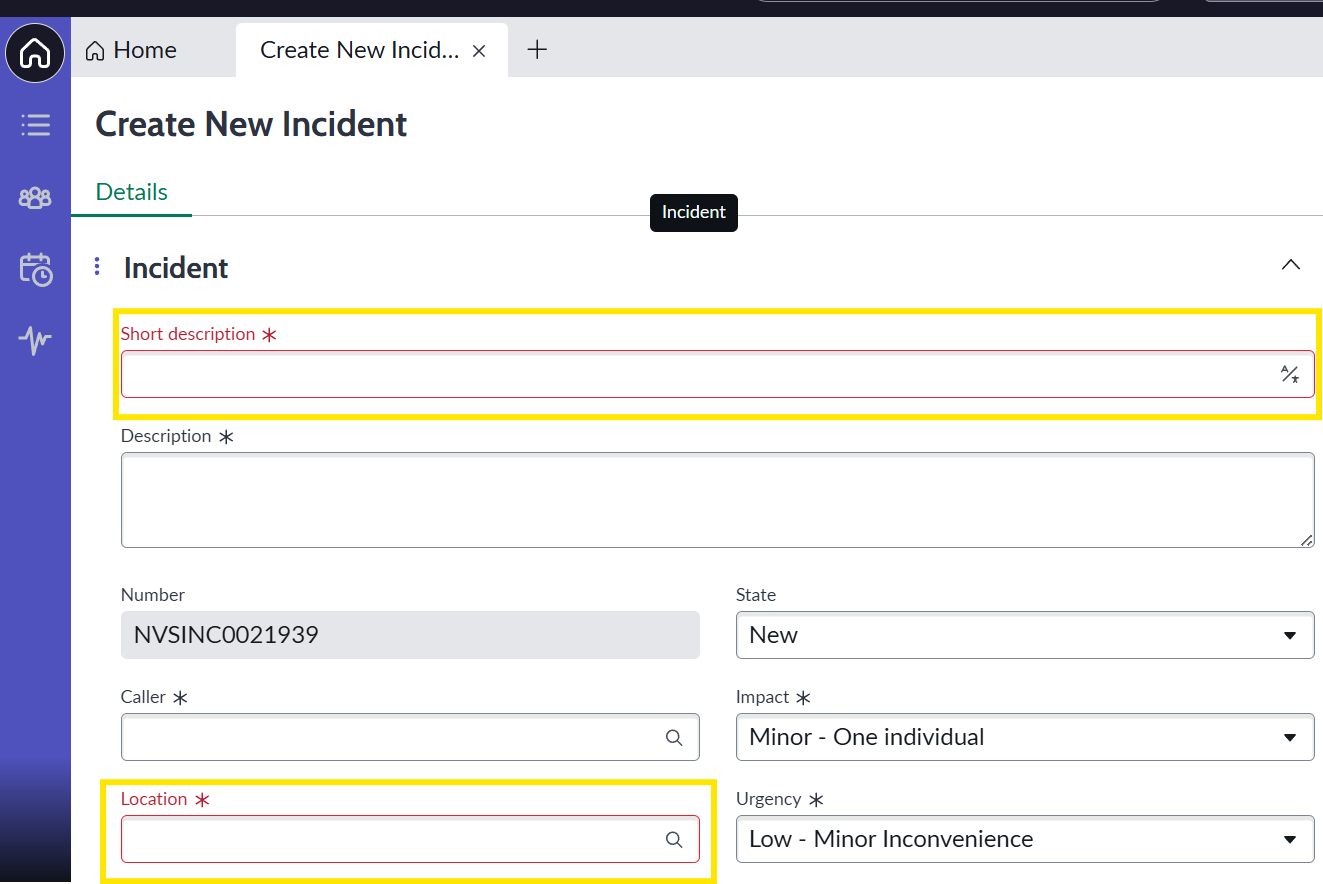
Mandatory fields highlighted in red prematurely when creating new Incident in SOW view.

- Mark as New
- Bookmark
- Subscribe
- Mute
- Subscribe to RSS Feed
- Permalink
- Report Inappropriate Content
03-26-2026 08:08 AM
When attempting to create a new Incident in the SOW (Next Experience) view, mandatory field validation is triggered immediately upon clicking the "+" (New Incident) icon, even before the user begins filling out the form. This behavior results in a poor user experience and visual inconsistency compared to expected ServiceNow form validation standards.
Steps to Reproduce:
Navigate to Incidents in SOW view.
Click on the "+" icon to create a new Incident.
Observe the form fields as soon as the form loads.
Move the cursor across the form.
Current Behavior:
The Location field appears with a red error alert immediately upon form load.
When hovering or moving the cursor over the form, even the Short Description field turns red.
The system behaves as if the user attempted to submit the form without filling mandatory fields, despite no action being taken yet.
Expected Result:
Mandatory field highlighting (red borders or error alerts) should only appear after a user attempt to submit a form without completing mandatory fields.
Mandatory fields should remain in their default neutral state until submission is triggered.
- Mark as New
- Bookmark
- Subscribe
- Mute
- Subscribe to RSS Feed
- Permalink
- Report Inappropriate Content
08-31-2026 06:54 PM
Thanks @manojdatasc for highlighting this issue. I’m also experiencing the same issue in the CSM portal for one of the catalog items. Even before filling out or submitting the form, the mandatory variables are displayed with a red border, which results in a poor user experience.
I’ll keep checking this post for any updates or potential solutions.