Randheer Singh

ServiceNow Employee
Options
- Subscribe to RSS Feed
- Mark as New
- Mark as Read
- Bookmark
- Subscribe
- Printer Friendly Page
- Report Inappropriate Content
06-02-2026
05:55 AM
In Part 1, we covered the fundamentals of REST API Access Policies, and in Part 2, we went deep on Auth Scope, OAuth Entity Linking, and MIAC. Both stopped at the REST boundary. But Basic Auth doesn't only enter through REST — it also rides in through SOAP, JSONv2, PDF, Excel, and export processors. If you lock down REST and stop there, those surfaces are still wide open.
This post closes the gap end-to-end. By the time you finish, you'll be able to deny Basic Auth across every inbound surface, and re-enable it only for the specific integrations that genuinely need it — tightly scoped, on your terms.
This blog content applies to Xanadu, Yokohama, Zurich, and Australia releases. One exception: Machine Identity Access Controls (MIAC) was introduced in Zurich. Future releases may change behavior — always refer to the product documentation for the latest details.
Why Eliminate Basic Auth?
Basic Authentication sends a static username and password on every request. It can't enforce MFA, the credentials don't rotate, and reused passwords make it the favorite target of credential-stuffing campaigns. It's also one of the first things compliance auditors flag for programmatic access. Moving integrations to OAuth, mTLS, or ID Token (Federated Token) removes the static-secret problem — but only if you actually stop accepting Basic Auth at the door.
The Mental Model: Two Enforcement Surfaces
ServiceNow enforces inbound authentication through two distinct mechanisms, depending on the surface:
| Surface | Controlled by |
|
REST APIs (Table, Import Set, Knowledge, Scripted REST, etc.) |
REST API Access Policy |
|
Everything else — SOAP, JSONv2, PDF, Excel, export, and other non-public processors |
The "Apply to all non-public processors" flag on an Authentication Profile, plus per-processor overrides |
A non-public processor is any processor that requires authentication (as opposed to public processors, which allow anonymous access).
The "Apply to all non-public processors" flag covers these — with one deliberate exception: the REST API processor, which is governed separately by REST API Access Policy (Part A). So, in practice, this flag covers every authenticated processor except REST.
Keep this split in mind: a REST API Access Policy will not protect your SOAP or JSONv2 endpoints. That's exactly the gap this post closes.
Step 0 — Know What You're Up Against
Before you deny anything, find out who's actually using Basic Auth today. Flipping a global deny without knowing your dependencies is how live integrations break.
The Machine Identity Console lists all inbound integrations on your instance, including which ones are currently authenticating with Basic Auth. Start there: it tells you exactly which third-party integrations you need to migrate to OAuth/mTLS or carve out before you tighten the screws.
For any account that must keep Basic Auth (at least temporarily), apply this hygiene baseline first:
-
Web Service Access Only = true — the account can't log into the UI, only call APIs.
-
Strong, complex password — long, random, unique.
-
Least-privilege role — only the roles the integration genuinely needs, nothing inherited "just in case."
-
IP restriction wherever feasible — lock the account to the integration's known source ranges.
Rule of thumb: every surviving Basic Auth account should be WSAO=true, least-privilege, IP-restricted, and on your migration list. Carve-outs are temporary, not permanent.
Part A — Restricting Basic Auth on REST APIs
Step 1 — Lock It Down Globally
Create a Global REST API Access Policy and associate Inbound Authentication Profiles for only the methods you want to allow — OAuth, mTLS, and ID Token (Federated Token). Deliberately leave Basic Auth out.

Remember the core rule from Part 1: once a policy is linked, only the methods in that policy are allowed — everything else is blocked. With Basic Auth absent from the global policy, it's now denied across all REST APIs.
Remember:
No policy = default access (OAuth, ID Token, mTLS, and Basic Auth all work).
Policy linked = only what's in the policy works. Omit Basic Auth = Basic Auth blocked.
Step 2 — Carve Out the Integrations That Genuinely Need Basic Auth
Some legacy integrations can't move to OAuth yet. Because the most specific policy wins (Part 1), you create an API-level policy that overrides the global one for just that API — and in it, you include Basic Auth alongside the other methods you still want to accept.
Example: a CRM integration must reach the Table API using Basic Auth. Create a Table API policy and add the Basic Auth profile plus mTLS (and any others you need).

Common mistake: if you add ONLY Basic auth to this override, you just blocked OAuth and mTLS for that API. Always include every method you still want to accept.Step 3 — Constrain the Carve-Out with Authentication Policies
A carve-out shouldn't mean "Basic Auth from anywhere, by anyone." Attach one or more Authentication Policies to the Basic Auth profile, using IP, Group, or Role filter criteria. Multiple policies use OR logic — if any policy evaluates true, the profile passes.
The recommended pattern: allow Basic Auth only for an explicitly exempted set of WSAO service accounts (for example, members of a dedicated "Basic Auth Exempted" group), and optionally only from trusted IP ranges.


So the effective rule becomes: "Basic Auth on the Table API, but only for these exempted service accounts, OR only from our corporate network."
Step 4 — Narrow the Table Scope
The Table API policy lets you pin the policy to individual tables rather than the whole API. If the CRM integration only needs `csm_consumer`, scope the policy to `csm_consumer` — the carve-out doesn't have to open every table.

Step 5 — Lock High-Privilege Accounts with MIAC (Zurich and later)
If the carve-out account is a high-privilege service account, you may still worry it could be repurposed to call unrelated APIs. Machine Identity Access Controls (MIAC) flips the model to deny-by-default: once enabled for a service account, all API access is blocked except the APIs and tables you explicitly allow — regardless of the account's roles, even admin.
Example: restrict the CRM service account to the Table API for `csm_consumer` only. If someone later tries to use it to pull `incident`, MIAC blocks it. MIAC works hand-in-hand with your REST API Access Policy.
Part B — Restricting Basic Auth on SOAP & Non-Public Processors
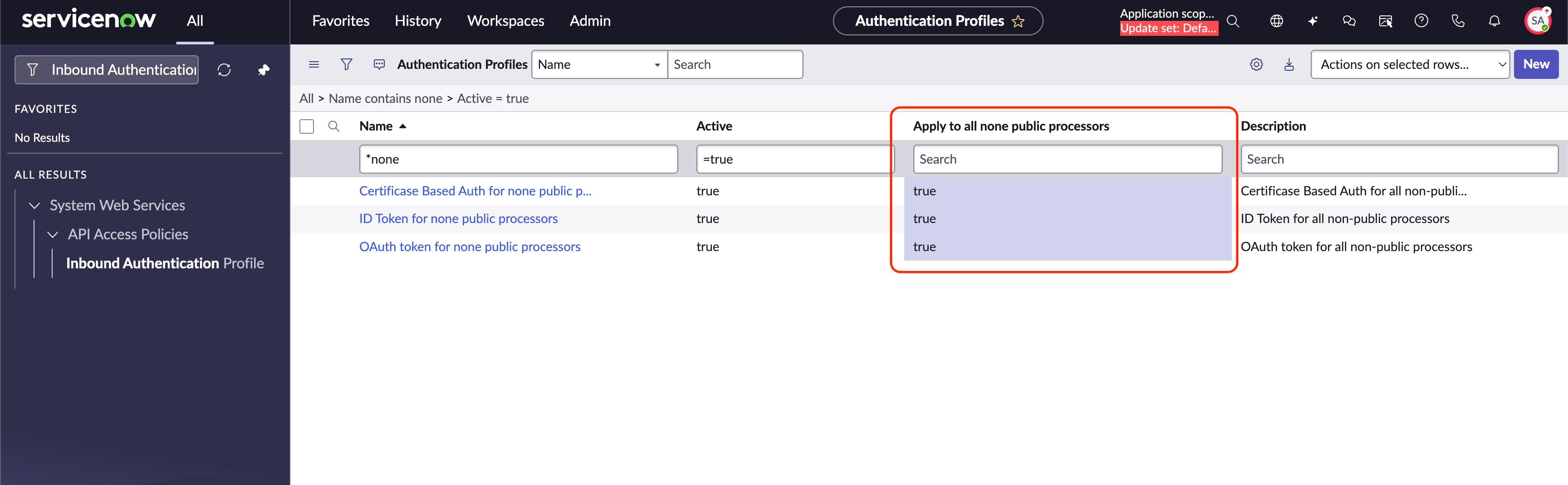
This is the surface most admins forget. REST API Access Policies don't touch it. Instead, there's a lesser-known field on the Authentication Profile table (`std_http_auth`).
The Lesser-Known Field
On an Authentication Profile, enable "Apply to all none public processors."
Yes, the checkbox label has a typo — it reads "Apply to all none public processors" (should be "non-public"). Search for it exactly as written so you can find the field.
When this flag is set, the profile is evaluated for all non-public processors — SOAP, JSONv2, PDF, Excel, export, and the rest — but not the REST API processor (REST is governed by Part A using the REST API access policies). So the play is straightforward: create a profile that allows OAuth, mTLS, and ID Token, enable this flag, and do not create a global Basic Auth profile for non-public processors.
How Evaluation Works
Precedence:
- No processor-to-profile mapping for a given processor → the platform uses the active GLOBAL profile (the one with "Apply to all non-public processors = true").
- A processor-to-profile mapping EXISTS for that processor → the mapping OVERRIDES the global profile for that processor only.
Step 1 — Create the Global Non-Public-Processor Profile
Create (or designate) an Authentication Profile allowing OAuth, mTLS, and ID Token, and enable "Apply to all none public processors." With no Basic Auth profile carrying this flag, Basic Auth is now denied across every non-public processor by default.
Note: You may have to add this field "Apply to all none public processors" to the form layout.
Step 2 — Override for a Specific Processor That Needs Basic Auth
When one processor genuinely needs Basic Auth (or a different method), create a Processor Access Policy mapping in the `sys_processor_profile_mapping` table for just that processor. This overrides the global behavior for that processor alone.
Example: a reporting tool calls `PDFProcessor` and you want to require OAuth specifically for it.

Common mistake: a processor mapping overrides the global non-public-processor profile for that processor — it doesn't add to it. Each mapping row points to a single authentication profile, so if you add only a Basic Auth mapping, you've just blocked OAuth and mTLS for that processor. Add a separate mapping row for each method that processor still needs to accept.If instead a legacy tool must hit a specific processor with Basic Auth, map that processor to a Basic Auth profile here.
Step 3 — Constrain the Override
Just like REST, the overriding profile can carry Authentication Policies with IP and Group restrictions. Apply the same exempted-WSAO-only, IP-restricted pattern from Part A, Step 3.
Putting It Together
Here's how the platform evaluates an incoming request across both surfaces — REST on the left (Part A), non-public processors on the right (Part B):
Your end state across both surfaces:
| Surface | Default posture | Carve-out mechanism | How it's constrained |
|
REST APIs |
Global policy: OAuth + mTLS + ID Token, no Basic Auth |
API-level (or table-level) override policy that re-adds Basic Auth |
Authentication Policies (exempted WSAO group + IP); MIAC for high-privilege accounts |
|
SOAP & non-public processors |
Global profile with "Apply to all non-public processors": OAuth + mTLS + ID Token, no Basic Auth |
Per-processor mapping in sys_processor_profile_mapping |
Authentication Policies (IP + Group) on the overriding profile |
The principle is identical on both sides: deny Basic Auth globally, then add it back only where a specific, hygiene-checked integration requires it.
Testing & Validation
Verify each surface independently — don't assume.
-
REST, Basic Auth blocked: call GET /api/now/table/incident with a Basic Auth header for a non-exempted account → expect 401 Unauthorized.
-
REST, allowed method still works: call the same endpoint with an OAuth bearer token → expect 200.
-
REST carve-out works (auth policies are OR'd — any one passing grants access):
-
Exempted WSAO account, Basic Auth, from any IP → expect 200 (the account policy passes on its own).
-
Non-exempted account, Basic Auth, from a trusted IP → expect 200 (the IP policy passes).
-
Non-exempted account, Basic Auth, from an untrusted IP → expect 401 (no policy matches).
-
-
Non-public processor blocked: call a JSONv2 or SOAP endpoint (for example, GET /incident.do?JSONv2) with Basic Auth → expect 401.
-
Processor override works: call the overridden processor (for example, PDFProcessor) with the method you mapped → expect success; with Basic Auth (if not mapped) → expect 401.
If any of these don't behave as expected, check policy precedence (most specific wins) and confirm the global non-public-processor profile is Active.
Common Mistakes
-
Adding only Basic Auth to an override — this silently blocks OAuth/mTLS for that API or processor and breaks working integrations. Always include every method you still accept.
-
Assuming the REST policy covers SOAP and processors — it doesn't. Part B is a separate mechanism.
-
Leaving a stale global Basic Auth profile active — if a Basic Auth profile still carries "Apply to all non-public processors," your processor lockdown is undone.
-
Carve-out accounts without hygiene — a permanent, broadly-privileged, non-IP-restricted Basic Auth account defeats the purpose. WSAO, least-privilege, IP-restricted, and on the migration list.
Summary
| Concept | Key point |
| Two surfaces |
REST → API Access Policy; everything else → "Apply to all non-public processors" + per-processor overrides |
| Discovery first |
Use Machine Identity Console to find current Basic Auth integrations before denying |
| Global deny |
Omit Basic Auth from the global REST policy and the global non-public-processor profile |
| Scoped carve-outs |
Re-add Basic Auth only via specific override policies/mappings, constrained by IP/Group/Role |
| MIAC |
Deny-by-default allowlist for high-privilege service accounts (Zurich and later) |
| Hygiene |
Every surviving Basic Auth account: WSAO, strong password, least privilege, IP-restricted |
Further Reading
- Part 1: Demystifying REST API Access Policies
- Part 2: Advanced API Access Controls — Auth Scope, OAuth Entity Linking, and MIAC
Questions about restricting Basic Auth across your inbound surfaces? Drop them in the comments.
- 7,056 Views
4 Comments
You must be a registered user to add a comment. If you've already registered, sign in. Otherwise, register and sign in.