SarvangiM

ServiceNow Employee
Options
- Subscribe to RSS Feed
- Mark as New
- Mark as Read
- Bookmark
- Subscribe
- Printer Friendly Page
- Report Inappropriate Content
15m ago
Knowledge-based authentication (KBA) for AI voice agents can check a caller’s answers against a system outside ServiceNow, in real time, without importing or storing that data.
For many customer service teams, the data that proves who a caller is lives somewhere else: a reservation system, a billing platform or a policy administration system. Copying it into ServiceNow means stale data, more personal data to protect, and another integration to maintain.
With scripted KBA answers, the voice agent asks its usual security questions, and your script fetches what it needs from the external system during the call. The data is used for the check and then discarded.
This post explains how the feature works and how to set it up, then uses an illustrative airline example to show the scripts in context. Your systems, APIs, and questions will differ; the pattern is what carries over.
How it works
By default, a KBA answer is checked against a column in a ServiceNow table, and no script is involved. When the facts live in another system, set the answer’s Script Configuration to Identification or Authentication and write a script that checks the caller’s answer there.
|
Script Configuration |
Use it when |
Script receives |
Script sets |
|
None (default) |
The answer is stored in a ServiceNow table |
NA |
NA |
|
Identification |
You need to find who the caller is, using an external system |
user_input: the caller’s answer |
table_name and sys_id of the matched ServiceNow record |
|
Authentication |
You need to verify the caller, using an external system |
user_id: the user being authenticated user_input: the caller’s answer kba_session_context: answers to scripted questions already given in this call |
kb_auth_result: true if the answer matches, false if not |
Identification and authentication are separate phases:
- Identification works out who the caller is. For example, the caller gives a loyalty or account number, and your script resolves it to their user record.
- Authentication verifies the caller is who they claim to be. For example, the caller answers questions about their booking or account, and your script checks each answer against the external system.
A caller can be identified without being authenticated. Authentication runs when the caller asks for something that requires it, or at the start of the call if the assistant is set up that way.
kba_session_context connects the two phases: an identifier given during identification is available to the authentication scripts, so they can look up the right record without asking the caller again.
Where it fits
External KBA suits any service where the facts that prove a caller’s identity live in a system of record outside ServiceNow.
|
Industry |
Typical system of record |
Example questions |
|
Travel |
Reservation or loyalty system |
Loyalty number, departure date |
|
Telecom |
Billing system |
Account number, last bill amount |
|
Insurance |
Policy administration platform |
Policy number, policy start date |
|
Financial services |
Core banking |
Account number, recent transaction amount |
|
Retail |
Order management or loyalty platform |
Order number, order date |
Who can be authenticated?
The caller must resolve to a sys_user record, or a record in a table that extends it. By default, scripted answers apply to external users, those with the snc_external role, which fits customer service callers. A caller who can’t be matched to a user record can still be identified as a guest for non-sensitive requests, but can’t be authenticated.
Before you begin
|
You need |
Notes |
|
Release |
KBA identification and authentication – March release, KBA Context Passing – June release |
|
AI voice agents |
A voice assistant with a communication channel configured |
|
Role |
auth_factors_admin |
|
Callers |
A sys_user record, with the snc_external role by default, for each caller you want to authenticate |
|
An API on your system of record |
Returns the data your questions check, quickly enough for a live call. Scripts have a time limit of 15 seconds by default, configurable from 1 to 30 seconds with the glide.auth_factors.kba.script_execution_time_out property. |
|
An outbound connection |
A REST Message to that API, authenticated with OAuth 2.0 rather than basic authentication (recommended). See the product documentation for setting up outbound OAuth. |
The example: Acme Air
Context: Acme Air runs customer service on ServiceNow, but bookings live in its reservation system. Loyalty members often call ServiceNow voice support when a flight is cancelled, and the airline wants its AI voice agent to verify them before discussing their booking, without copying reservation data into ServiceNow.
In this demo, Acme Air’s reservation system is a second ServiceNow instance with a simple bookings table. Field names and query format in the scripts come from that setup; use whatever your system’s API expects.
Let’s assume Maya is an Acme Air loyalty member. Her flight 1123 on November 4 was cancelled, and she calls Acme Air Support to rebook. Before the assistant can help, it needs to verify her.
|
Data |
Where it lives |
|
Maya’s user record, with the snc_external role |
ServiceNow |
|
Her loyalty number, booking, flight, and dates |
Acme Air’s reservation system only |
Maya is identified by her loyalty number and authenticated on two booking details. Each check reads the reservation system during the call.
Step 1: Connect to your system of record
Create one REST Message for the external API. Credentials live in its authentication profile, so no script holds a secret.
- Go to System Web Services > Outbound > REST Message and create a record, for example Acme Air Reservations.
- Set the endpoint to your API. In our example: https://reservations.acmeair.example/api/bookings
- Set Authentication type to OAuth 2.0 and select the OAuth profile for your API.
- Create an HTTP method for the lookup, for example get_booking (GET), with a variable for the query and the list of fields to return.
- Test the method with a known identifier, and confirm the response contains only the fields your questions check.
Step 2: Add a shared Script Include
In this example, a Script Include wraps every call to the reservation API, so each KBA answer script stays a few lines. It isn’t required, but it keeps the lookup logic and its safeguards in one place.
var AcmeReservationsClient = Class.create();

AcmeReservationsClient.prototype = {

  initialize: function () {},


  digits: function (v) { return String(v || '').replace(/\D/g, ''); },


  lookup: function (query) {

    try {

      var r = new sn_ws.RESTMessageV2('Acme Air Reservations', 'get_booking');

      r.setStringParameterNoEscape('query', query);

      r.setHttpTimeout(10000); // shorter than the KBA script time limit

      var res = r.execute();

      if (res.getStatusCode() != 200) {

        gs.warn('[AcmeKBA] lookup failed: HTTP ' + res.getStatusCode());

        return null;

      }

      return JSON.parse(res.getBody()).result || [];

    } catch (e) {

      gs.warn('[AcmeKBA] lookup error: ' + e.message); // never log caller answers

      return null;

    }

  },


  byLoyalty: function (loyalty) {

    loyalty = this.digits(loyalty); // digits only, so input can't alter the query

    return loyalty ? this.lookup('u_loyalty_number=' + loyalty) : null;

  },


  // Finds the booking for the user being authenticated and confirms it is theirs

  bookingForUser: function (userId, ctx) {

    var user = new GlideRecord('sys_user');

    if (!user.get(userId)) return null;

    var email = String(user.getValue('email') || '').toLowerCase();

    if (!email) return null;


    // Reuse the loyalty number given during identification, if present

    if (typeof ctx == 'string') { try { ctx = JSON.parse(ctx); } catch (e) { ctx = {}; } }

    ctx = ctx || {};

    var loyalty = '';

    for (var k in ctx) { if (/loyalty/i.test(k)) loyalty = ctx[k]; }


    var rows = loyalty ? this.byLoyalty(loyalty) : this.lookup('u_email=' + email);

    if (!rows || rows.length != 1) return null;

    if (String(rows[0].u_email).toLowerCase() != email) return null;

    return rows[0];

  },


  type: 'AcmeReservationsClient'

};
Step 3: Create the scripted answers
Go to All > Authentication Factors > Knowledge Based Factor > Answers and create one answer per question. When Script Configuration is Identification or Authentication, the table and column fields are replaced by a script editor.
|
Description |
Script Configuration |
|
Loyalty number (external) |
Identification |
|
Flight number (external) |
Authentication |
|
Departure date (external) |
Authentication |
Identification: loyalty number
Resolves the loyalty number to exactly one active user, or to nobody.
var rows = new AcmeReservationsClient().byLoyalty(user_input);

if (rows && rows.length == 1) {

  var u = new GlideRecord('sys_user');

  u.addActiveQuery();

  u.addQuery('email', String(rows[0].u_email).toLowerCase());

  u.query();

  if (u.getRowCount() == 1 && u.next()) {

    table_name = 'sys_user';

    sys_id = u.getUniqueValue();

  }

}
Authentication: flight number
kb_auth_result = false; // fail closed

var c = new AcmeReservationsClient();

var b = c.bookingForUser(user_id, kba_session_context);

if (b) {

  var expected = c.digits(b.u_flight_number);

  kb_auth_result = (expected.length > 0 && c.digits(user_input) == expected);

}
Authentication: departure date
The booking stores the date as YYYY-MM-DD; the voice model delivers MMDD, as the question’s format description asks (Step 4).
kb_auth_result = false; // fail closed

var c = new AcmeReservationsClient();

var b = c.bookingForUser(user_id, kba_session_context);

if (b) {

  var given = c.digits(user_input);

  kb_auth_result = (given.length == 4 && given == c.digits(b.u_departure_date).slice(4));

}
Step 4: Create the questions and map them
Go to All > Authentication Factors > Knowledge Based Factor > Questions, create one question per answer, then link each pair in Knowledge Based Question Answer Mappings.
|
Field |
Loyalty number |
Flight number |
Departure date |
|
Question |
Acme Air loyalty number |
Flight number |
Flight departure date, month and day |
|
Keyword |
acme_loyalty_no |
acme_flight_no |
acme_departure_mmdd |
|
Input Type |
Voice |
Voice |
Voice |
|
Input Format Example |
12345678, 87654321 |
845, 2047 |
0915, 1231 |
Writing questions for voice
- Choose keywords your scripts can rely on. In our example, the authentication scripts find the loyalty number in kba_session_context by looking for a key containing loyalty.
- Write the Input Format Description as an instruction to the voice model. Describe how callers really say the value and the exact format your script expects.
- Eg: For the departure date: “Departure date as 4 digits: a 2-digit month followed by a 2-digit day (MMDD). Callers may say it naturally (‘November fourth’) or as digits (‘eleven oh four’). Convert month names and ordinals to numbers, pad month and day to two digits, and ignore the year if spoken. Output only the 4 digits.” When a caller says “November fourth,” the script receives 1104.
- Use format examples that don’t match a real record. They guide the voice model, and a real value there would hint at an answer.
Two product rules: A question with a scripted answer can have only one answer. All answers on a question must follow the same approach.
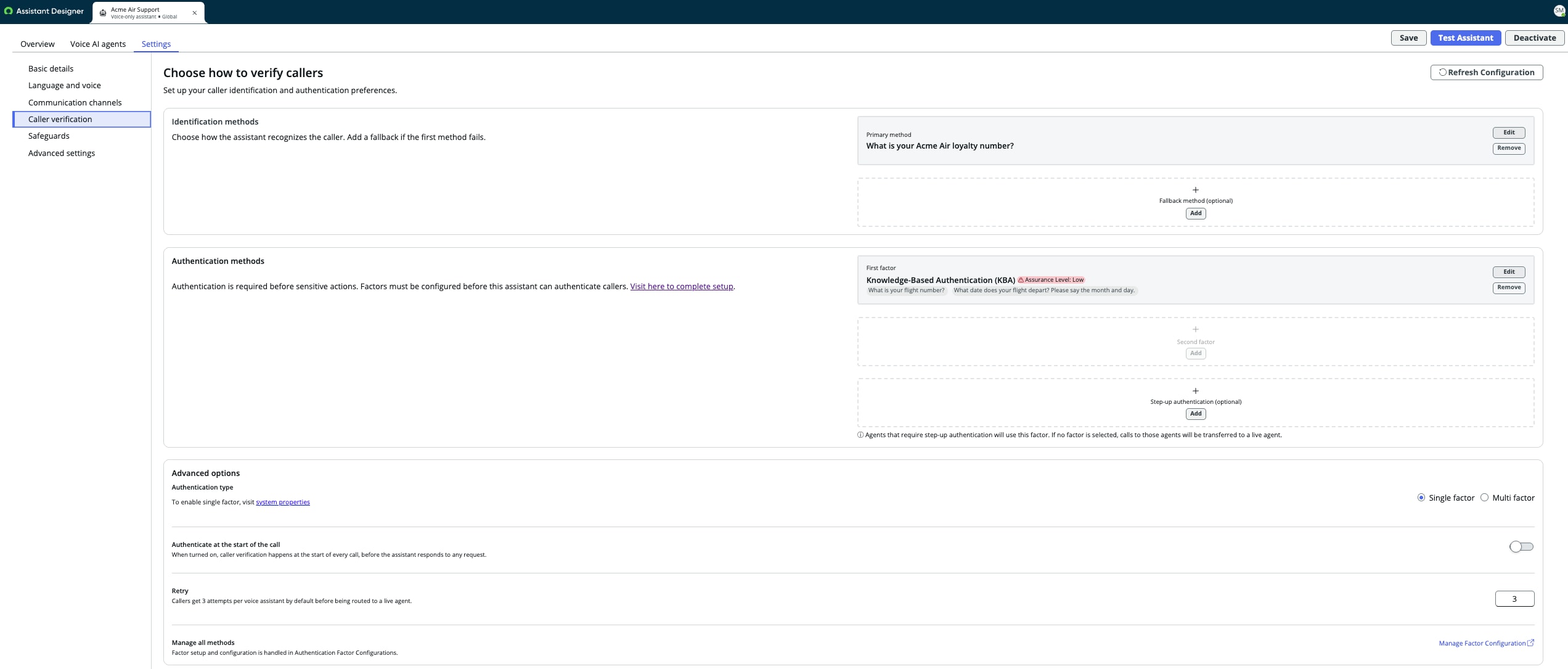
Step 5: Set up caller verification
In AI Voice Assistant Designer, open your voice assistant and go to Settings > Caller verification.
|
Setting |
Example value |
|
Identification, primary method |
Acme Air loyalty number |
|
Authentication, first factor |
Knowledge-Based Authentication (KBA), with the flight number and departure date questions |
|
Authentication type |
Single factor (see the note on assurance below) |
|
Authenticate at the start of the call |
Off, so verification runs only when the caller asks for something that requires it |
|
Retry |
3 (default) |
Assurance level. Designer marks KBA as a low-assurance factor, as the KBA responses can be known by people other than the caller in many cases. For higher-risk actions, add a second factor such as an authenticator app or Okta Verify push notification.
Step 6: Test it
Call the assistant and run each case.
|
Test |
Caller gives |
Expected result |
|
Happy path |
A valid loyalty number, then the correct flight number and departure date |
Identified, then authenticated |
|
Wrong answer |
A valid loyalty number, then a wrong departure date |
Not authenticated, without saying which answer was wrong |
|
Unknown identifier |
A loyalty number with no booking |
Not identified |
|
No matching user |
A loyalty number whose email matches no user |
Not identified |
|
Ambiguous match |
A loyalty number whose email matches two users |
Not identified |
|
General question |
A question that needs no personal data |
Answered without verification |
Design and security practices
Your scripts make the authentication decision, so treat them as security code.
|
Practice |
How |
|
Fail closed |
Set kb_auth_result = false first. Any error, timeout, or unexpected response leaves the caller unauthenticated. |
|
Clean input before it reaches a query |
Reduce identifiers to the characters they can contain, so an answer can’t alter the lookup |
|
Match exactly one record |
Zero or several matches means identification fails, never a guess |
|
Check ownership |
Confirm the external record belongs to the user being verified |
|
Stay under the time limit |
Give API calls a timeout shorter than the KBA script limit (15 seconds by default) |
|
Keep secrets out of scripts |
Hold credentials in the REST Message’s authentication profile |
|
Log steps, never answers |
Log results such as pass or fail, never what the caller said or what was expected |
|
Fetch only what you check |
Return only the fields the scripts use |
|
Choose questions others can’t easily answer |
Avoid public or widely shared facts, and add a second factor for high-risk actions |
Troubleshooting
|
Symptom |
Check, in order |
|
A valid caller is never identified |
The API call succeeds; the external record matches exactly one active user; the voice model produces the value your script expects (review the Input Format Description) |
|
Identified, but authentication always fails |
The user has the snc_external role; the lookup returns one record that belongs to the user; the expected value and the caller’s answer are normalized the same way |
|
API calls return 401 or 403 |
The OAuth profile and its credentials; the API user’s permissions on the external system |
|
Verification passes, then the call goes to a live agent |
The AI agent’s role requirement matches the caller’s roles; a transcription error changed the request |
|
Verification times out |
The API’s response time, and your HTTP timeout against the script limit |
Limitations
- Callers need a user record (by default, an external user) to be authenticated.
- Each question with a scripted answer maps to exactly one script.
- The platform runs your script; its correctness, input handling, and error handling are yours.
Wrap-up
External KBA lets a voice agent verify callers against your system of record, with nothing copied into ServiceNow. The pattern is small: one connection and a short script per question.
Try it against your own system of record and share what you build in the comments.
Learn more
- Authentication factors (product documentation)
- AI voice agents are here (getting started and FAQs)
- Caller verification for AI voice agents (overview)
Labels:
You must be a registered user to add a comment. If you've already registered, sign in. Otherwise, register and sign in.