- Mark as New
- Bookmark
- Subscribe
- Mute
- Subscribe to RSS Feed
- Permalink
- Report Inappropriate Content
01-14-2024 02:53 AM
Hi,
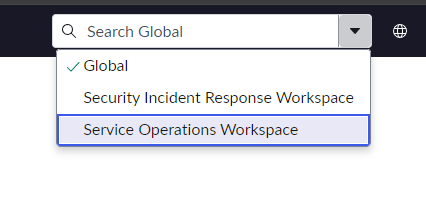
Has anyone added the SIR Workspace to the Unified Search who can help me out?
I followed the guide here - https://docs.servicenow.com/bundle/vancouver-platform-administration/page/administer/search-administ... and it all seems to work fine for Admins, however none admins who use the SIR workspace do not get the option to select "Security Incident Workspace"
I thought it may well be related to ACL's specifically sys_search_source & m2m_search_context_config_search_source
But adding the read for the role sn_si.analyst for both "Security Incident Response" and "Security Incident Response Workspace" scopes didn't seem to change much.
Solved! Go to Solution.
- Mark as New
- Bookmark
- Subscribe
- Mute
- Subscribe to RSS Feed
- Permalink
- Report Inappropriate Content
01-15-2024 07:25 AM
If anyone else finds this.
Fix is to add a read acl (sn_si.read role) for the sys_search_context_config table in the security incident response scope.


- Mark as New
- Bookmark
- Subscribe
- Mute
- Subscribe to RSS Feed
- Permalink
- Report Inappropriate Content
01-14-2024 04:51 AM
I don't have the SIR workspace running in any of my instances but the overall concept is the same for all workspaces. You have to check the read ACL of type "ux_route". For the Service Operations Workspace (SOW) there are two ACLs OOTB:
- now.sow.home
- now.sow.*

Check the ACLs for the SIR Workspace and you should be able to identify the issue.
Maik
- Mark as New
- Bookmark
- Subscribe
- Mute
- Subscribe to RSS Feed
- Permalink
- Report Inappropriate Content
01-14-2024 05:32 AM
Hi @Maik Skoddow,
Isn't that more about accessing the workspace? They can access it fine it's just the search drop down they cannot (although I can as admin). Checking the ACL's you mention there is now.sir.* for type "ux_route" with the role sn_si.read so I think that is fine.
Regards
- Mark as New
- Bookmark
- Subscribe
- Mute
- Subscribe to RSS Feed
- Permalink
- Report Inappropriate Content
01-14-2024 05:49 AM
sorry you are right. I was on the wrong path.
Please refer to the documentation for your question: https://docs.servicenow.com/bundle/vancouver-platform-user-interface/page/administer/navigation-and-...
Maik
- Mark as New
- Bookmark
- Subscribe
- Mute
- Subscribe to RSS Feed
- Permalink
- Report Inappropriate Content
01-14-2024 05:55 AM
Thanks @Maik Skoddow but that is what I followed to set it up as per my original post which has the link on it 🙂