- Mark as New
- Bookmark
- Subscribe
- Mute
- Subscribe to RSS Feed
- Permalink
- Report Inappropriate Content
10-31-2018 02:57 AM
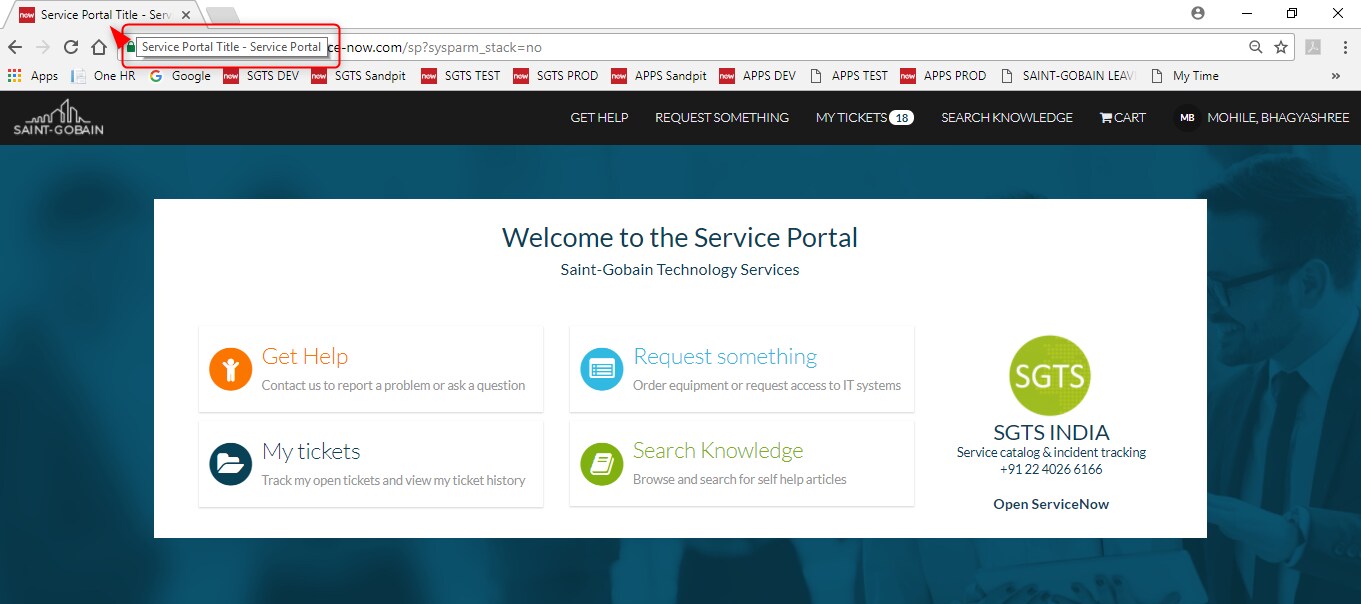
As highlighted in the below snip, i want to know how we can edit the browser tab when opening the Service portal. Since we have upgraded on London the tab is displayed as "Service Portal Title - Service Portal" (as seen in the snip below) but when i have compared with the Istanbul instance i have noticed that it is exactly the vice versa for all pages i.e. "Service Portal - Service Portal Title".

Does anyone knows that where exactly we can configure the tab name ?
Solved! Go to Solution.

- Mark as New
- Bookmark
- Subscribe
- Mute
- Subscribe to RSS Feed
- Permalink
- Report Inappropriate Content
10-31-2018 03:34 AM
yes,
like @serviceportalpro said in @afifa link
"...For Service Portal pages, the tab name is derived using page name and portal name. The format is PAGE_NAME - PORTAL_NAME..." ( switched order with London ?)
so, to update the portal name part go to "Service Portal/Portals" and edit the "title" field for your portal
( or go to "Service Portal Configuration/Branding Editor/Quick Setup/Portal title" )
and to update the page name part go to "Service Portal Configuration/Pages/", and select "index" page for this portal ( or your custom index page) and change this page "Title".
Regards
- Mark as New
- Bookmark
- Subscribe
- Mute
- Subscribe to RSS Feed
- Permalink
- Report Inappropriate Content
10-31-2018 03:42 AM
Yes, i have already referred this link anyway but i just wanted to know if there is any other way to edit the tab because the format PAGE NAME - PORTAL NAME is been initiated with london release i believe!