How to Hide Attachment paperclip icon in compose email for incident table

- Mark as New
- Bookmark
- Subscribe
- Mute
- Subscribe to RSS Feed
- Permalink
- Report Inappropriate Content
yesterday - last edited yesterday
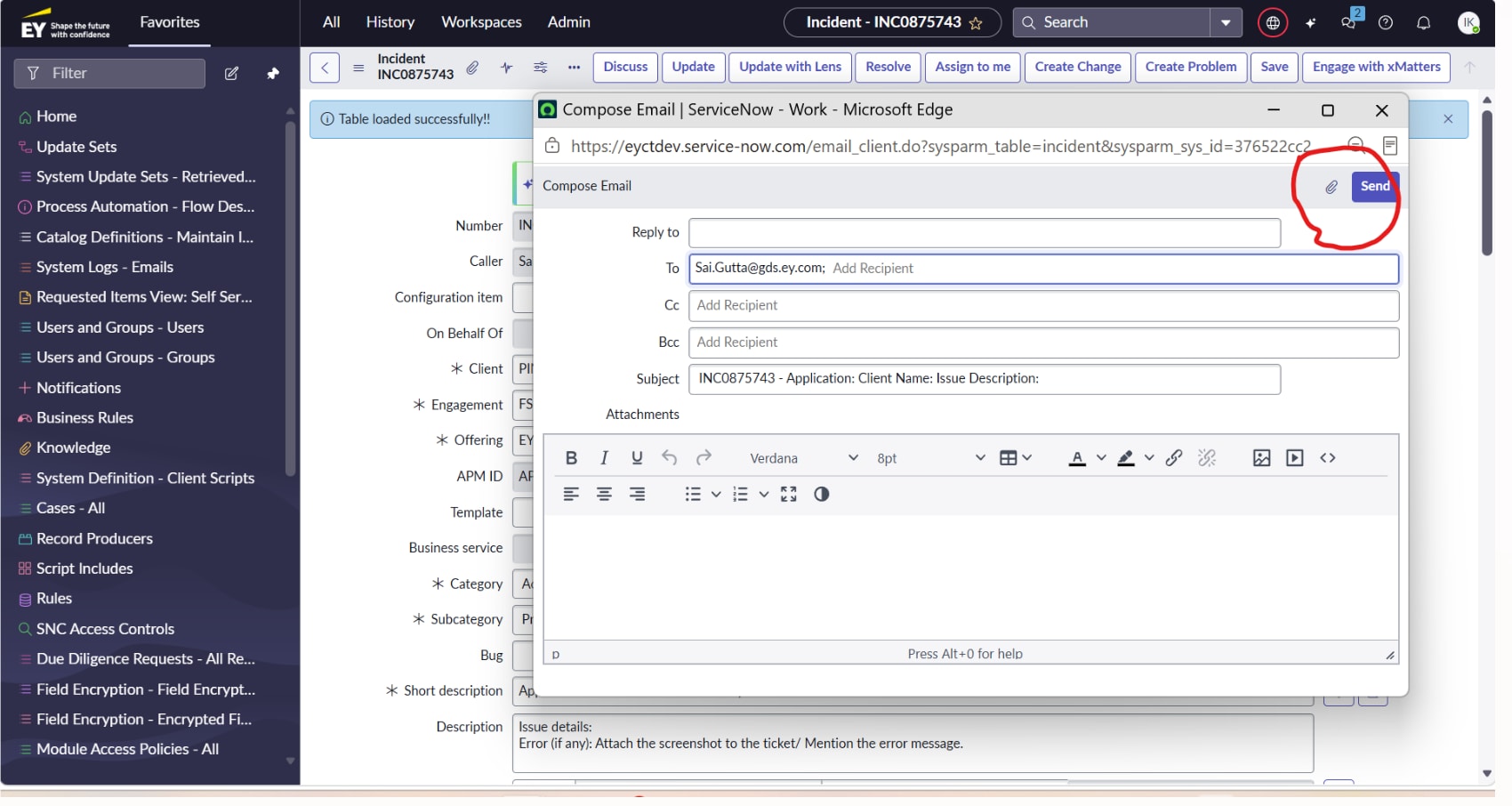
I have a requirement to hide this attachment paperclip icon in compose email under incident table dynamically based on client field data value, for both native UI and SOW and CSM workspace also
and "reply to" field I have to set ready only in compose email how to do that
check SS for reference


- Mark as New
- Bookmark
- Subscribe
- Mute
- Subscribe to RSS Feed
- Permalink
- Report Inappropriate Content
yesterday
For attachment icon
a) For native
-> the email_client UI page is not exposed to admins, so the only option you can try is DOM manipulation using UI script and then grab somehow the sysId of the record to get field value and then hide the icon
b) For workspace
-> you will have to duplicate the variant and then handle this, somewhat complex to handle
For reply to
-> left nav Email client configuration and open it for your table
-> Display Configuration
-> uncheck "Display Reply-To"


💡 If my response helped, please mark it as correct ✅ and close the thread 🔒— this helps future readers find the solution faster! 🙏
