- Mark as New
- Bookmark
- Subscribe
- Mute
- Subscribe to RSS Feed
- Permalink
- Report Inappropriate Content
05-25-2022 10:31 PM
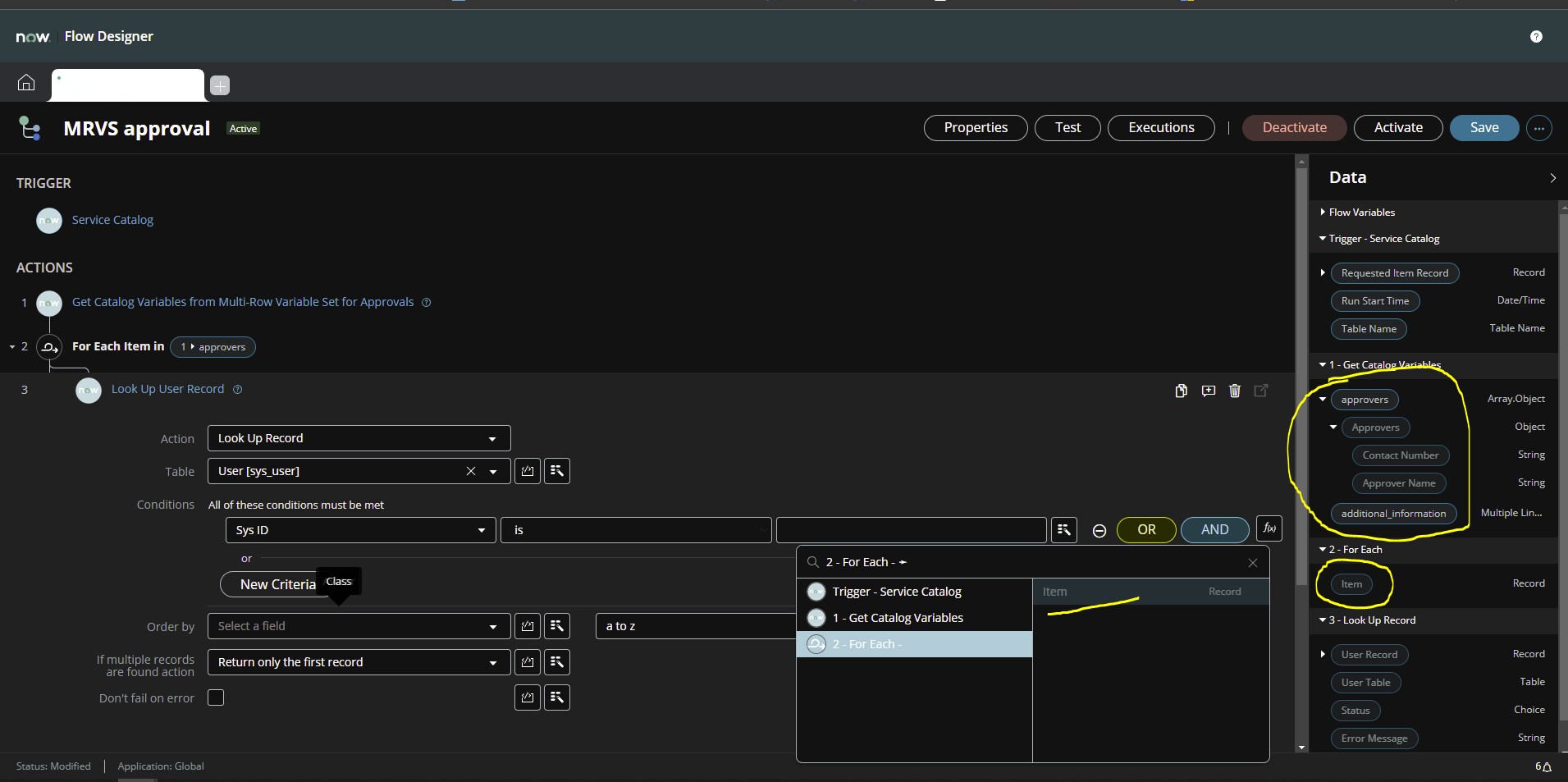
My personal dev instance is on Rome. I'm trying to use the value from one of the columns of a multi-row variable set in a For Each loop to lookup the sys_ids in sys_user. The steps I've take are:
1) Get Catalog Variables from the Catalog Item in question
2) Add a For Each using the Array.Object from Step 1
3) Perform a Look Up Record
Bot the String for the column in the Array Object and the Item in the For Each loop are greyed out and unable to be selected.
Have I missed something obvious?

Solved! Go to Solution.
- Labels:
-
Flow Designer
- Mark as New
- Bookmark
- Subscribe
- Mute
- Subscribe to RSS Feed
- Permalink
- Report Inappropriate Content
05-31-2022 07:08 PM
If anyone encounters this problem in future, the steps to resolve are:
- Save your Flow
- Type "cache.do" in the filter navigator and hit enter
- Wait for the information screen to display
- Refresh your Flow Designer tab
The datapill in the "For Each" loop is now available for use
- Mark as New
- Bookmark
- Subscribe
- Mute
- Subscribe to RSS Feed
- Permalink
- Report Inappropriate Content
05-31-2022 07:08 PM
If anyone encounters this problem in future, the steps to resolve are:
- Save your Flow
- Type "cache.do" in the filter navigator and hit enter
- Wait for the information screen to display
- Refresh your Flow Designer tab
The datapill in the "For Each" loop is now available for use

- Mark as New
- Bookmark
- Subscribe
- Mute
- Subscribe to RSS Feed
- Permalink
- Report Inappropriate Content
08-24-2022 02:02 PM
Thank you, this was driving me mad!
- Mark as New
- Bookmark
- Subscribe
- Mute
- Subscribe to RSS Feed
- Permalink
- Report Inappropriate Content
11-27-2023 12:11 PM
OMG - Thank you for this - I spent hours trying to figure out what was going on here!
- Mark as New
- Bookmark
- Subscribe
- Mute
- Subscribe to RSS Feed
- Permalink
- Report Inappropriate Content
03-31-2026 04:37 AM
Hi @Rosemary4
I have one requirement on MRVS
When a Catalog Item is submitted with multiple MRVS rows, we need one SCTASK created per row this is done through flow, and each SCTASK should carry only that row’s data.
A Catalog Item (RITM) with an MRVS (task_details) containing multiple rows.
Each row has fields
Expected Output:
For every MRVS row, a separate SCTASK record is created. and for each line row data should add to the one single line text variable.
please assist on this
- Mark as New
- Bookmark
- Subscribe
- Mute
- Subscribe to RSS Feed
- Permalink
- Report Inappropriate Content
03-31-2026 05:01 PM
You might want to try starting a new thread asking the community.