TinyMCE bulleted/numbered list wrapping oddly from list-style-position default

- Mark as New
- Bookmark
- Subscribe
- Mute
- Subscribe to RSS Feed
- Permalink
- Report Inappropriate Content
10-04-2023 01:48 PM - last edited 2 weeks ago
Hello there,
Updated for Australia!
For anyone who is struggling with your numbered or bulleted lists wrapping underneath the bullet/number instead of aligning with the words...I am using the same workaround that ServiceNow gave me WAY back in Quebec when it happened the first time. The update of the editor to v5 in Utah reintroduced the style property, v6 brought it back it again with Yokohama and Zurich. It persists in Australia so here we go again!
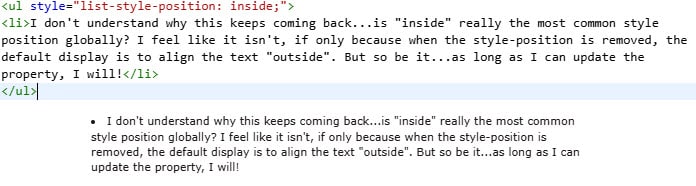
It's caused by a default of "inside" being applied to the list-style-position property in ordered or unordered lists. i.e. ,< ul style="list-style-position: inside;" > (If you change it to 'outside' within the html, it will wrap and align as you probably expect it to, but that's a lot of manual work.)
**Caveat** I don't work for ServiceNow but I did validate this workaround through a support ticket. 🙂
To get rid of this default:
- Assuming you're on V6, open the system property glide.ui.html.editor.valid_plugins
- If you're still on V5, open the system property glide.ui.html.editor.v5.valid_plugins
- Remove 'align_listitems' from the choice and value fields.
The result should be that an ordered or unordered list will have no style applied, and will look like < ul > or < ol > when you check the html. I've attached a couple screenshots to highlight the difference.
Good luck!
Kristin
- Labels:
-
Knowledge Management
-
Service Catalog
- 3,598 Views

- Mark as New
- Bookmark
- Subscribe
- Mute
- Subscribe to RSS Feed
- Permalink
- Report Inappropriate Content
06-13-2024 05:53 PM
Thank you Kristen!! Removing "align_listitems" from the choice and value fields worked like a charm!! This has been a thorn in my side ever since it was introduced. Thank you for sharing!
- Mark as New
- Bookmark
- Subscribe
- Mute
- Subscribe to RSS Feed
- Permalink
- Report Inappropriate Content
07-11-2024 10:25 AM
I'm so glad I could help!
- Mark as New
- Bookmark
- Subscribe
- Mute
- Subscribe to RSS Feed
- Permalink
- Report Inappropriate Content
06-24-2025 04:20 PM
Hello...I thought I'd link you back here in case you didn't remember what you did....because it's back in Yokohama lol.
- Mark as New
- Bookmark
- Subscribe
- Mute
- Subscribe to RSS Feed
- Permalink
- Report Inappropriate Content
Thursday
Hello,
This workaround is effective in the Native View, but it does not resolve the issue in Knowledge Center Workspace and HR Agent Workspace. Is there an alternative workaround or solution available for these workspaces?