


chuck_warner

ServiceNow Employee
Options
- Subscribe to RSS Feed
- Mark as New
- Mark as Read
- Bookmark
- Subscribe
- Printer Friendly Page
- Report Inappropriate Content
05-04-2015
12:48 PM
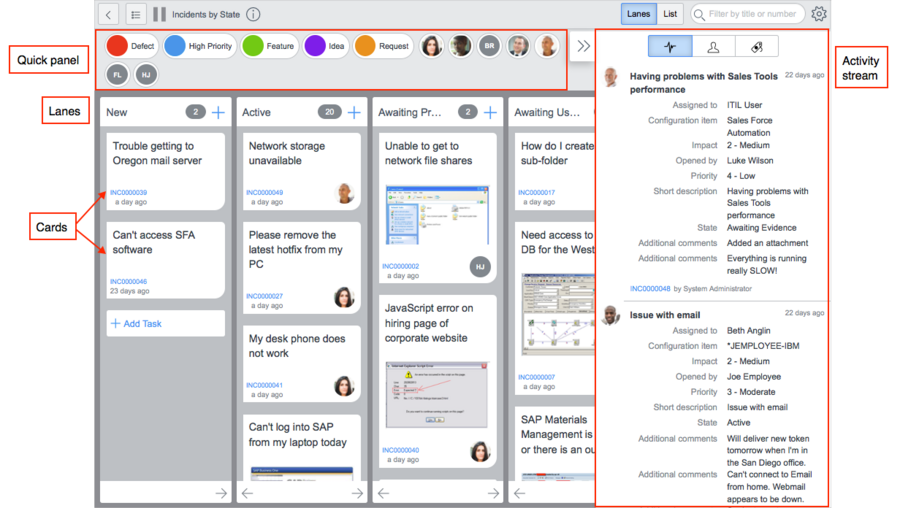
Visual task boards, also known as VTBs, were a new feature that we introduced as of Eureka. To sum them up they are a way to present task based records (either task table itself or tables extended from task) in a graphical user interface that allows users to easily work with them.
Here Ben Yukich has given us a quick demo on how visual task boards transform the navigation of lists and forms into an interactive graphical experience.
At the top level, you have a board which is the main record. The board then has "lanes" which are the way in which the records are distinct from each other. For example, you might have lanes based on priority or status. Then within each lane you will have "cards" which represent the the task records. Boards have "members" which are the users who are tied to that board to work with it. You have the ability to configure and change the appearance of your VTB to help you organize and work more efficiently.
Here are the tables that are supporting this:
- vtb_board
- vtb_board_member
- vtb_lane
- vtb_card
- vtb_card_history (Fuji only)
- vtb_task
The extra table for Fuji (vtb_card_history) is due to a design change which stopped posting lane changes to the associated tasks activity filter. We had numerous customers tell us they did not like the activity log getting cluttered up with visual task board lane change messages. In Visual Task Boards in Fuji track the lane changes in the vtb_card_history table.
Tips and Tricks for using Visual Task Boards:
- Be aware of is that to use visual task boards there are specific browser requirements. You need to make sure your browser supports the use of visual task boards before you can get the most out of your VTBs.
- I would recommend that you get to Eureka patch 10 to take advantage of the latest fixes made to visual task board feature. A lot of the work was centered around enforcing normal record security within visual task boards such as UI policy requirements.
- Initials that get used for a user on the visual task board may not appear correctly. If you have altered your sys_user table display name value (depending on what you used), the initials do not get set correctly. This occurs because we calculate the initials off of the display name instead of the full name value.
- The number of cards that appear in a board are limited to 100. Too many cards in a task board can impact performance so we guard against this by setting a limit. When you are dealing with a graphical interface like visual task boards if you have too many items for users to manage it quickly becomes unwieldy so the card limit also serves as a better user experience as well.
- Use the sys_ui_context_menu to restrict access to the "Show Visual Task Board" list menu option from users. The first thing you will notice is that there is no UI action for this. This option actually comes from from the sys_ui_context_menu table.
- You can see the record in your instance by appending the following URL to your instance name: nav_to.do?uri=sys_ui_context_menu.do?sys_id=5d93ba0047331100ba13a5554ee490c6
- You can update the condition to restrict access as desired.
- To restrict access to the "My Task Boards" module, just update the roles field on that module to restrict as you desire. The "My Task Boards" module is under the Self-Service application. If you have deactivated the "Self-Service" application then you will not see the "My Task Boards" module until you update the parent application to be one that is active in your instance.
If you are experiencing trouble using VTBs, here are a few articles that may help you out:
- To restore an archived task
- Get your VTB preferences to store correctly by installing the mobile UI plugin
- Edit the short description on a VTB from the pop-up card
- Add yourself to the member list of a VTB when getting client side errors
- Changing VTB configuration in UI15 when upgrading to Fuji
- Manually change your Document mode in F12 Developer Tools to access a Eureka instance
If you are not on Eureka or greater yet then you can jump into one of our public demo instances and give visual task boards a try. How do you use VTBs at your company?
- 20,895 Views
27 Comments
- « Previous
- Next »
You must be a registered user to add a comment. If you've already registered, sign in. Otherwise, register and sign in.