
- Mark as New
- Bookmark
- Subscribe
- Mute
- Subscribe to RSS Feed
- Permalink
- Report Inappropriate Content
10-16-2025 01:40 AM
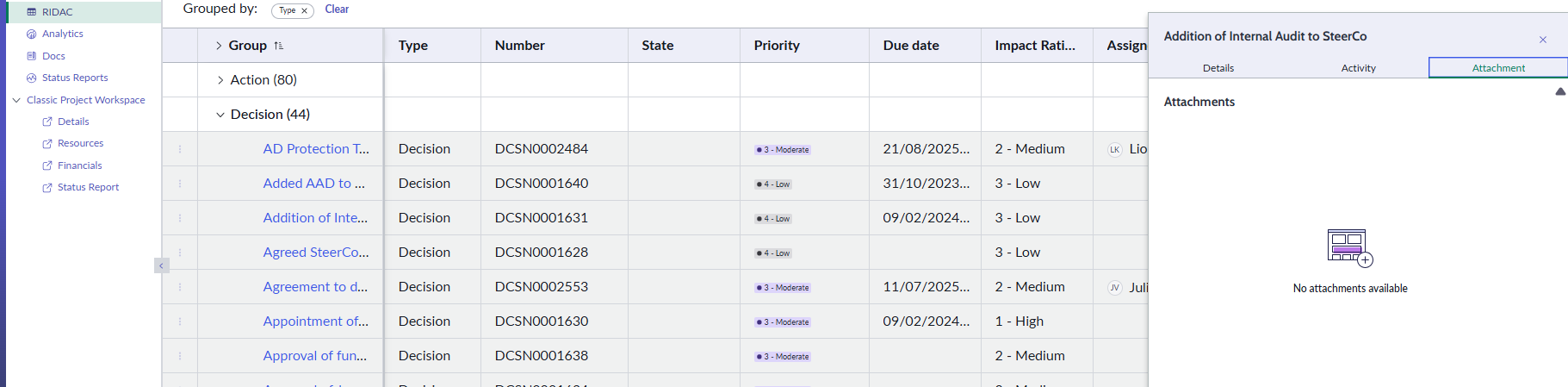
How do I add an attachment to RIDAC decision in ServiceNow Project Workspace? I cannot find the paper clip icon used to add attachments.
Solved! Go to Solution.

- Mark as New
- Bookmark
- Subscribe
- Mute
- Subscribe to RSS Feed
- Permalink
- Report Inappropriate Content
10-16-2025 06:07 AM - edited 10-16-2025 06:08 AM
Hi @User492015,
To add an attachment to a RIDAC decision in Project Workspace, make sure you have the appropriate role, such as it_project_manager. Open the decision record, and you should see the Select file button in the Attachments section.
For Example in my pdi Lynda Caraway has only it_project_manager role

and she can see the Select file button

If my response helped, please mark it as the accepted solution so others can benefit as well.
- Mark as New
- Bookmark
- Subscribe
- Mute
- Subscribe to RSS Feed
- Permalink
- Report Inappropriate Content
10-16-2025 06:07 AM - edited 10-16-2025 06:08 AM
Hi @User492015,
To add an attachment to a RIDAC decision in Project Workspace, make sure you have the appropriate role, such as it_project_manager. Open the decision record, and you should see the Select file button in the Attachments section.
For Example in my pdi Lynda Caraway has only it_project_manager role
and she can see the Select file button
If my response helped, please mark it as the accepted solution so others can benefit as well.
- Mark as New
- Bookmark
- Subscribe
- Mute
- Subscribe to RSS Feed
- Permalink
- Report Inappropriate Content
11-12-2025 03:00 AM
Thanks.
I figured out that that the reason the PM was not able to add an attachment to a RIDAC Decision is because the decision had been closed.
