Visual Task Boards

- Mark as New
- Bookmark
- Subscribe
- Mute
- Subscribe to RSS Feed
- Permalink
- Report Inappropriate Content
02-19-2015 12:57 PM
I am wondering if anyone else has figured out how to have nested project tasks (subtasks) to populate all together on the task board. I do not see an easy way to have the nested items populate out such that they can be reviewed with the overall task list. (For example: maybe I have Create Test Plans as the top task, and nested tasks of convert use cases to test cases, review test cases with user, obtain signoff on test cases, etc)
Advice?

- Mark as New
- Bookmark
- Subscribe
- Mute
- Subscribe to RSS Feed
- Permalink
- Report Inappropriate Content
02-20-2015 10:28 AM
Best I can think of is to do the following:
1. Build a query from the Project Tasks lists where Top task = Create Test Plans.
2. Then add the Parent column to your list.
3. Then click on the trigram / hamburger menu from the new Parent column and select Show Visual Task Board.
That will give you a guided board with all tasks under that Top task separated by lanes based on their Parent tasks. Then (which I just think is cool) you can switch those tasks from parent to parent by moving them from lane to lane. Then, even cooler, when you add a new task to a lane, it will inherit that lanes parent and top task.
Then in Fuji, there is similar functionality built in using a workbench. When you click on different phases in the workbench you can show child tasks for each phase in a list or VTB view with a click of a button. Check out this wiki section..you will see the List and VTB buttons towards the top right of the screen shot..http://wiki.servicenow.com/index.php?title=Project_Workbench#Components
Those buttons will activate this functionality...Using Visual Task Boards - ServiceNow Wiki
And the VTB fans went wild....
- Mark as New
- Bookmark
- Subscribe
- Mute
- Subscribe to RSS Feed
- Permalink
- Report Inappropriate Content
03-12-2015 04:55 PM
Hi Alex, this is an interesting solution! My challenge is that the items I am working with are larger, more complex projects. There are often tasks nested under phases - so there are multiple nests in any given project - sometimes going in three levels. So the task board would need to show more than just the 'create test plans' top task and items beneath that item. If I am understanding the solution offered correctly, this would provide the top task and nested items for that top task only.
I am hoping to offer something that shows the entire scope of the PRJ record task assignments in a single board, rather than through multiple boards targeting single top tasks one at a time. Have I misunderstood or is there maybe a way to bridge this?
((Plus, it takes a little time to explode each task to see/select the nested tasks))
Sonja
- Mark as New
- Bookmark
- Subscribe
- Mute
- Subscribe to RSS Feed
- Permalink
- Report Inappropriate Content
03-16-2015 07:29 AM
I just experimented with the new Project Workbench VTB functionality. It looks like for each phase, it only displays all the tasks exactly 1 level down from the Phase, instead of all the tasks below that phase
I also tried expanding my hierarchical list from within a Project to show all task levels and then create a VTB from it, but that still just creates a VTB of the header tasks.
Pradeep Bansal is there currently a way to get the Project Workbench VTB display all subtasks for a given phase, regardless of how many levels down it goes?
The best bet to get all tasks for a given project seems to be going to Project > Projects > Tasks > All. Then filtering for the project name. Create a VTB there. But this won't really give you a column with tasks for each phase (is that what you're asking for?)
I tried creating a VTB based on the WBS order (level) to possibly ignore the level 1's & 2's, but instead it just created a flexible VTB. Perhaps displaying on the VTB card the WBS # would help.
- Mark as New
- Bookmark
- Subscribe
- Mute
- Subscribe to RSS Feed
- Permalink
- Report Inappropriate Content
03-16-2015 07:25 PM
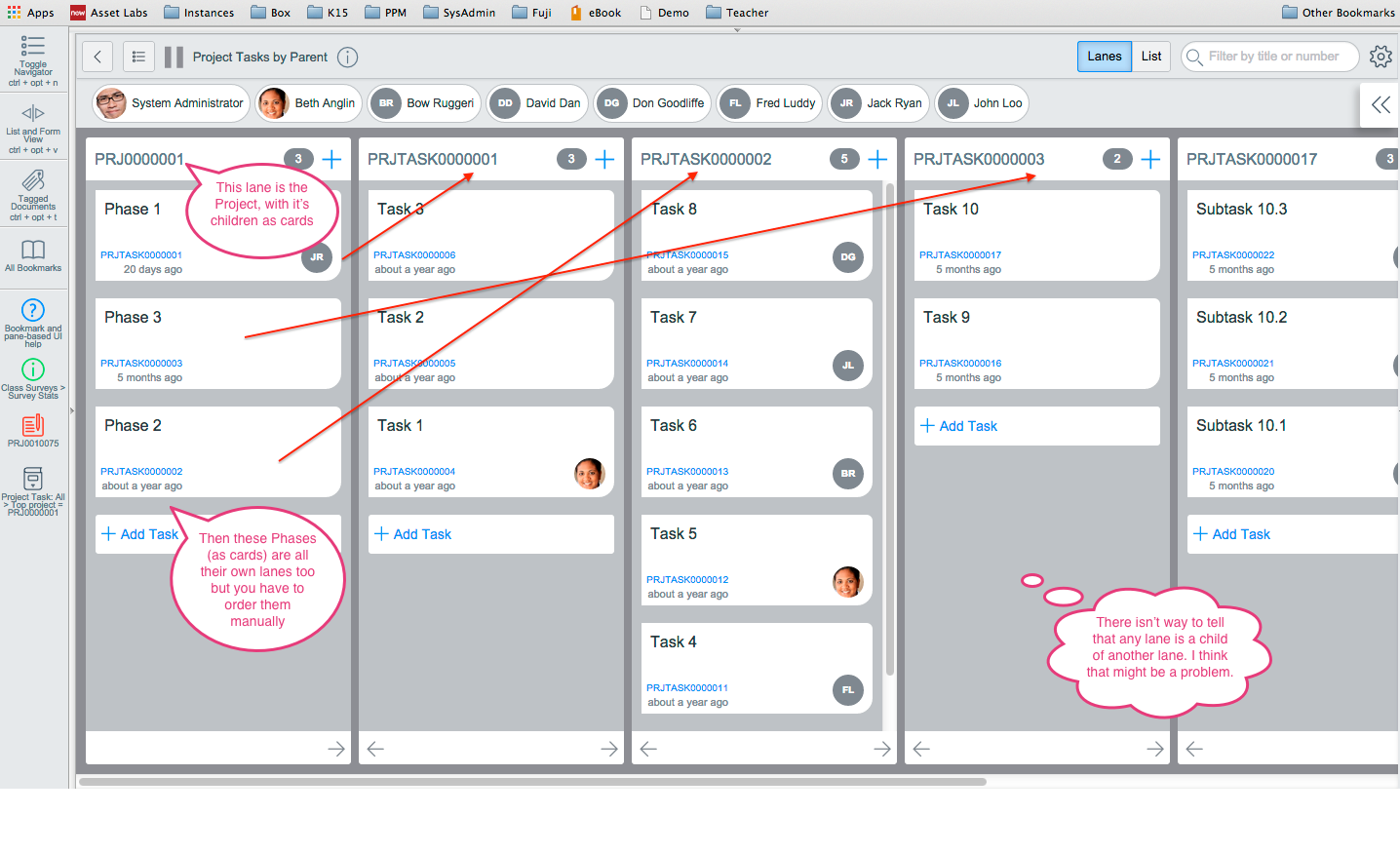
Hi Sonja, That VTB Solution I gave is based on the Parent field so it should show all Projects or Project Tasks that have children as a lane, then their children in that lane. The problem is that you lose the hierarchy of Top task (Top project in Fuji) to Parent to Parent.... -- and so forth. Also it only has the numbers in the lanes, but I think that can be changed. Check out the screen shot and let me know if that would work for you (with the loss of hierarchy) and then I think we can work on getting the names of the Project Tasks and Projects instead of the numbers. I tried to explain it in the screen shot. Let me know if it doesn't make sense.