- Mark as New
- Bookmark
- Subscribe
- Mute
- Subscribe to RSS Feed
- Permalink
- Report Inappropriate Content
08-31-2017 11:46 AM
I am trying to change a few planned end dates for different projects but the system is not allowing me. I thought it may be related to 1 project but it is the same for all projects.
I can go in and change the planned end date but once i refresh the screen or click the green check mark, it reverts to the original planned end date.
Why is this like this and how can this be fixed?

Solved! Go to Solution.

- Mark as New
- Bookmark
- Subscribe
- Mute
- Subscribe to RSS Feed
- Permalink
- Report Inappropriate Content
09-01-2017 06:35 AM
Craig,
The screen I shared is the creation of a project.
For the problem with weekend days it's the normal behaviour of PPM.
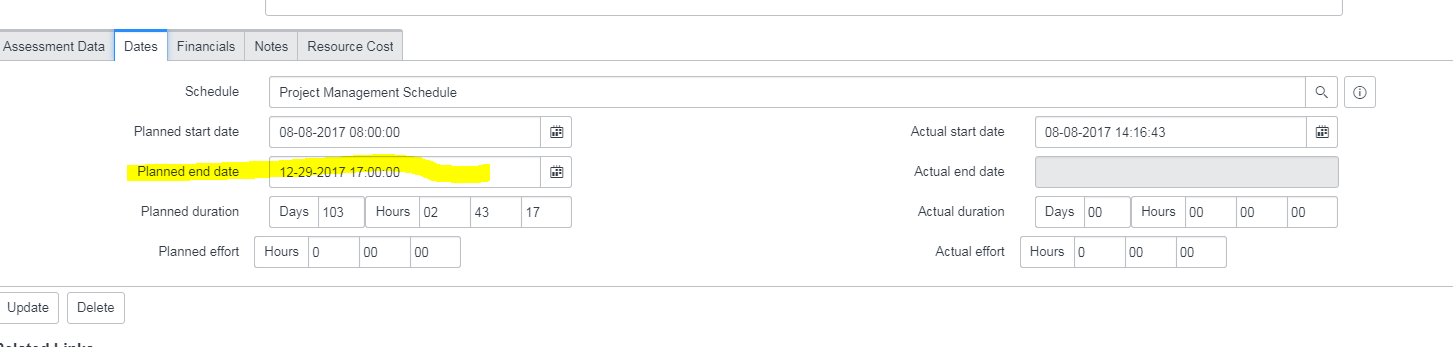
You have a default schedule on the "dates" tab wich determines on which days you can work :

Best regards,
Jorge De Araujo
- Mark as New
- Bookmark
- Subscribe
- Mute
- Subscribe to RSS Feed
- Permalink
- Report Inappropriate Content
09-01-2017 04:54 AM
I just did some more testing and i was able to change the dates but it seems you can only change the dates to business work days(monday-friday)
Is this how it should work?
The original project end dates were 12-29-17 which was a friday and i was trying to change it to 12-31-17 which is a sunday and it wouldnt allow me to do that but if i changed it to that monday or the previous thursday it works fine.
- Mark as New
- Bookmark
- Subscribe
- Mute
- Subscribe to RSS Feed
- Permalink
- Report Inappropriate Content
09-01-2017 06:35 AM

- Mark as New
- Bookmark
- Subscribe
- Mute
- Subscribe to RSS Feed
- Permalink
- Report Inappropriate Content
12-23-2020 11:36 PM