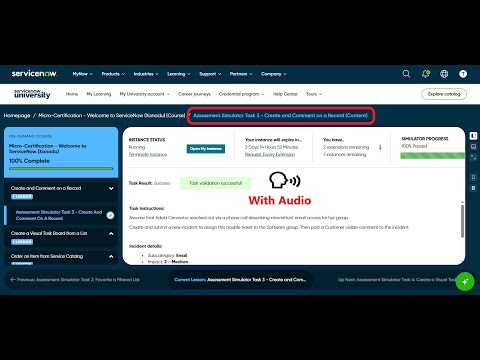
Assessment Simulator Task 3 - Create and comment on a record validation error

- Mark as New
- Bookmark
- Subscribe
- Mute
- Subscribe to RSS Feed
- Permalink
- Report Inappropriate Content
3 weeks ago

steps I followed
impersonate as platform user->create incident with specified values->save and submit before posting comment->add comment(visible to customer)only not any workposts/notes->save then validate it displays the error in screenshot


- Mark as New
- Bookmark
- Subscribe
- Mute
- Subscribe to RSS Feed
- Permalink
- Report Inappropriate Content
3 weeks ago
Hi @VakadaV
CC: @CN-L
Regards
Dr. Atul G. - Learn N Grow Together
ServiceNow Techno - Functional Trainer
LinkedIn: https://www.linkedin.com/in/dratulgrover
YouTube: https://www.youtube.com/@LearnNGrowTogetherwithAtulG
Topmate: https://topmate.io/dratulgrover [ Connect for 1-1 Session]
****************************************************************************************************************
- Mark as New
- Bookmark
- Subscribe
- Mute
- Subscribe to RSS Feed
- Permalink
- Report Inappropriate Content
3 weeks ago
Hi @VakadaV,
Could you provide a screenshot of your Incident and the comment you've added please?
☕ Powered by curiosity, caffeine, and more failed attempts than I'd like to admit
- Mark as New
- Bookmark
- Subscribe
- Mute
- Subscribe to RSS Feed
- Permalink
- Report Inappropriate Content
2 weeks ago

what should i do now

- Mark as New
- Bookmark
- Subscribe
- Mute
- Subscribe to RSS Feed
- Permalink
- Report Inappropriate Content
2 weeks ago
Hi @KarnatiA
Check these one.
Ensure You are right-clicking the header and select Save before adding any comments.
Check these videos, validate your implemented steps:
refer: https://www.youtube.com/watch?v=AgqQ-LWodxQ
https://www.youtube.com/watch?v=PFmFFaqaoxc
Regards
Tanushree Maiti
ServiceNow Technical Architect
LinkedIn: https://www.linkedin.com/in/tanushreemaiti