Assessment Simulator Task 3 - Create and Comment on a Record


- Mark as New
- Bookmark
- Subscribe
- Mute
- Subscribe to RSS Feed
- Permalink
- Report Inappropriate Content
05-05-2026 05:38 AM

- Mark as New
- Bookmark
- Subscribe
- Mute
- Subscribe to RSS Feed
- Permalink
- Report Inappropriate Content
05-05-2026 05:42 AM
Hi @SandraC39359048 ,
Impersonated by Platform User
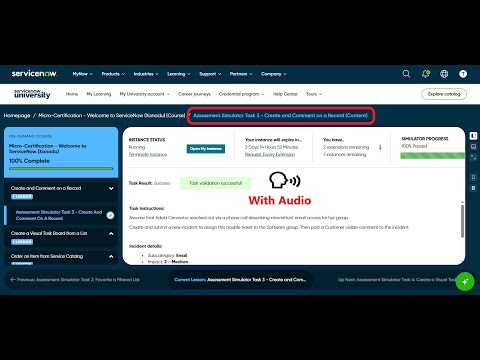
- From Favorite 'My Incidents' then click on New button
- Fill the form with below
- Subcategory: Email
- Channel : Phone
- Category : Inquiry / Help
- Impact: 2 – Medium
- Urgency: 2 – Medium
- Assignment group: Software
- Short description: Intermittent email access
- Description: The department is experiencing intermittent email access. Please help!
- Post a comment to the incident: The software group is investigating similar incidents and will respond when they have a resolution.
- Click on Submit
Refer: https://www.youtube.com/watch?v=AgqQ-LWodxQ
https://www.youtube.com/watch?v=PFmFFaqaoxc
https://www.youtube.com/watch?v=P0WnIkoM0PM
Regards
Tanushree Maiti
ServiceNow Technical Architect
LinkedIn: https://www.linkedin.com/in/tanushreemaiti


- Mark as New
- Bookmark
- Subscribe
- Mute
- Subscribe to RSS Feed
- Permalink
- Report Inappropriate Content
05-05-2026 05:56 AM
still not working

- Mark as New
- Bookmark
- Subscribe
- Mute
- Subscribe to RSS Feed
- Permalink
- Report Inappropriate Content
05-05-2026 08:16 AM
how can I delete this record so I can start again?
- Mark as New
- Bookmark
- Subscribe
- Mute
- Subscribe to RSS Feed
- Permalink
- Report Inappropriate Content
05-05-2026 08:27 AM - edited 05-05-2026 08:28 AM
You can not delete .
You can validate the steps again. (which is not needed remove it and add it again)
So that output should be as expected in tasks instruction.
Note: You can release the lab instance and request for new-> that is not recommended as you have to start from the begining.
So just give some time and validate one by one steps. It would be done.
Good Luck!
Regards
Tanushree Maiti
ServiceNow Technical Architect
LinkedIn: https://www.linkedin.com/in/tanushreemaiti



