- Mark as New
- Bookmark
- Subscribe
- Mute
- Subscribe to RSS Feed
- Permalink
- Report Inappropriate Content
12-05-2025 02:40 PM
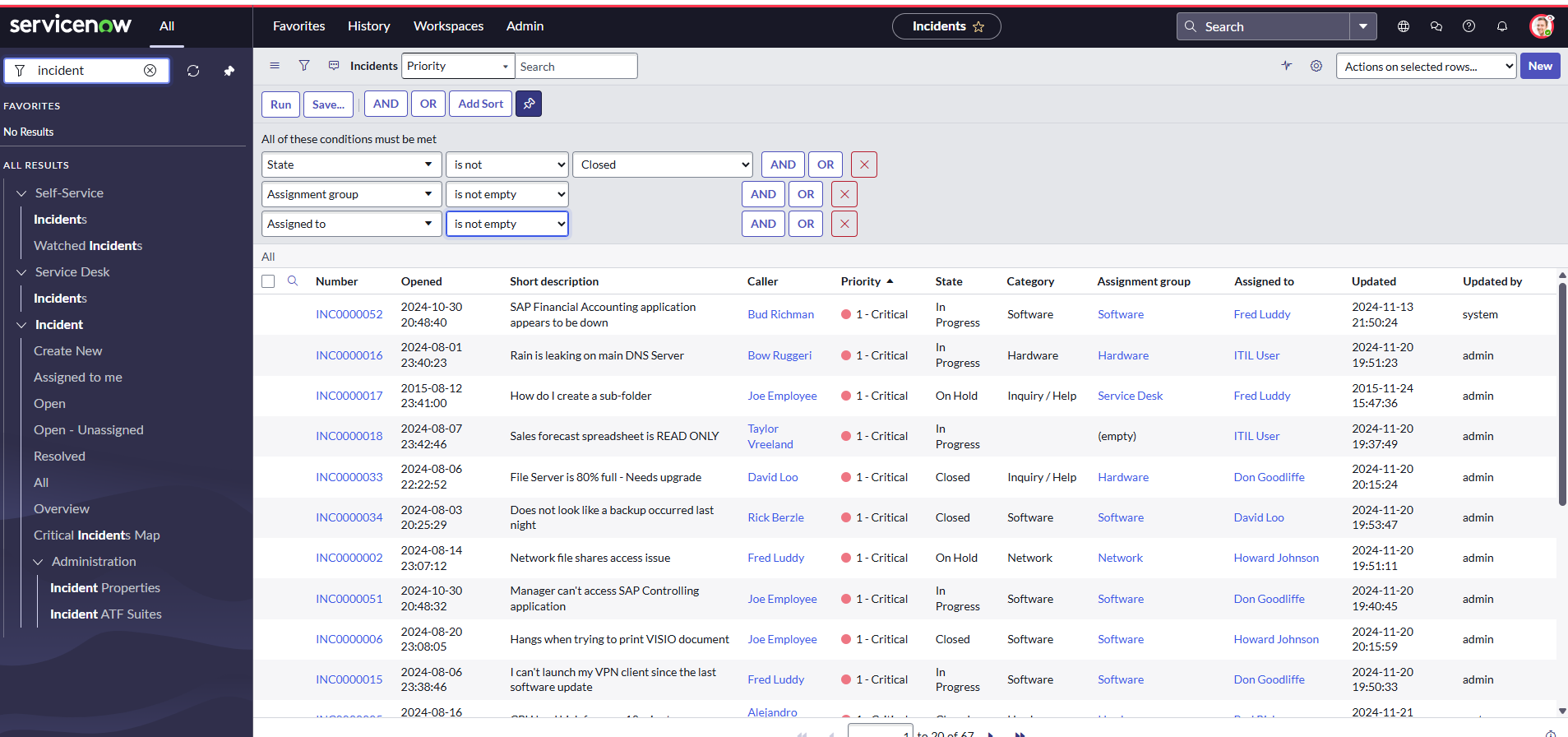
I am having issues with the lists and filters tasks. It is stating to change the state to in progress and that I should change the status to 10 records. My problem is I see most of them already have in progress as the status, but the one that currently has on hold status once I highlight it, I am not getting the option to change it to in progress and also I cannot change the status of the category of one to software as requested. Here are the instructions.
Task Instructions:
| 1. | Navigate to the All menu and select Incident > All. |
| 2. | Select Show/hide filter (funnel) icon. |
| 3. | Set the field, operator(filter/condition), and value choice lists to the following: State | is not | Closed AND
|
| 4. | Select Run. |
| 5. | Select the Priority column to sort the list so that 1-Critical incidents appear first in the list. |
| 6. | Select the State column of all 1-Critical incidents and use the List Editor to change the State to In Progress. Select the green check mark to save the list changes. (10 rows will be updated.)
|
| 7. | Select the Personalize List (gear) icon to remove the "Opened" and "Updated by" columns. |
| 8. | Locate INC0000055 and set the Category to Software. |
Solved! Go to Solution.


- Mark as New
- Bookmark
- Subscribe
- Mute
- Subscribe to RSS Feed
- Permalink
- Report Inappropriate Content
12-05-2025 04:28 PM
First, from the screenshot you didn't click the Run button to execute the filter (step 4). Once you have all of the States highlighted, double-click one of them that has a different value to make the field editable, then whatever you change it to will be the value on all of the highlighted rows, even if that already was the value.
- Mark as New
- Bookmark
- Subscribe
- Mute
- Subscribe to RSS Feed
- Permalink
- Report Inappropriate Content
12-05-2025 04:28 PM
First, from the screenshot you didn't click the Run button to execute the filter (step 4). Once you have all of the States highlighted, double-click one of them that has a different value to make the field editable, then whatever you change it to will be the value on all of the highlighted rows, even if that already was the value.
- Mark as New
- Bookmark
- Subscribe
- Mute
- Subscribe to RSS Feed
- Permalink
- Report Inappropriate Content
12-19-2025 07:43 AM
i haven an issue when i submit validate it show failed can you help
- Mark as New
- Bookmark
- Subscribe
- Mute
- Subscribe to RSS Feed
- Permalink
- Report Inappropriate Content
02-04-2026 09:59 AM
I have conducted all the items on the Module but still listed as failed.

- Mark as New
- Bookmark
- Subscribe
- Mute
- Subscribe to RSS Feed
- Permalink
- Report Inappropriate Content
05-18-2026 08:03 AM
same issue pla help