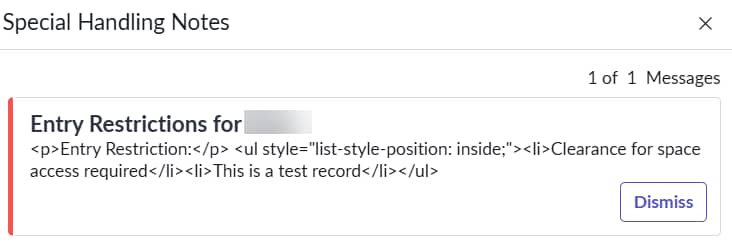
Special Handling Notes displaying html instead of rich text

- Mark as New
- Bookmark
- Subscribe
- Mute
- Subscribe to RSS Feed
- Permalink
- Report Inappropriate Content
04-27-2026 06:59 AM
We recently upgraded to Australia and have noticed the Special Handling Notes are now appearing incorrectly as html instead of the rich text format as expected and as it worked previously.
I created a new SHN to verify if maybe previous ones were just not converted, but still get the tags.
Here's what it should contain:
Entry Restriction:
- Clearance for space access required
- This is a test record
View the attached image for what is current popup.
I noticed if it's a simple sentence, it appears correctly, but when i do formatting or adding any bullets, it appears with html tags.
Where do i go to verify or is this something we need to contact Support with?

- Mark as New
- Bookmark
- Subscribe
- Mute
- Subscribe to RSS Feed
- Permalink
- Report Inappropriate Content
05-12-2026 03:54 AM
Hi @Srivathsa
Can you check this KB and validate- KB3008188 Special Handling Notes are not popping up on all cases after Zurich upgrade
Regards
Tanushree Maiti
ServiceNow Technical Architect
LinkedIn: https://www.linkedin.com/in/tanushreemaiti

- Mark as New
- Bookmark
- Subscribe
- Mute
- Subscribe to RSS Feed
- Permalink
- Report Inappropriate Content
05-12-2026 05:14 AM
Thank you for your reply @Tanushree Maiti . However the recommendation on the KB article shared from your end did not resolve the HTML tags on special notes.
I had raised a Now-Support ticket on it and received the below work around that solved the issue. It is a known error handled via problem PRB2001110 & will be fixed as a part of Australia release patch 2. Find below the link to docs on Australia release patch 2 where we have the problem listed
https://www.servicenow.com/docs/r/release-notes/australia-patch-2.html
As a workaround, we need to adjust the script on UI page: "special_handling_notes"
In HMTL script, replace the line number 88 with below line
<g:no_escape>${HTMLSAN:gr.getDisplayValue("message")}</g:no_escape>
Please mark this response as Helpful & Accept it as solution if it assisted you with your question.