Employee Center Colors

Options
- Mark as New
- Bookmark
- Subscribe
- Mute
- Subscribe to RSS Feed
- Permalink
- Report Inappropriate Content
05-15-2025 10:16 AM
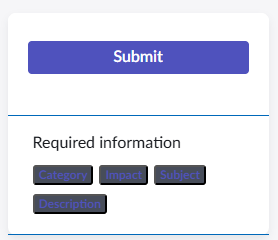
After upgrading to Yokohama a couple of weeks ago, I noticed that within a catalog item, the text under the submit button has a dark/black background. I went into the Brand editor but didn't see anything specific for these items. Is there anywhere else I can go to change it to a white background? See screenshot.
1 REPLY 1


Options
- Mark as New
- Bookmark
- Subscribe
- Mute
- Subscribe to RSS Feed
- Permalink
- Report Inappropriate Content
05-16-2025 09:20 PM
Hello @Menalik,
For similar kind of issue, please refer to the below link:
If it is helpful, please mark it as helpful and accept the correct solution by refer to this solution it will helpful to them.
Thanks & Regards,
Abbas Shaik