- Mark as New
- Bookmark
- Subscribe
- Mute
- Subscribe to RSS Feed
- Permalink
- Report Inappropriate Content
03-15-2026 10:49 PM
dear community,
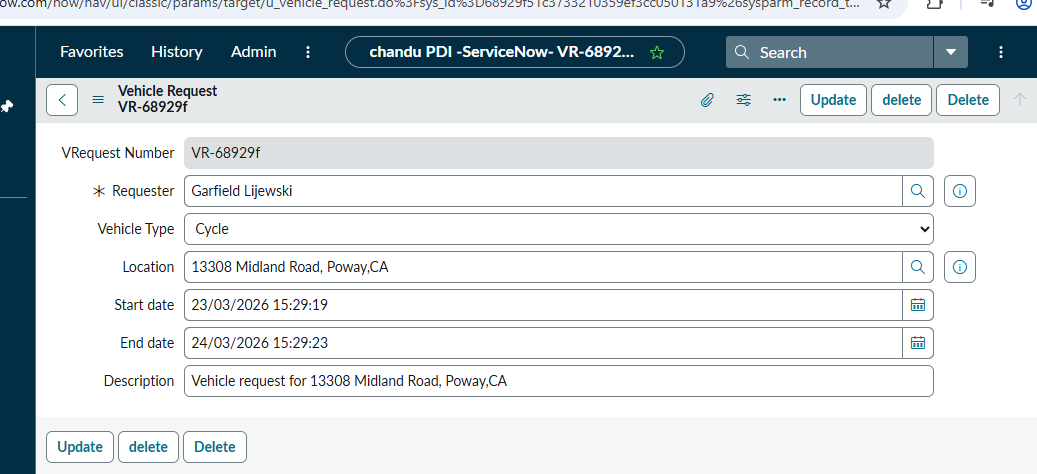
i created custom table and i did not have any autonumber field in that, but i created one customer field and it will generate a number when ever user saves the record. i want to populate that field value below the table name in form header. but right now i am seeing the created on field value.
from where it is populating?
Thanks,
chandu ram
Solved! Go to Solution.

- Mark as New
- Bookmark
- Subscribe
- Mute
- Subscribe to RSS Feed
- Permalink
- Report Inappropriate Content
03-16-2026 10:25 PM
Hi @vits18735a0,
Try this and let me know your issue is solved or not.
- As you mentioned, you have already have custom field, Now navigate to your custom table and select the number field and Set Display as true. (Note: you can keep only one field as Display true in a table)
- Now save and create the new request
Regards
BK
LinkedIn: https://www.linkedin.com/in/bhavyashree-karanth-55032a121
YouTube: https://www.youtube.com/@NowWithBhavya
- Mark as New
- Bookmark
- Subscribe
- Mute
- Subscribe to RSS Feed
- Permalink
- Report Inappropriate Content
03-16-2026 10:25 PM
Hi @vits18735a0,
Try this and let me know your issue is solved or not.
- As you mentioned, you have already have custom field, Now navigate to your custom table and select the number field and Set Display as true. (Note: you can keep only one field as Display true in a table)
- Now save and create the new request
Regards
BK
LinkedIn: https://www.linkedin.com/in/bhavyashree-karanth-55032a121
YouTube: https://www.youtube.com/@NowWithBhavya
- Mark as New
- Bookmark
- Subscribe
- Mute
- Subscribe to RSS Feed
- Permalink
- Report Inappropriate Content
03-22-2026 08:31 AM


.png)