multiple-selection checkbox Employee Center

- Mark as New
- Bookmark
- Subscribe
- Mute
- Subscribe to RSS Feed
- Permalink
- Report Inappropriate Content
02-11-2026 05:27 PM
How do I create a multiple-selection checkbox for a catalog item in Employee Center that looks like this?

- Mark as New
- Bookmark
- Subscribe
- Mute
- Subscribe to RSS Feed
- Permalink
- Report Inappropriate Content
02-11-2026 06:14 PM
Hi @LuisBravo17
Please try following
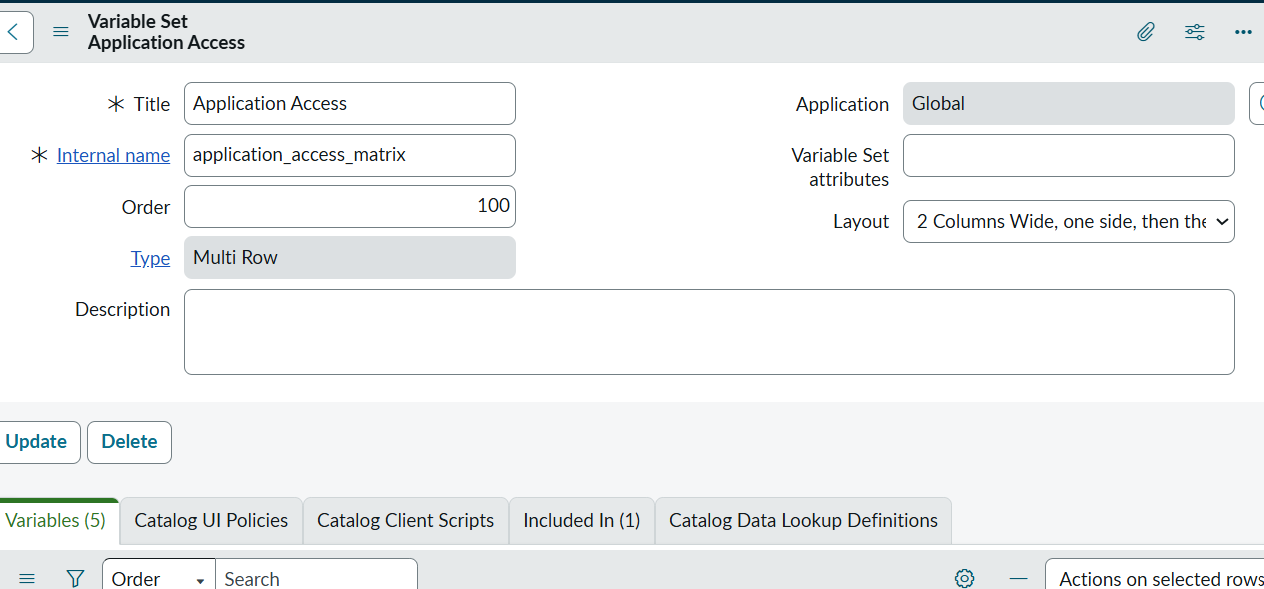
Create a Multi-Row Variable Set
Service Catalog → Catalog Variables → Variable Sets → New
Step 2: Add Variables Inside the MRVS
Inside the MRVS, create:
Environment (Dropdown) Type: Select Box
includes Choices:PROD,STG,TEST
Create variables for TASTY,SAP,APEX etc type: Checkbox
Please like my post. Thanks
- Mark as New
- Bookmark
- Subscribe
- Mute
- Subscribe to RSS Feed
- Permalink
- Report Inappropriate Content
02-11-2026 06:26 PM
Hi, thanks for replying. I already tried it that way, but I wasn't completely happy with how it looked, which is why I asked if there was a way to make it more similar to the image I uploaded.
- Mark as New
- Bookmark
- Subscribe
- Mute
- Subscribe to RSS Feed
- Permalink
- Report Inappropriate Content
02-11-2026 07:22 PM
there is no such type of select box like you mentioned in image (table format select boxes). However you can create your own variable using html css javascript (angularjs) using custom variable type.

If this helped to answer your query, please mark it helpful & accept the solution.
Thanks!
Krishnamohan

- Mark as New
- Bookmark
- Subscribe
- Mute
- Subscribe to RSS Feed
- Permalink
- Report Inappropriate Content
02-11-2026 07:13 PM - edited 02-11-2026 07:14 PM
For your requirement Multi row variable set would be nearest solution. Only thing is that you will not get that tabular format flavor and left row header.
Though ServiceNow recommendation is not to use DOM manipulation, but here is community post where they have tried with UI macro: Displaying a table on a Catalog Item using the HTM... - ServiceNow Community
Regards
Tanushree Maiti
ServiceNow Technical Architect
LinkedIn: https://www.linkedin.com/in/tanushreemaiti