Business Rule configured for Insert only runs after record update

- Mark as New
- Bookmark
- Subscribe
- Mute
- Subscribe to RSS Feed
- Permalink
- Report Inappropriate Content
09-07-2026 03:21 PM
Hi everyone,
I’m having an issue with a Business Rule that is configured to run **After Insert / Update**, but it does not execute during the initial record creation.
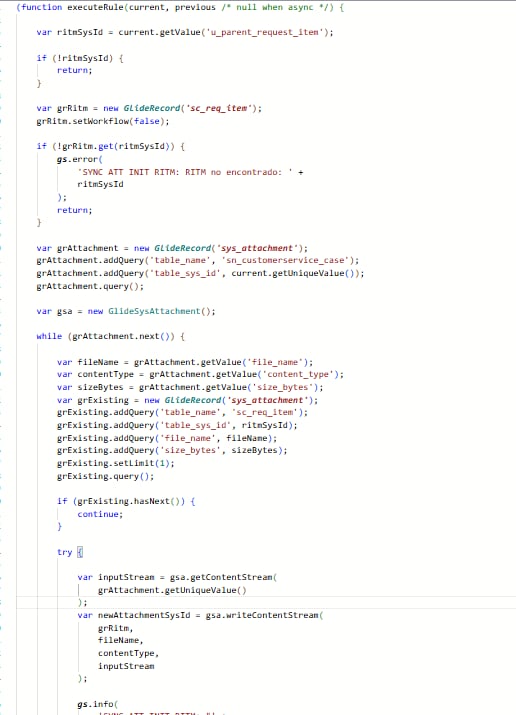
The Business Rule has the correct table and conditions configured. However, when the record is created, the rule does not run at all — even the `gs.info()` logs at the beginning of the script are not generated.
What is strange is that once I manually update any field on the same record, the Business Rule executes correctly and the logic works as expected.
I already validated the following:
* The Business Rule is active.
* The table is correct.
* The **Insert** option is enabled.
* The configured conditions are met when the record is created.
* I temporarily tested with a very simple condition such as `Active is true`, but the Business Rule still did not execute on insert.
* There are no logs generated during the initial creation, which makes me think the Business Rule is not being triggered at all.
* Once any field is updated afterward, it executes normally.
* The same logic/code is being used in similar Business Rules for other tables, and it works correctly on insert there. The issue only happens with this specific table/process.
The record is being created through a process where some related/reference fields are populated during the creation process.
Has anyone experienced a situation where a Business Rule configured for **Insert** only starts executing after a subsequent update?
Any suggestions on what else I should validate would be greatly appreciated.
Thanks!
- Mark as New
- Bookmark
- Subscribe
- Mute
- Subscribe to RSS Feed
- Permalink
- Report Inappropriate Content
09-07-2026 06:39 PM
This sounds like an order of operations issue. If submitting record 1 causes record 2 to be created, the parent field is simply null and has not been changed which means it will not trigger initially. I would have to use the workflow/logic in which I create record 2 to update record 1 with the appropriate reference to trigger the logic properly (the one case you can use current.update() in an AFTER business rule.) If I ensure that I create record 2 for referencing before submitting record 1, the conditions are certainly met.
I'm sure you understand this so can you walk us through the exact order of operations?

- Mark as New
- Bookmark
- Subscribe
- Mute
- Subscribe to RSS Feed
- Permalink
- Report Inappropriate Content
09-07-2026 07:54 PM
hi @ivettemarti ,
Looking at your BR, I would first check the value of u_parent_request_item at the time of insert.
Your condition is Parent Request Item is not empty OR Parent Request Item changes.
If u_parent_request_item is populated later by another Flow/BR/process, this BR will not trigger during the initial insert.
The script also has an immediate return when ritmSysId is empty.
Temporarily remove the filter condition and add gs.info() as the first line to confirm whether the BR is firing.
If it fires, then the issue is definitely the timing of u_parent_request_item population.
In that case, consider running the BR on Update when the field changes, or trigger the logic from the process that populates the field.
If this helps, please mark it as Helpful and accept the solution.
Regards,
Tejas

- Mark as New
- Bookmark
- Subscribe
- Mute
- Subscribe to RSS Feed
- Permalink
- Report Inappropriate Content
09-07-2026 11:48 PM
Hi @ivettemarti ,
After looking into reviewing the Business rule i suspect that Parent Request item is may be empty during initial record creation , which could be preventing Business rule from meeting the condition and triggering on insert.
As troubleshooting remove the condition on Business rule add simple gs.info() check whether it runs or not ,
- if log appeared issue may likely on condition evaluation while insert
- if log does not appear, enable Debug Business rule and review the execution details to determine why business rule is skipped or not triggered at all
it may also to be worth verifying whether Parent Request item field is being populated at the time or insert or only during a subsequent update.
Regards
BK
LinkedIn: https://www.linkedin.com/in/bhavyashree-karanth-55032a121
YouTube: https://www.youtube.com/@NowWithBhavya

- Mark as New
- Bookmark
- Subscribe
- Mute
- Subscribe to RSS Feed
- Permalink
- Report Inappropriate Content
09-08-2026 12:02 AM
Hello @ivettemarti ,
The configuration seems correct..
Try removing the filter conditions for a while and run for insert operation..
If my response helped mark as helpful and accept the solution.