- Mark as New
- Bookmark
- Subscribe
- Mute
- Subscribe to RSS Feed
- Permalink
- Report Inappropriate Content
12-04-2025 08:09 PM
Hello Everyone,
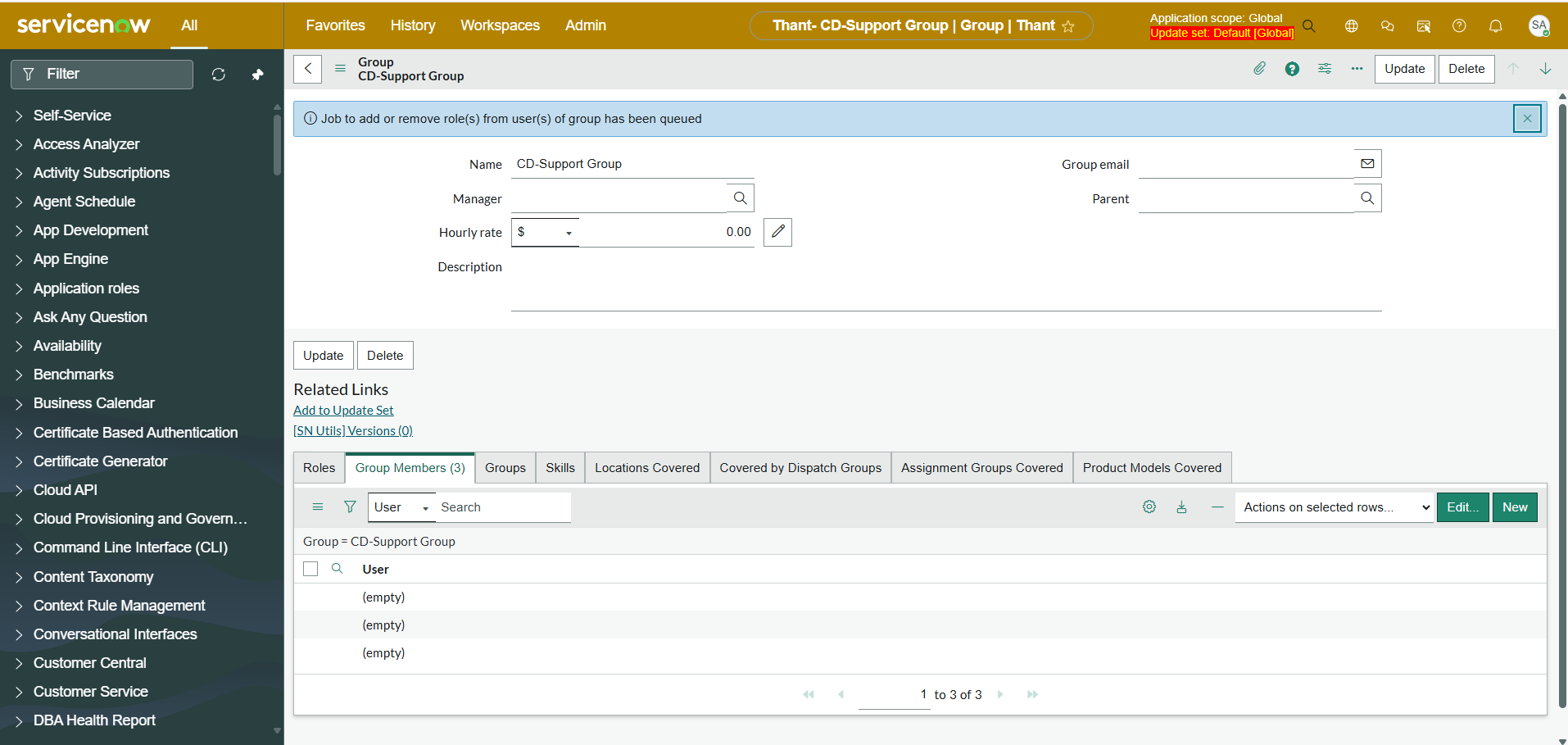
Has anyone experienced with the same issue as the user list is not showing in filter options, even the selected user names show as (empty) in the list? Please refer the screenshots attached.
I have tried to resolve this issue by deactivating my custom the Script Include and Business Rules related to sys_user and sys_user_group as well as clearing some caches however nonetheless could resolve the issue.
Please advice me if you have any solutions to resolve this issue.
Instant version: Zurich
Issue encounter: user list and user name are blank in Platform View
Thanks in advanced!
Thant
Solved! Go to Solution.
- Mark as New
- Bookmark
- Subscribe
- Mute
- Subscribe to RSS Feed
- Permalink
- Report Inappropriate Content
12-09-2025 10:49 PM
Hello Guys!
Thanks for feeding your inputs to resolved the tedious issue. After I have tried some workarounds to trace the root cause, eventually the root cause was due to the custom column that somehow corrupted sys_user table and broken display value function.
Finally, the issue has been resolved after deleted the custom column triggering the error.
Thank you all.
Thant

- Mark as New
- Bookmark
- Subscribe
- Mute
- Subscribe to RSS Feed
- Permalink
- Report Inappropriate Content
12-04-2025 08:45 PM
hello @Thant1 ,
Can you please check acl related to sys_user table , i think you impersonate another user rather than system admin. First impersonate as system admin and see same issue is faced to admin or not , if yes then there some restrictions were added on sys_user table or sys_user_grmember, sys_user_group table.
If this helps you then mark it as helpful and accept as solution.
Regards,
Aditya


- Mark as New
- Bookmark
- Subscribe
- Mute
- Subscribe to RSS Feed
- Permalink
- Report Inappropriate Content
12-04-2025 08:53 PM
is this showing name for admins and not showing for non-admins?
Seems non-admins don't have field level READ ACL for Name field
check that by using access analyzer
[Vancouver Release] Customers gain enhanced access visibility with ServiceNow Access Analyzer
💡 If my response helped, please mark it as correct ✅ and close the thread 🔒— this helps future readers find the solution faster! 🙏
Ankur
✨ Certified Technical Architect || ✨ 10x ServiceNow MVP || ✨ ServiceNow Community Leader
- Mark as New
- Bookmark
- Subscribe
- Mute
- Subscribe to RSS Feed
- Permalink
- Report Inappropriate Content
12-04-2025 10:02 PM - edited 12-04-2025 10:02 PM
Hi @Ankur Bawiskar ,
Appreciated for your advice. The issue is both admin and non-admin arent able to see the user list and user names in the filter option of the form as well as in the related list.
I have checked with the access analyzer and confirmed all the permission is passed.
Not sure, could this be kind of instance error or smth...One thing for sure is I didnt really touched the acl part before encountering this issue.
Please let me know if you have any workarounds.
Thank you!
- Mark as New
- Bookmark
- Subscribe
- Mute
- Subscribe to RSS Feed
- Permalink
- Report Inappropriate Content
12-04-2025 10:08 PM
was this working fine earlier?
Did you recently upgrade?
💡 If my response helped, please mark it as correct ✅ and close the thread 🔒— this helps future readers find the solution faster! 🙏
Ankur
✨ Certified Technical Architect || ✨ 10x ServiceNow MVP || ✨ ServiceNow Community Leader