- Mark as New
- Bookmark
- Subscribe
- Mute
- Subscribe to RSS Feed
- Permalink
- Report Inappropriate Content
12-04-2025 08:09 PM
Hello Everyone,
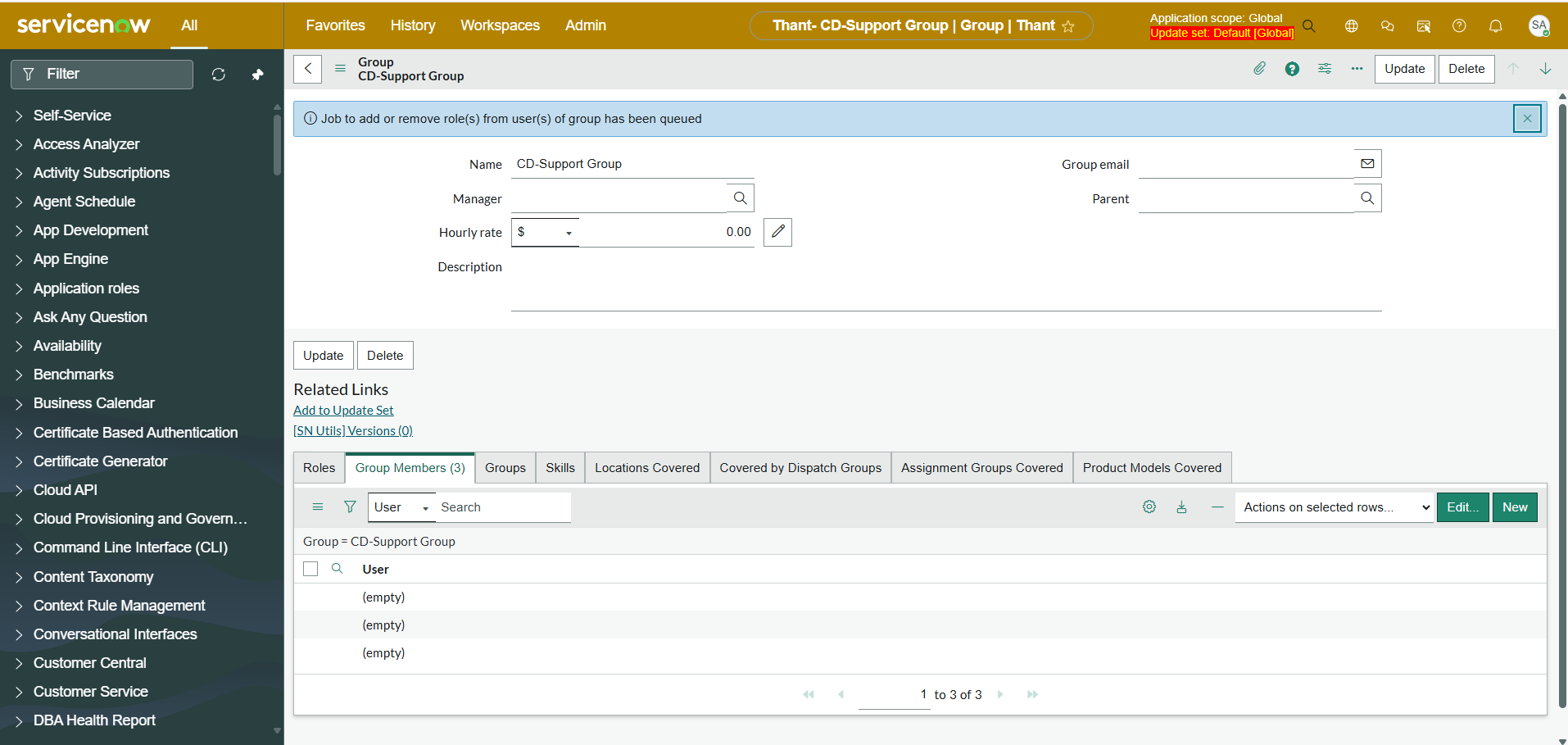
Has anyone experienced with the same issue as the user list is not showing in filter options, even the selected user names show as (empty) in the list? Please refer the screenshots attached.
I have tried to resolve this issue by deactivating my custom the Script Include and Business Rules related to sys_user and sys_user_group as well as clearing some caches however nonetheless could resolve the issue.
Please advice me if you have any solutions to resolve this issue.
Instant version: Zurich
Issue encounter: user list and user name are blank in Platform View
Thanks in advanced!
Thant
Solved! Go to Solution.
- Mark as New
- Bookmark
- Subscribe
- Mute
- Subscribe to RSS Feed
- Permalink
- Report Inappropriate Content
12-09-2025 10:49 PM
Hello Guys!
Thanks for feeding your inputs to resolved the tedious issue. After I have tried some workarounds to trace the root cause, eventually the root cause was due to the custom column that somehow corrupted sys_user table and broken display value function.
Finally, the issue has been resolved after deleted the custom column triggering the error.
Thank you all.
Thant
- Mark as New
- Bookmark
- Subscribe
- Mute
- Subscribe to RSS Feed
- Permalink
- Report Inappropriate Content
12-04-2025 10:13 PM
It was working fine before upgrading to Zurich version. Have upgraded a month ago.

- Mark as New
- Bookmark
- Subscribe
- Mute
- Subscribe to RSS Feed
- Permalink
- Report Inappropriate Content
12-04-2025 09:53 PM - edited 12-04-2025 10:01 PM
@Thant1 Verify whether, all those user record actives or not?
given link may solve you issue:
if my response helped, please mark it as correct and close the thread this helps future readers find the solution faster!
- Mark as New
- Bookmark
- Subscribe
- Mute
- Subscribe to RSS Feed
- Permalink
- Report Inappropriate Content
12-05-2025 01:07 AM
Hi @Nilesh Pol
Appreciated for your advice. There is no changes made in both user and group table in related list under System UI, no specific filter has been applied. Its all baseline config.
In fact, the issue exists in those fields referring to user table in all form from platform view, not only in group list.
Thanks!
- Mark as New
- Bookmark
- Subscribe
- Mute
- Subscribe to RSS Feed
- Permalink
- Report Inappropriate Content
12-05-2025 06:15 AM
@Thant1 if No other customizations made by you and developers, then please raise HI ticket.
if my response helped, please mark it as correct and close the thread this helps future readers find the solution faster!
- Mark as New
- Bookmark
- Subscribe
- Mute
- Subscribe to RSS Feed
- Permalink
- Report Inappropriate Content
12-09-2025 10:49 PM
Hello Guys!
Thanks for feeding your inputs to resolved the tedious issue. After I have tried some workarounds to trace the root cause, eventually the root cause was due to the custom column that somehow corrupted sys_user table and broken display value function.
Finally, the issue has been resolved after deleted the custom column triggering the error.
Thank you all.
Thant