- Mark as New
- Bookmark
- Subscribe
- Mute
- Subscribe to RSS Feed
- Permalink
- Report Inappropriate Content
03-01-2026 11:10 PM
Hello,
I'm trying to setup Universal Task and my use case is to create a universal task for an employee to collect some details when a catalog item is submitted.
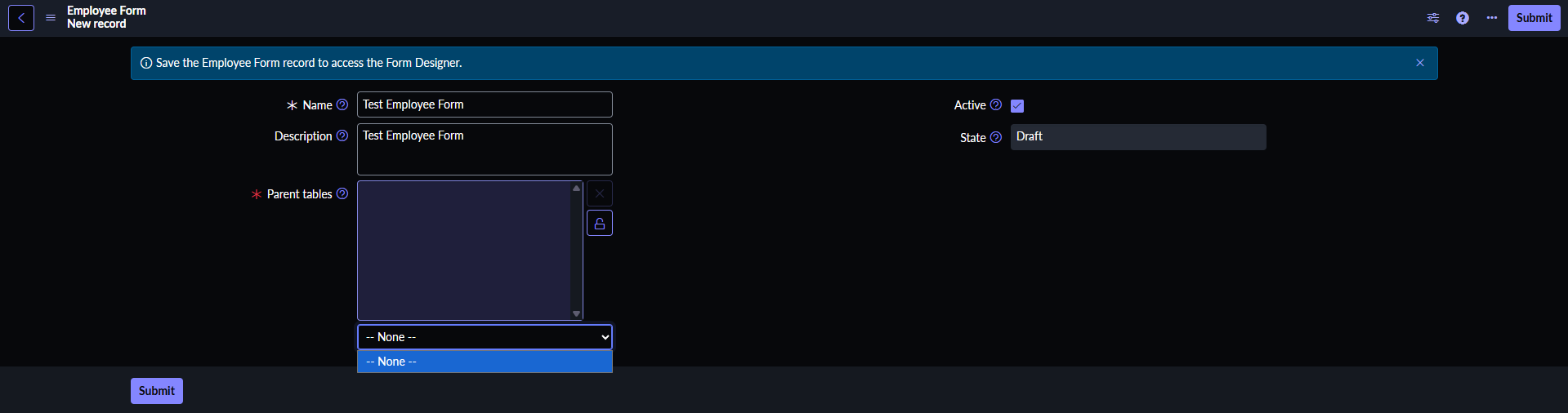
When I try to create an employee form (after creating a "Universal Task Configuration" of task type "Collect Employee Input"), I'm not getting any options in the "Parent tables" field which is why I'm not able to save it.
Any assistance is greatly appreciated.
Solved! Go to Solution.
- Mark as New
- Bookmark
- Subscribe
- Mute
- Subscribe to RSS Feed
- Permalink
- Report Inappropriate Content
03-03-2026 12:16 AM
For anyone who faces the same issue, my mistake was that I did not create a record in the "Employee Input Task Configurations" table (sn_uni_task_emp_input_task_config). This is why I was not able to see my table in the "Parent Tables" field.
Here's more info about this table: https://www.servicenow.com/docs/r/employee-service-management/universal-task/ut-config-empform-view-...
- Mark as New
- Bookmark
- Subscribe
- Mute
- Subscribe to RSS Feed
- Permalink
- Report Inappropriate Content
03-02-2026 12:28 AM
@Ankur Bawiskar do you have any idea about this?


- Mark as New
- Bookmark
- Subscribe
- Mute
- Subscribe to RSS Feed
- Permalink
- Report Inappropriate Content
03-02-2026 01:23 AM
did you check the dictionary config for that field?
if it has some dependency on other field?
Ankur
✨ Certified Technical Architect || ✨ 10x ServiceNow MVP || ✨ ServiceNow Community Leader
- Mark as New
- Bookmark
- Subscribe
- Mute
- Subscribe to RSS Feed
- Permalink
- Report Inappropriate Content
03-03-2026 12:16 AM
For anyone who faces the same issue, my mistake was that I did not create a record in the "Employee Input Task Configurations" table (sn_uni_task_emp_input_task_config). This is why I was not able to see my table in the "Parent Tables" field.
Here's more info about this table: https://www.servicenow.com/docs/r/employee-service-management/universal-task/ut-config-empform-view-...