Reference preview popup (“i” icon) behavior in CSM/FSM Configurable Workspace.

- Mark as New
- Bookmark
- Subscribe
- Mute
- Subscribe to RSS Feed
- Permalink
- Report Inappropriate Content
05-08-2026 02:13 AM - edited 05-08-2026 02:13 AM
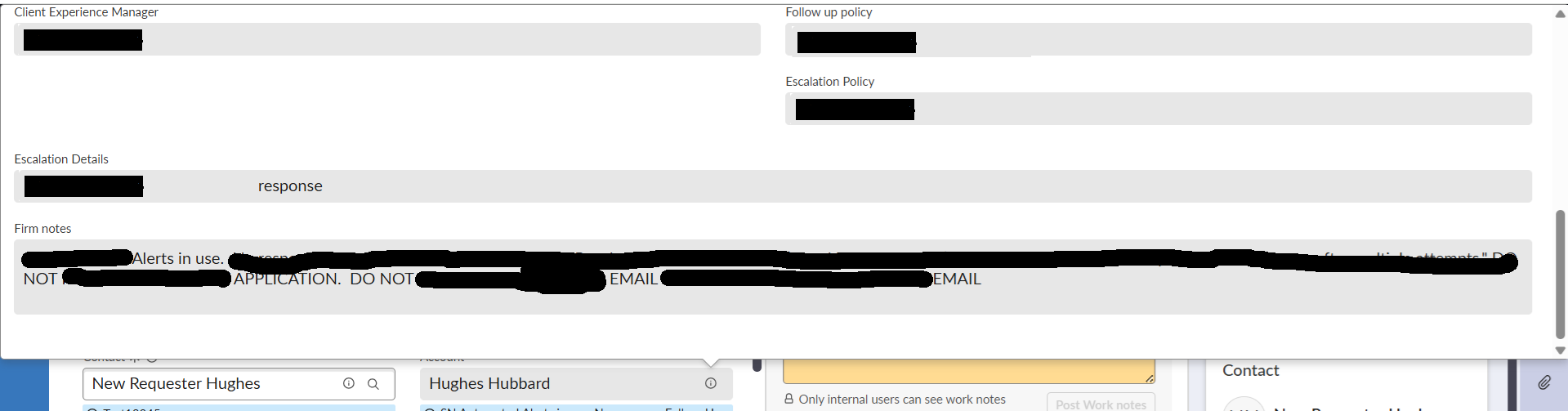
When users click the “i” button on the Account reference field, the preview popup opens correctly using the sys_popup view.
However, the popup width is dynamically increasing based on the content of a field called Firm Notes.
- Firm Notes is a String field
- Character limit is 4000
- The field is mandatory
- Because of long content, the popup becomes extremely large.
Current Behavior
- Small content -> normal popup size
- Large Firm Notes content → popup expands vertically and occupies the full screen
Constraint
I cannot remove the Firm Notes field from the sys_popup view because it is required by the business.
Environment
- CSM/FSM Configurable Workspace
- Reference preview popup from Account field
I want the preview popup to have either:
- Fixed/max width
- Internal scrolling if content is large
- Consistent popup dimensions irrespective of field content
Refer attached screenshots.
1 - With less or no content in Firm Notes
2 - With some content in Firm Notes (45 characters).

- Mark as New
- Bookmark
- Subscribe
- Mute
- Subscribe to RSS Feed
- Permalink
- Report Inappropriate Content
05-08-2026 02:36 AM
Ahoy @srohan24,
I understand your point and I believe it is correct behaviour.
What you can try is to update the form layout.
I can see that there are two columns:
Left: Client Experience Manager
Right: Followup Policy, Escalation Policy
Move the Firm notes to either one of the above columns, that could make the trick (no guarantee, just hit or miss)

It can be done with configure > form design as well as > form layout, depends on your preferences
✂-----Cutting-out-the---✦AI-noise✦---All-replies-written-and-vouched-for-by-GlideFather---
- Mark as New
- Bookmark
- Subscribe
- Mute
- Subscribe to RSS Feed
- Permalink
- Report Inappropriate Content
05-08-2026 03:41 AM
yes, but this will change the view of the popup, the placement of fields
- Mark as New
- Bookmark
- Subscribe
- Mute
- Subscribe to RSS Feed
- Permalink
- Report Inappropriate Content
05-08-2026 06:59 AM
Yes @srohan24 correct. But it could solve your issue, no?
The field would be just slightly moved and from the UX perspective, it will look better there in my opinion than to have the popup so wide
✂-----Cutting-out-the---✦AI-noise✦---All-replies-written-and-vouched-for-by-GlideFather---

- Mark as New
- Bookmark
- Subscribe
- Mute
- Subscribe to RSS Feed
- Permalink
- Report Inappropriate Content
05-08-2026 02:39 AM
Hi @srohan24
Could you confirm you have kept your browser zoom level at 100% or less during viewing sys popup in Workspaces.
Regards
Tanushree Maiti
ServiceNow Technical Architect
LinkedIn: https://www.linkedin.com/in/tanushreemaiti