Reference preview popup (“i” icon) behavior in CSM/FSM Configurable Workspace.

- Mark as New
- Bookmark
- Subscribe
- Mute
- Subscribe to RSS Feed
- Permalink
- Report Inappropriate Content
05-08-2026 02:13 AM - edited 05-08-2026 02:13 AM
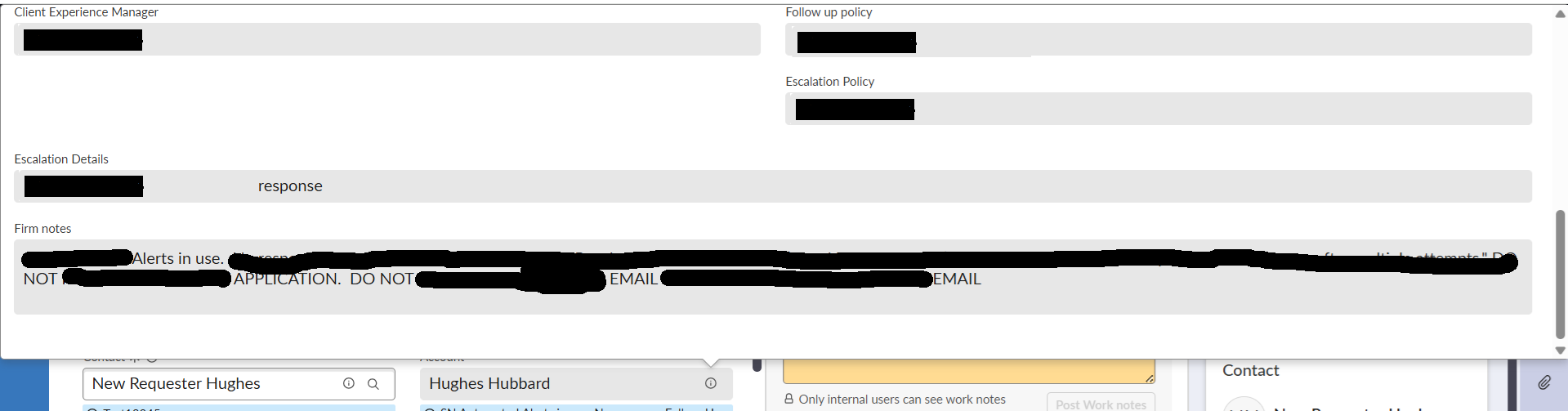
When users click the “i” button on the Account reference field, the preview popup opens correctly using the sys_popup view.
However, the popup width is dynamically increasing based on the content of a field called Firm Notes.
- Firm Notes is a String field
- Character limit is 4000
- The field is mandatory
- Because of long content, the popup becomes extremely large.
Current Behavior
- Small content -> normal popup size
- Large Firm Notes content → popup expands vertically and occupies the full screen
Constraint
I cannot remove the Firm Notes field from the sys_popup view because it is required by the business.
Environment
- CSM/FSM Configurable Workspace
- Reference preview popup from Account field
I want the preview popup to have either:
- Fixed/max width
- Internal scrolling if content is large
- Consistent popup dimensions irrespective of field content
Refer attached screenshots.
1 - With less or no content in Firm Notes
2 - With some content in Firm Notes (45 characters).
- Mark as New
- Bookmark
- Subscribe
- Mute
- Subscribe to RSS Feed
- Permalink
- Report Inappropriate Content
05-08-2026 03:20 AM
it's 100%