kim_purcell
Kilo Explorer
Options
- Subscribe to RSS Feed
- Mark as New
- Mark as Read
- Bookmark
- Subscribe
- Printer Friendly Page
- Report Inappropriate Content
01-28-2015
01:06 PM
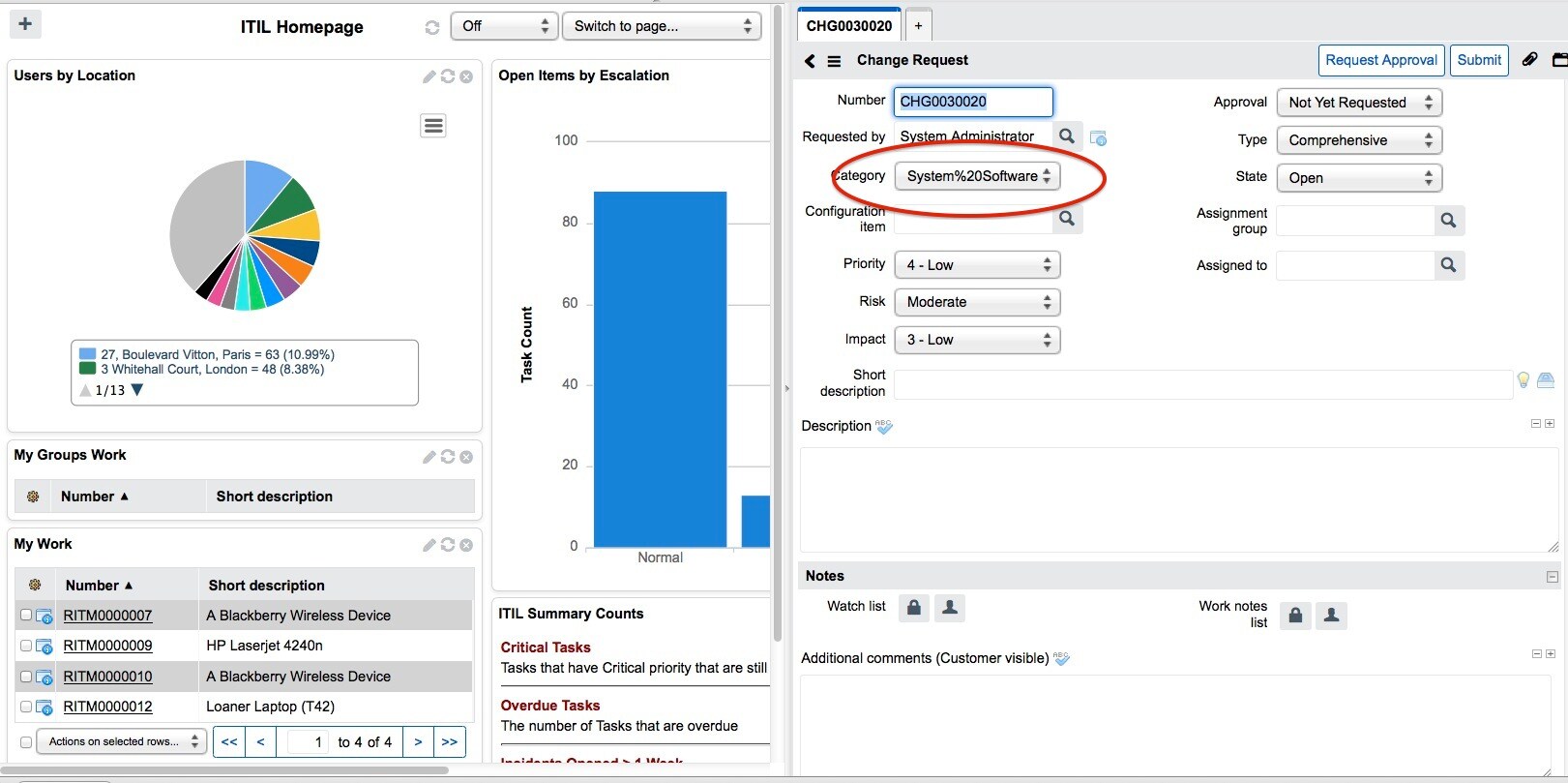
If you are working in a split layout and have a choice list value that uses more than one word in an URL argument (for example, category is System Software as opposed to Software) you can oddly end up with a %20 between words in Chrome and Firefox. Here's what you'll see:
To resolve this issue, you can use one word, or better yet, create an onLoad client script on the table using the script value below:
- Right-click on the table header, and select Personalize.
- Select Client Scripts.
- Create New.
- Select OnLoad for Type.
- In the Script field, enter the script:
if (g_form.getValue('FIELD_NAME') == 'WORD1%20WORD2') {
g_form.setValue('FIELD_NAME','WORD1 WORD2');
}
Just replace the FIELD_NAME, WORD1, and WORD2 values with the appropriate field name and multi-word values, and you'll be off and running at 100%.
Have other quirks with layout or spacing? Here are some other articles to help you out:
- Setting multi-word choice list value (KB0541716)
- Variable sets are not displaying in the intended order (KB0547042)
- When personalizing the variable form via the variables related list, it loses the form sections (KB0...
- Recent selections box for a reference field displays even when field is hidden on form (KB0542553)
- [Mobile UI] Long content overlaps with other rows in the list (KB0542009)
- Mobile interface showing duplicate icons for [sys_ui_home_favorite],
- Mobile interface showing duplicate icons for [sys_ui_home_favorite], [sys_ui_home_section] and [labe...
You must be a registered user to add a comment. If you've already registered, sign in. Otherwise, register and sign in.