sabell2012

Mega Sage
Options
- Subscribe to RSS Feed
- Mark as New
- Mark as Read
- Bookmark
- Subscribe
- Printer Friendly Page
- Report Inappropriate Content
12-18-2015
06:25 AM
Design is where the rubber-meets-the-road. We have our requirements. We have investigated and analyzed each of these and turned over all the technical rocks that might impede our progress. We are now ready for design!
This is another of the software engineering steps that I often see get tossed aside. What appears to happen is that the requirements are gathered, and coding begins. Almost at the same time! This is similar, in my mind, to the old joke where a manager tells his developers to start coding, and he will go find out what the users want!
Design is where you, as the developer, take the requirements, and analysis, and begin detailing and organizing how they are to be developed into a solution.
My rule-of-thumb: When I am done with the design I should be able to hand all the documentation to a junior developer who should be able to make ALL of the changes, and do the unit testing with a minimum of supervision.
Also, even after you get into the Design Phase it is possible to find a process or design problem that will require the team revisit the requirements, and/or analysis steps. Each of these steps acts as checks-and-balances to reduce risk and improve quality. Take them seriously! They are not just bureaucratic make-work!
A side note: The combination of Requirements, Analysis & Prototyping, and Design should constitute roughly 60% of the time of a project. The remaining 40% could and should be roughly divided in two and allotted to coding and testing. Frankly, by the the time you finish with Design, coding should be a snap. You have overcome your technical difficulties in prototyping, and with design you should have all of the to-dos, how-tos, in-what-orders, and unit tests defined.
BTW, I do not limit prototyping to the big stuff. Nor is it something that I relegate to the Analysis step only. I will be working with code-snippets and using Scripts - Background or Fix Scripts throughout the project. Don't be too rigid with the process. Use common sense.
Contents
What the Design Should Contain:
1. Detail on where changes will be made and what they will consist of. Here is where coding standards can begin to dictate how the solution will look behind-the-scenes.
2. The order in which the changes will be accomplished.
3. The unit tests to be used to exercise all of the changes. Yes, this will contain the detail and steps of the unit tests!
4. Any integration tests identified by the developer to ensure that the changes do not break the existing codebase.
I am not terribly locked into a rigid format on this. I use common sense to achieve the purpose. Remember: Don't think of this as make-work! It is truly an important step on the process.
Document Organization
What follows is how I usually organize my design. Note the order: Each of these can have cumulative dependencies on the previous. In addition, starting with table changes, there should be a reference to a requirement that is addressed by the change. Some of these may address more than one requirement. This is where requirements numbering shines as it is a way of specifically showing which requirement was addressed. This is another facet of software engineering: requirements traceability.
1. Overview - a high-level "executive" description of the tasks that are to be accomplished with this design. Include any referenced requirements documentation.
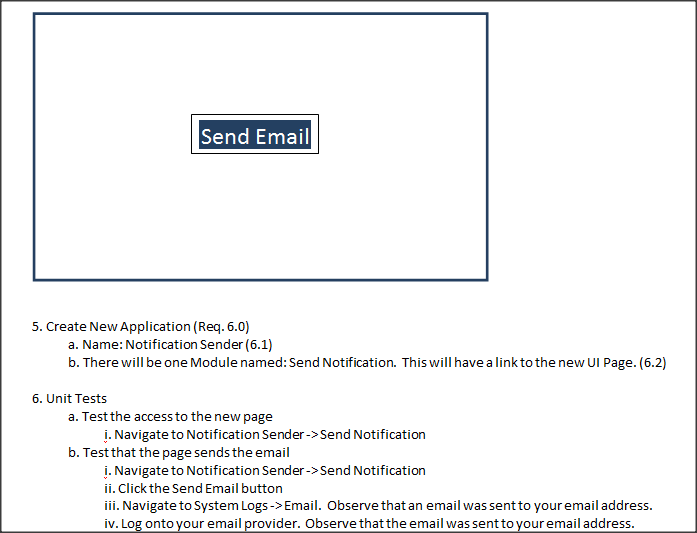
For example:
2. Next in "constructive" order the design elements. What this means is that each element build or relies on the previous.
For example: Table changes should come before form changes. You would add new columns to a table before adding those fields to a form. So it is pretty much common sense.
This list is a good rule of thumb, but by no means is it inclusive.
a. Table - these will include new tables, column changes, column additions, ACL additions and changes
b. Forms - these will include field locations on the form, label changes, UI Actions and ordering. Here I pull in the screen shots from the requirements.
c. Database Views - these will include new views, modifications to existing views.
d. Code changes - here is where the underlying code is detailed. This includes Client Scripts, Business Rules, Events and Script Actions, Script Includes, etc.
e. Workflow changes - Diagram this using Visio or something like it. Roughly what the workflow will be doing.
f. Service Catalog and/or Record Producer changes
i. Storyboarding - How will the Service Catalog or Record Producer actually flow. What will be on each page. The variables involved. What will be passed to the underlying workflow. What client script or ui action will be involved. This has a dependency on the workflow.
g. Scheduled Jobs, Reporting, and other modifications that rely on everything prior.
i. Scheduled Jobs can have a dependency on Script Includes.
ii. Reporting can have a dependency on Database Views, or table changes.
h. Navigation - Application Menus, Modules
i. Unit tests.
i. Detail these out. These will include what is being tested for (the requirement), and the steps to produce the test. Expected results.
j. Integration tests.
i. Detail these out. These will be to the area of ServiceNow that is affected by the change. They are to verify no impact. Include the steps to produce the test. Expected results.
k. Process tests.
i. These are to verify that the process flow (if any) has been achieved. This is usually a requirements validation step.
ii. Example:
Service Catalog -> Collects information (variables) -> Workflow -> Active Directory command -> MID Server -> Active Directory -> Expected return.
Suggested Tools
This is by no means an exhaustive list, or an endorsement of any of these, but I find the following to be useful:
Visio - One of my main tools. With this I can do flows, use-cases, storyboarding, etc.
MS Word, Libre Office, Open Office or any other document tool - I can do diagramming, and documenting here as well, it is just a bit more difficult.
Evernote - This is a super tool for cloud collaboration.
OneNote - I am probably most comfortable with this for design documentation. It allows for great network collaboration, and with Office 365 you have cloud collaboration available as well.
Design Wrapup
Give the team the chance to feedback on the design. Keep everyone in the loop (thus the need for collaboration).
When you have completed your design the final step is to get sign-off from the business owner! Do NOT move forward to development without this! An email confirmation should suffice.
Conclusion
Design is an important part of the software engineering process. It has the purpose of making development simpler by logically organizing the various tasks that will need to be performed to achieve the requested changes. The detail provided is useful not only to the developer who will be doing the work, but to the business owner, project manager, business analyst, and test team. The entire team benefits from understanding what the solution will actually involve.
If you have not already included this step in your projects; I would highly recommend doing so. To me this is one of critical components of software development. Remember software engineering reduces risk, and improves quality!
Steven Bell
If you find this article helps you, don't forget to log in and "like" it!
Also, if you are not already, I would like to encourage you to become a member of our blog!
- 2,419 Views
You must be a registered user to add a comment. If you've already registered, sign in. Otherwise, register and sign in.