Suzanne Smith

ServiceNow Employee
Options
- Subscribe to RSS Feed
- Mark as New
- Mark as Read
- Bookmark
- Subscribe
- Printer Friendly Page
- Report Inappropriate Content
07-01-2015
07:51 AM
Composite fields are used in Demand Management and in Project Management applications and pull two types of information into a single field.
The idea for this blog post and the title were completely swiped from a Twitter post by community member, Robert Fedoruk (rfedoruk)!
A composite field combines information from two fields in a table to create one field. Composite fields are available in the following tables beginning with the Fuji release:
- Project [pm_project]
- Project task [pm_project_task]
- Demand (dmn_demand]
- Idea [idea]
Using composite fields in ServiceNow:
In the screenshot below, you can see the Dictionary Entry for the Idea column in the Idea [idea] table. The Type is a Composite Field and the Attributes field tells us that the first field is the Short Description and the second field is the Number.
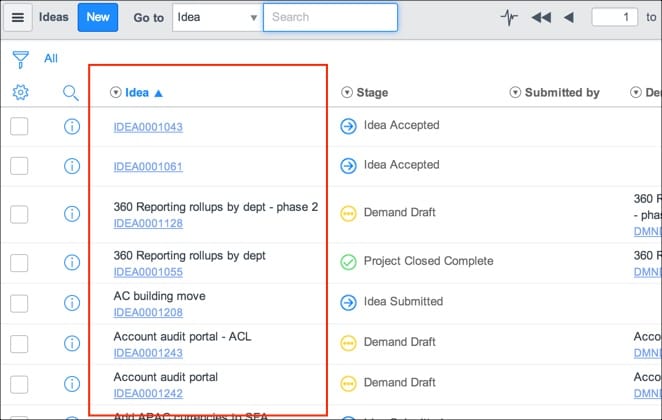
Now, let's see the beautiful list view this creates. Here is the Ideas list with the Idea column showing both the Short Description and the Number fields. Click the number to open the Idea form. Note that the Demand column also contains a composite field with the demand Name and Number. (After an idea is accepted, it is promoted to a "demand.") Click a number in the Demand column to open the Demand form.

If you sort the column, sorting is based on the short description and not the number. For example, in the screenshot below I switched the sort order of the Idea column to ascending (a-z). Note that in the first two rows of the column, two ideas with empty short description fields show at the top, followed by two short descriptions beginning with a number (360), and then short descriptions beginning with the letter "A."
Composite fields are new in the Fuji release. Stay tuned for more information about composite fields in upcoming releases.
Additional tips and information:
- You can search on a composite field using the short description or the number.
- Sorting is currently supported based on the second field in a composite field.
- rfedoruk asked about composite views in a community post and Ben Vargas kindly explained how the stage column was able to "read ahead."
- 4,202 Views
9 Comments
You must be a registered user to add a comment. If you've already registered, sign in. Otherwise, register and sign in.