Goran WitchDoc

ServiceNow Employee
Options
- Subscribe to RSS Feed
- Mark as New
- Mark as Read
- Bookmark
- Subscribe
- Printer Friendly Page
- Report Inappropriate Content
05-16-2017
07:34 AM
Sitting here at the table, trying to take in all the emotions and knowledge that was gathered in Knowledge 17. It's been a ride, and sadly not enough time to meet everyone I wanted to meet.
Remember also that this is written when comparing to Istanbul release.
I held a round table about what obstacles you might run into when moving from CMS to Service Portal and some solutions for them. Since I didn't have any PowerPoint or similar, I promised to do a blog post about my findings. And before moving on. This is not a post about all nice features of Service Portal. I'm only highlighting the issues that you might run into moving from CMS to Service Portal.
I would also recommend that you try to see the move as a "portal 2.0" and not just a clone from CMS to Service Portal. You got a totally different tool set at your disposal, so be sure that you know what it can do so you don't miss a great opportunity to take you portal to the next level.
Beneath I will mention something I call "normal" UI and compare it to Service Portal. When I talk about Service Catalog and "normal" UI I'm talking about this:
General things:
- Is there a migration tool or a clear path?
- Nope, sadly not. No one button to press. The path isn't so clear either and depending how customized/complex you CMS portal is, you got a quick migration or a very tough one.
- Do I still need to know Jelly?
- It's gone, for the positive side, most of all see this as a real nice thing. But it also gives you a real headache if you have done a lot of customization in Jelly. all these needs to be redone for the portal. I recommend that you first of all go through the functionalities that exists in OOB widgets, and go from there. Remember that there is many more OOB widgets in Istanbul than Helsinki and I bet there will be even more/better ones in Jakarta that is coming out soon. Also remember that the variable type "Macro" has a UI Macro connected to it, and that will of course not work since it uses Jelly. A little more about it further down in the Service Catalog section.
- How does it work with mobile devices and this "responsive" pages people are talking about?
- Yes, Service Portal has the responsive/mobile in it's mind. You will easy get a portal that renders the pages after what device/resolution is used to access the portal.
- Iframes, do we use them in the portal?
- You might need it still for some more complex stuff. But for easier things like lists, forms etc. there are even OOB widgets to handle these.
- Dynamic blocks then with my nice layout and code?
- Nope, you will need to redo all this. most of the stuff is in Jelly and the other stuff is mainly built in widgets. Some code might be reusable in the Server Scripting and for example CSS.
- I still use IE9 on my client computer!
- Well, Service Portal needs new version than IE9 to get the angular to work. But there is other places in ServiceNow that also uses angular, which will give you problem. But I would also say that there is bigger problem than ServiceNow if clients still using IE9 which Microsoft stopped supporting quite a while ago.
- How about the URL, will that be the same?
- URL to the start page will be the same, if it's decided to keep it. For sub pages and stuff(ex. KB article) it will be changed. So if you got URLs referring to different parts of you CMS, these needs to be updated. Also remembers you might has notifications etc. that has a link that isn't correct for the Service Portal.
- Contextual search, I love it. Is it there?
- Well, yes and no. From the start, it didn't work. Now there is a patch from HI to make it pretty good(Link here), but leave some room for improvements. No idea how it looks like in Jakarta. There is also a few versions of this done by other companies, but haven't seen anyone for free yet.
- We have multiple CMS sites for different users, can I have that in Service Portal as well?
- You can, OOB ServiceNow redirect all logged on "none role" users to one specific portal. This can be customized so depending on your parameters the user will get redirected to different portals. I wrote a quick post about it HERE. You can also make a more clever portal that just changes looks depending on the user as well. A bit more complex, but might be the correct way to go.
Service Catalog:
- I heard there is only one Catalog per Portal, is that true?
- Yes, that is true. OOB there is only support for one portal. Here you need to think of how the design for the whole enterprise would look like. Should you have multiple portal and more "OOB" or should you start customize OOB Widgets to handle more than one catalog? There are both pros and cons for both solutions and I think there is probably a couple of hydrid version etc. as well of the two examples I have. Example with multiple Portals is that the search will only be in the specific portal the user is at. Istanbul has added "search sources" which gives your the opportunity to make the search go outside the specific portal and can be uses to search in multiple. But when you want the user to be able to browse multiple catalogs at the same time, you need to customize the OOB widgets for displaying this.
- You mention variable types about, is there more to know?
- Yes, there is quite a few things here:
- Macro: As I mention above, in CMS you could have UI Macros connected to the Macro variable. They don't work in Service Portal since it doesn't support Jelly. A good thing is thou that the variable now has a widget field where you can redo the same functionality in a widget and connect it to the same macro. What to remember here is that if you got variables that are going to be used on items that are used on both Service Portal and the "normal" UI, you need both UI Macro and Widget. This since the Widget won't work in the "normal" UI and vice versa. Which means you perhaps should think of having fullfillers etc. also use the catalog in the Service Portal "view" instead of maintaining both a widget and UI Macro.
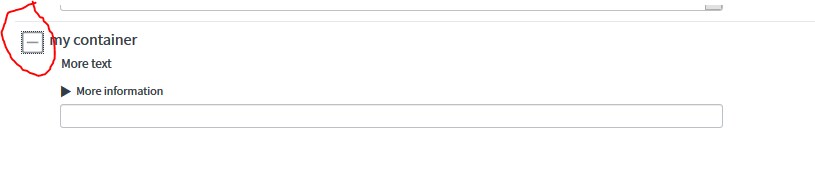
- Other Variable types: Variables behave different depending on they are shown in the Service Portal or the "normal" UI. For example in the "normal" UI you can use a container to expand/collapse the variables inside the container like this:
And on Service Portal the option to expand/collapse is gone and you also see the thin gray line is gone as well:
If you go to the documentation for variable types you can see that some types has the text "The Xxxx variable is yet not supported on service portal and mobile devices". This doesn't mean that it don't work at all, but it might have a different look or functionality.
- Help Text: There are also other things that behave different and the help text is one of them. In the "normal" UI it is a nice expand/collapse feature with some blue background like this:
and on Service Portal it is suddenly a grayed out text like this:
- Yes, there is quite a few things here:
- So, how about Order Guides?
- Order Guides works like they should, besides the variable type issue mention above. But there is one major change when comparing to the "normal" UI and it's the layout. "Normal" UI has a tabbed format of the Order Guide while the OOB widget has all items in a vertical row.
- Order Guides works like they should, besides the variable type issue mention above. But there is one major change when comparing to the "normal" UI and it's the layout. "Normal" UI has a tabbed format of the Order Guide while the OOB widget has all items in a vertical row.
- Do I need to do anything with my Catalog Client Scripts & Catalog UI Policies?
- You probably will. Simple stuff will probably work, but there is a few things to think about:
- UI Type needs to be set to either "All" or "Mobile / Service Portal". If not, it won't load in the Service Portal. But switching over to "mobile" also means that for example your GlideForm API get reduced since the mobile version doesn't have all the nice features the normal one has. Here is a link to the Mobile GlideForm API
- DOM Manipulation using stuff like $, jQuery doesn't work and need to be replaced. Same thing goes for getControl, getElement etc.
- If you got some variable sets that all items use. Perhaps it's an idea to put this into the widget it self. Always make sure it's what you really want and need.
- You probably will. Simple stuff will probably work, but there is a few things to think about:
- So, how do I test if the things work?
- Well, first of all. Don't use the "Try it" button. Things might work when you go test through the "normal" UI but not in the Service Portal. Then you have the other way around as well, since variable type macro with widgets won't work in the "normal" UI..
Then of course since client scripts and UI Polices works different depending on how you access them, test them on the places they will be used. And do that also since the variables them self might look difference depending on where you access them as well.
- Well, first of all. Don't use the "Try it" button. Things might work when you go test through the "normal" UI but not in the Service Portal. Then you have the other way around as well, since variable type macro with widgets won't work in the "normal" UI..
Knowledge
- Only one Knowledge per portal as well?
- Yes, here is just the same issue as for the Catalogs with the same thoughts and pros & cons.
- Yes, here is just the same issue as for the Catalogs with the same thoughts and pros & cons.
- How about public Knowledge, is that doable?
- With Service Portal it's a lot easier to have a knowledge public(user not needed to login to search it)
- With Service Portal it's a lot easier to have a knowledge public(user not needed to login to search it)
- Where did copy permanlink go?
- It's gone. But on the other hand you can easy just copy the URL from the browser instead. Just remember that if you have old links to the knowledge base, they won't point to the new Service Portal.
Thats about what I have for the session and what came up while we talk. If you got more things, please post it in the comments and I'll add it.
//Göran
- 10,435 Views
16 Comments
- « Previous
-
- 1
- 2
- Next »
You must be a registered user to add a comment. If you've already registered, sign in. Otherwise, register and sign in.