Daniel Draes

ServiceNow Employee
Options
- Subscribe to RSS Feed
- Mark as New
- Mark as Read
- Bookmark
- Subscribe
- Printer Friendly Page
- Report Inappropriate Content
07-09-2021
07:43 AM
So you have created a new integration spoke for something ServiceNow does not have as a ready-made plugin on the store. As a good developer you have done all due diligence of unit testing the new Flow Actions and Subflows to the best of your knowledge. But what about automating these tests? Your company has adopted usage of ATF - ServiceNow's Automated Test Framework. But ATF cannot test Flows, Subflows or Actions directly. But… there are solutions to this … I want to highlight one options for you in this blog article. Have you used this or another approach? Comment below, I am interested to learn about it.
Create a custom step configuration
ATF allows to create custom Step Configurations which can be used to do all kinds of things we probably just did not think of (yet). There is a great Creator Toolbox video where I show how to create this - and actually I am using a REST API call action as an example. Here are the essential pieces to create a bespoke Step Configuration to test your integration action.
Open Flow Designer and navigate to your action (Subflows and Flows actually work the same way).
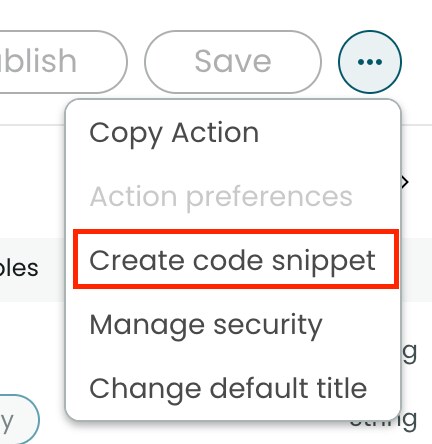
Inside the action choose the 3-dots menu on the top right and select 'Create code snippet'
Use the 'Copy Code Snippet to Clipboard' action and store the code in your favorite local editor for now.
In the classic UI window navigate to Automated Test Framework (ATF) -> Administration -> Step Configurations.
Click on 'New'
Give the new configuration a name, some description, a template reminder, an order and select 'Server - Independent' as Step environment.
Scroll down to the Step execution script. Now we need to copy the code snippet from before but without its first and last line (function declaration and final closing brackets) as these are already in in the template field. Paste the rest of the code snipped after the line
(function executeStep(inputs, outputs, stepResult, timeout)
Almost done 🙂 As you can see the function is using variables called inputs and outputs, our code snipped unfortunately used the same nomenclature. We need to make these disjunct. Quickest way is to rename the variables in our function declaration, e.g. change the line to read like this:
(function executeStep(stepInputs, stepOutputs, stepResult, timeout)
Now all you need to add are the input and output variables to our step configuration. To do so first save the step configuration with context menu -> Save. Scroll to the related lists and create all input and output variables. With the variables created you can map them accordingly, e.g.
var action_inputs = {};
inputs['address'] = stepInputs.u_address;
…

stepOutputs.u_status = outputs['status'];
With that we created a step configuration which is dynamic enough to allow testing of the flow action with server side runs of ATF tests.
Labels:
- 3,030 Views
You must be a registered user to add a comment. If you've already registered, sign in. Otherwise, register and sign in.