- Mark as New
- Bookmark
- Subscribe
- Mute
- Subscribe to RSS Feed
- Permalink
- Report Inappropriate Content
05-25-2018 02:25 AM
Hello All,
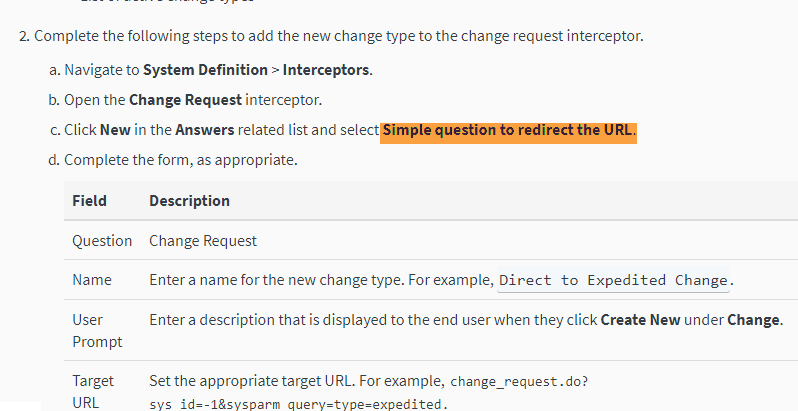
I am tyring to add new change type to interceptor in my personal instance(just for experimentation). I am referring ServiceNow product documentation for the same, however I am not able to add type to interceptor.
document says to select "Simple question to redirect the URL".

But when I follow given path and open interceptor to add new type, I don't see option "Simple question to redirect the URL".

Thanks,
Akshay
Solved! Go to Solution.

- Mark as New
- Bookmark
- Subscribe
- Mute
- Subscribe to RSS Feed
- Permalink
- Report Inappropriate Content
05-25-2018 05:31 AM
Use:
Ask the user to make a selection
Then fill out the following:
Name = Direct to 'your text here'
Uaer Prompt = Text you want the user to see and click on
Target URL = something like 'change_request.do?sys_id=-1&sysparm_query=type=emergency'
Type = Answer
Version Kingston.
Regards
Paul


- Mark as New
- Bookmark
- Subscribe
- Mute
- Subscribe to RSS Feed
- Permalink
- Report Inappropriate Content
05-25-2018 04:22 AM
Hi Akshay,
which ServiceNow release are you running?
Regards
- Mark as New
- Bookmark
- Subscribe
- Mute
- Subscribe to RSS Feed
- Permalink
- Report Inappropriate Content
05-27-2018 09:20 PM
Hi Sebastian,
I am using Kingston release.
Thanks,
Akshay
- Mark as New
- Bookmark
- Subscribe
- Mute
- Subscribe to RSS Feed
- Permalink
- Report Inappropriate Content
05-25-2018 05:31 AM
Use:
Ask the user to make a selection
Then fill out the following:
Name = Direct to 'your text here'
Uaer Prompt = Text you want the user to see and click on
Target URL = something like 'change_request.do?sys_id=-1&sysparm_query=type=emergency'
Type = Answer
Version Kingston.
Regards
Paul
- Mark as New
- Bookmark
- Subscribe
- Mute
- Subscribe to RSS Feed
- Permalink
- Report Inappropriate Content
05-27-2018 09:17 PM
Hi Paul,
Thanks for reply.
Your solution worked for me when I performed it as below.
Name = Direct to 'your text here'
User Prompt = Text you want the user to see and click on

Save the form first and then Target URL field appeared on the form(See below screen shot).

Target URL = something like 'change_request.do?sys_id=-1&sysparm_query=type=emergency'
Type = Answer
Thanks,
Akshay