
- Mark as New
- Bookmark
- Subscribe
- Mute
- Subscribe to RSS Feed
- Permalink
- Report Inappropriate Content
10-23-2020 04:15 AM
Hi All,
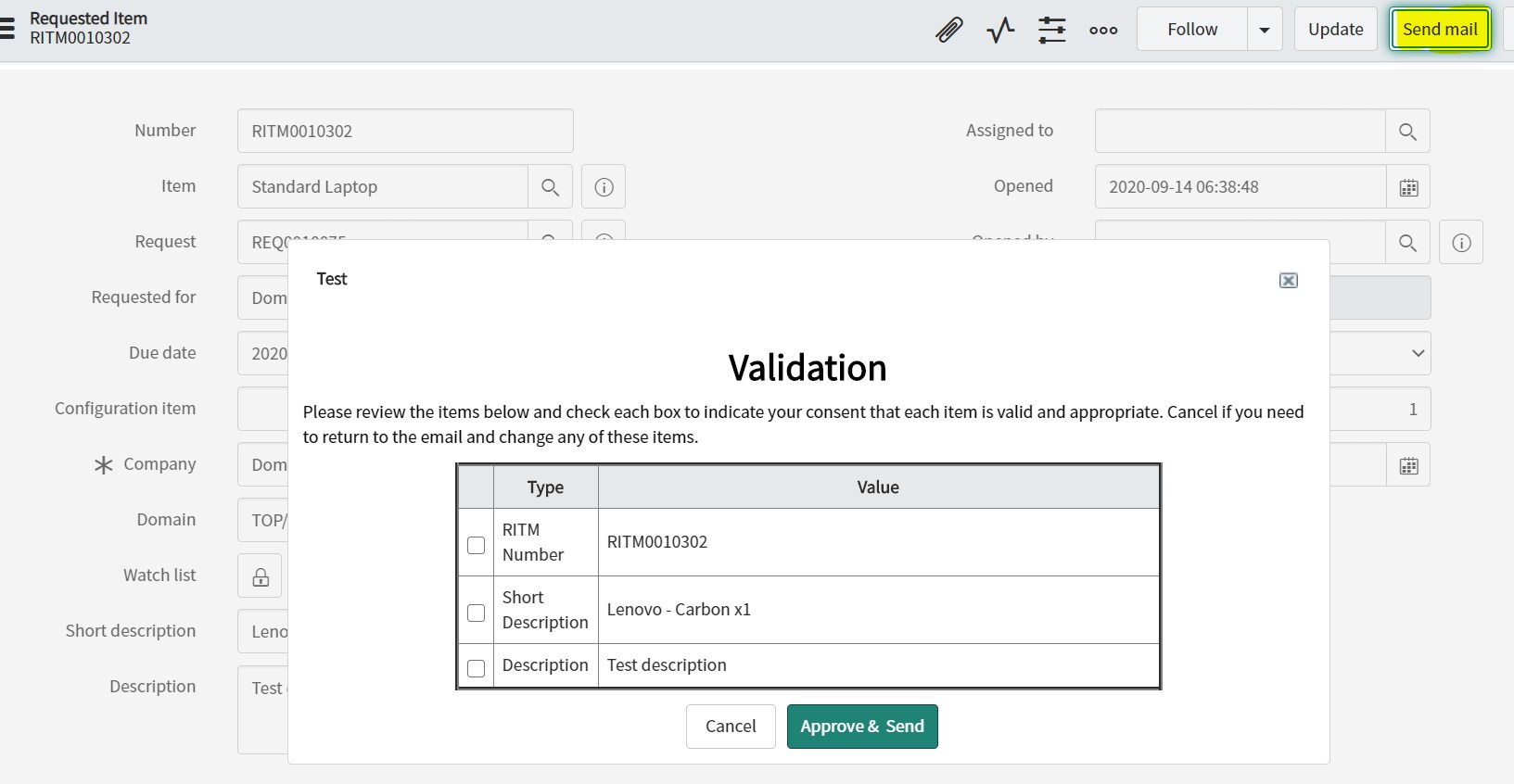
I have created a custom ui page that gets opened on click of a ui action on ritm. I am passing few values from ritm to this ui page. Ui Page as below:

For each checkbox on the page, i need to set some timer ,say 5sec each. So in this case total timer should be set for 15secs. Timer will start once ui page loads.
If i click on Approve and Send button before 15secs, i should get an alert stating "I have not taken the standard time of 15secs to review this page. I I want to continue?."
If i click on YES for this first alert, I should be able to proceed ahead. If NO is clicked on alert, i should be routed back to validation ui page.
How Can I add timer on ui page?
Solved! Go to Solution.
- Labels:
-
Scripting and Coding


- Mark as New
- Bookmark
- Subscribe
- Mute
- Subscribe to RSS Feed
- Permalink
- Report Inappropriate Content
10-23-2020 05:00 AM
Another way if you don't want to use GlideAjax to get the time when user clicks the button use this
function validate(){

var d = new Date();

var nowTime = (d.getTime())/1000; // get value in seconds

var initialTime = gel('hiddenValue').value;

var initialTimeSeconds = initialTime/1000; // get value in seconds

var diff = nowTime - initialTimeSeconds;

if(diff > 15){

alert('');

return false;

}

}
Regards
Ankur
- Mark as New
- Bookmark
- Subscribe
- Mute
- Subscribe to RSS Feed
- Permalink
- Report Inappropriate Content
10-26-2020 04:42 AM
you must be knowing when the UI page loads how many values so accordingly you can multiple with 5seconds
Regards
Ankur
- Mark as New
- Bookmark
- Subscribe
- Mute
- Subscribe to RSS Feed
- Permalink
- Report Inappropriate Content
10-25-2020 05:18 AM
Hope you are doing good.
Let me know if I have answered your question.
If so, please mark appropriate response as correct & helpful so that this thread can be closed and others can be benefited by this.
If not, please let us know if you need some more assistance.
Regards
Ankur
